FAQ & support
Find answers to common questions, fix common issues, and learn how to get help when you're stuck.
Connect with us
- Browse community discussions, share your feedback, or connect with us on Discord, channel #claude-adoe-for-creativity.
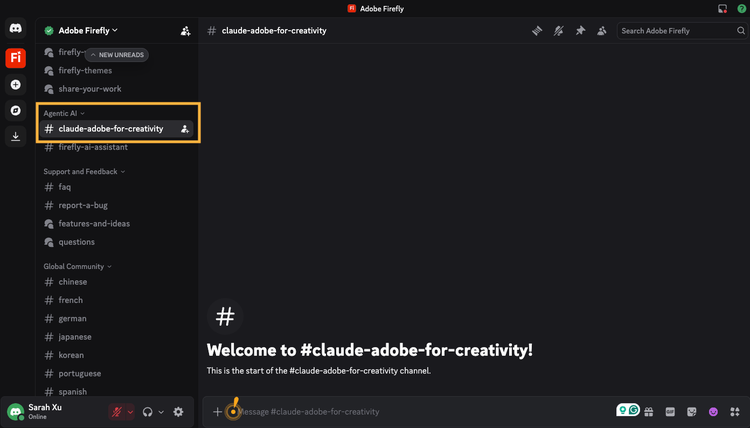
Note: If you don't see the channel, click on Adobe Firefly in the upper left corner, check Show All Channels, and you should see #claude-adobe-for-creativity channel under the Agentic AI section.
Frequently asked questions
About Adobe for creativity and Getting Started
data-slots=heading, text
Do I need an Adobe account to use the Adobe for creativity connector?
- No, many Adobe tools are available without signing in. More tools are available when you sign in, including Gen Expand and video tools. A few tools require paid subscription.
data-slots=heading, text
What Adobe tools and workflows does Adobe for creativity in Claude provide?
- Access 50+ tools across Photoshop, Lightroom, Illustrator, Firefly, Premiere, Express, InDesign, and Adobe Stock — all through natural language, without switching apps. Use skills for complex, multi-step workflows. Edit and retouch images, design from templates, resize photos and videos, and more.
data-slots=heading, text
Do I need a paid Claude subscription?
- Not for the connector itself — any Claude plan works. A paid Claude plan (Pro, Max, Team, or Enterprise) is required to use Cowork and plugins.
data-slots=heading, text
What's the difference between the connector, skills, and the plugin?
- The connector is the bridge that lets Claude call Adobe's tools.
- Skills teach Claude how to do specific creative workflows well.
- The plugin (Cowork only) bundles the connector, skills, and slash commands together so you can install everything at once.
data-slots=heading, text
Do I need to install the skills separately?
- If you don't have Claude paid subscription, and would like to use the skills. You can manually install the skills. In Cowork, installing the Adobe for creativity plugin handles both in one step.
data-slots=heading, text
Can I use this on my phone?
- You can run workflows you've already set up, but you can't install new connectors, skills, or plugins from the iOS or Android apps. Set up on web or desktop first.
Learn More about Adobe creative agents
data-slots=heading, text
Is Adobe for creativity connector powered by Adobe’s creative agent?
- Yes, it is powered by Adobe's creative agent, that brings tools across Adobe Creative Cloud, informed by decades of understanding of creative workflows.
data-slots=heading, text
It looks like many of the same tools available in the Firefly AI Assistant are also accessible through this connector in Claude. What’s the advantage of using the Firefly AI Assistant instead of relying on this connector in Claude?
- Both FF AI Assistant and Adobe for creativity bring together tools from across the Adobe creative suite to execute creative workflows.
- The FF AI Assistant enables a richer experience with greater visibility and control into how assets evolve at every step of the workflow.
- FF AIA includes a wider variety of creative tools. FF AIA offers generative tools such as text to image and Gen Fill as well as a wide choice of image and video generation models from across the industry. And easy access to assets in the Creative Cloud, smoother transitions to Adobe apps, and saved creative preferences
data-slots=heading, text
Is there anything that I can’t do through the Adobe for creativity connector that I can do with the assistant?
- The FF AI Assistant enables a richer experience with greater visibility into how assets evolve at every step of the workflow.
- It also includes a wider array of creative tools, such as text to image and Gen Fill. And easy access to assets in the Creative Cloud and saved creative preferences
data-slots=heading, text
Adobe has already made its apps available across platforms like ChatGPT and Microsoft Copilot. Are you planning to extend this new approach to creation to those platforms as well?
- We’re continuously learning and optimizing for the best experience for our users
Troubleshooting
Most issues fall into a few categories. Try the fixes below before contacting support.
Installation issues
data-slots=heading, text
"I can't find 'Adobe for creativity' in the connectors directory"
- Confirm you're on a supported platform. The directory is not browsable on iOS or Android — use claude.ai or Claude Desktop.
- Make sure your Claude account is signed in.
- On Team or Enterprise plans, an owner may need to enable connectors for your organization before you can install new ones.
data-slots=heading, text
"Install fails or hangs"
- Check your internet connection.
- Try signing out of Claude and back in, then retry the install.
- Clear your browser cache and reload claude.ai.
data-slots=heading, text
"The Cowork plugin isn't available"
- Plugins require a paid Claude plan (Pro, Max, Team, or Enterprise).
- Cowork is desktop-only — you need Claude Desktop on macOS or Windows.
- On organization plans, confirm with your admin that Cowork and Skills are both enabled.
Authentication issues
data-slots=heading, text
"I'm currently in guest mode but I'd like to sign in to my Adobe account for more functionalities"
- Go to Customize → Connectors → Adobe for creativity.
- Click Disconnect, then Connect again.
- Complete the Adobe sign-in flow, paying attention to which account you pick if you have multiple.
- Start a new chat and try again.
Skills and tools issues
data-slots=heading, text
"The connector says it's installed but I don't see Adobe tools in my chat"
- Make sure the connector is enabled for this conversation: click + in the lower-left of the chat, hover over Connectors, and toggle Adobe for creativity on.
data-slots=heading, text
"Claude isn't using the skill I installed"
- Confirm the skill is turned on under Customize → Skills.
- Name the skill explicitly in your prompt: "Use the portrait retouching skill on these photos."
data-slots=heading, text
"Claude is trying to use the wrong tool"
- Be more specific about outcome and constraints. For example, "give me a 9:16 version of this video at 1080p with captions" is far more reliable than "resize this for social." Name Adobe for creativity if needed.
data-slots=heading, text
"A tool I expected isn't available"
- Not every Adobe capability is available yet. If a specific tool is missing, let us know on Discord.
File and upload issues
data-slots=heading, text
"My file is too large to upload"
- There are size limits on both Claude and Adobe sides. If you hit one: compress the source if appropriate (for example, ship a TIFF as a high-quality JPEG).
data-slots=heading, text
"The final file didn't save to my Creative Cloud folder"
- Confirm you're signed in to Adobe.
- Check your Adobe storage quota — if you're at your storage cap, we are not able to save your files.