Multiple dimension reporting
Use multiple dimension reporting to retrieve up to five dimensions in a single request.
This guide describes key report features available with the Customer Journey Analytics Report API, including:
-
Multiple dimensions in a single request
-
Dimension-level search
-
Multi-column sorting
Multiple dimensions in a single request
With the Customer Journey Analtyics Report API, you can request data across multiple dimensions simultaneously in a single report request. This enhancement changes how reports are structured and queried. Rather than retrieving one dimension at a time and nesting breakdowns vertically to analyze combinations, you can specify up to five dimensions in a single request and receive a result of concatenated dimension objects. Multiple dimension reporting is designed to solve a common reporting challenge: understanding which combinations of dimension values drive outcomes, without requiring multiple API calls, post-processing, or manual joins. For more information on this capability and how each array of dimension items behaves as a concatenated list of dimensions, see Multiple Dimension Columns.
Multiple dimensions array
The POST Report endpoint accepts a dimensions array of objects where each object includes a name and a dimensionColumnId--a user-defined identifier. The array structure provides the foundation for multi-dimension reporting, dimension-level search, and advanced sorting.
Dimension column IDs
Every dimension (and metric) can be assigned a column ID. These IDs can have the following characteristics:
- Be specified by the user
- Be any unique value (UUID, number, string)
- Be used to map both sorting rules and search rules
If the user does not provide column IDs, the system will auto‑assign positional IDs. Explicit IDs are recommended as a best practice.
Example multiple dimension request
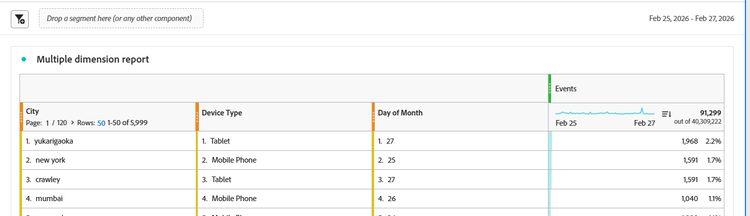
The following example shows a free-form table in Customer Journey Analytics Workspace with multiple dimensions in one row. Below the visualization, a JSON fragment shows a request for the matching results shown in that table. The example shows both the dimensions array and the dimension column IDs as described above.
    "dimensions": [
        {
            "id": "variables/placeContext.geo.city",
            "dimensionColumnId": "a111ef1",
            "nonesBehavior": "exclude-nones"
        },
        {
            "id": "variables/device.typeID.global-classify-string._globallookupscja.lookupID.5f76432e4c7588194b1f6150._globallookupscja.deviceType",
            "dimensionColumnId": "a222kl2",
            "nonesBehavior": "exclude-nones"
        },
        {
            "id": "variables/timepartdayofmonth",
            "dimensionColumnId": "a333ri3",
            "nonesBehavior": "return-nones"
        }
    ],
Example details
The dimensions array above shows the following:
- The IDs of the dimensions include the terms
city,device, anddayofmonth. - The column IDs of the dimensions, in the same order, are
a111ef1a,a222kl2, anda333ri3.
Dimension-level search
With dimension-level search, you can search within specific dimensions instead of globally across an entire report. This works with the following conditions:
- Each dimension includes a search object
- Search objects contain a
clauseparameter - The
clauseparameter is provided a text match value with the wordCONTAINS. - Dimensions can also be searched by Dimension Column IDs
Example dimension search
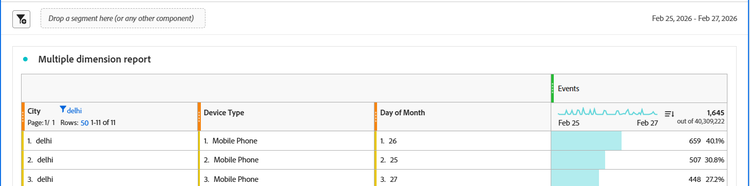
The following example shows a free-form table in Customer Journey Analytics Workspace with a dimension text search filter applied for dehli. Below the visualization is an example JSON fragment showing how the search is specified.
        {
            "id": "variables/placeContext.geo.city",
            "dimensionColumnId": "0",
            "search": {
                "clause": "( CONTAINS 'delhi' )"
            },
            "nonesBehavior": "exclude-nones"
        },
Example details
The city dimension above shows the clause parameter with a text match of dehli after the word CONTAINS.
data-variant=info
data-slots=text
Errors and Constraints
-
Dimension Relation Errors: Dimensions must be related. Requests to combine unrelated dimensions in a single request will return an error.
-
Too Many Combinations Errors: If too many dimensions produce an excessive number of row combinations, the system may reject the request due to scale limitations. The resulting error will indicate that the report is too complex.
For more information on the Customer Journey Analytics Reporting API, see the overview.