Adobe Experience Platform Edge Network
Before starting
Install Identity for Edge Network
The Adobe Experience Platform Edge Network extension requires the Identity for Edge Network extension in order to operate. As a first step install and configure the Identity for Edge Network extension, then continue with the steps below.
Configure the Edge Network extension in Data Collection UI
- In the Data Collection UI, in your mobile property, select the Extensions tab.
- On the Catalog tab, locate or search for the Adobe Experience Platform Edge Network extension, and select Install.
- Select the Datastream you would like to use per environment. Read more about datastreams below.
- Set up the Domain configuration by either using the automatically populated domain, or a first party domain mapped to an Adobe-provisioned Edge network domain. For more information, see domain configuration below.
- Select Save.
- Follow the publishing process to update SDK configuration.
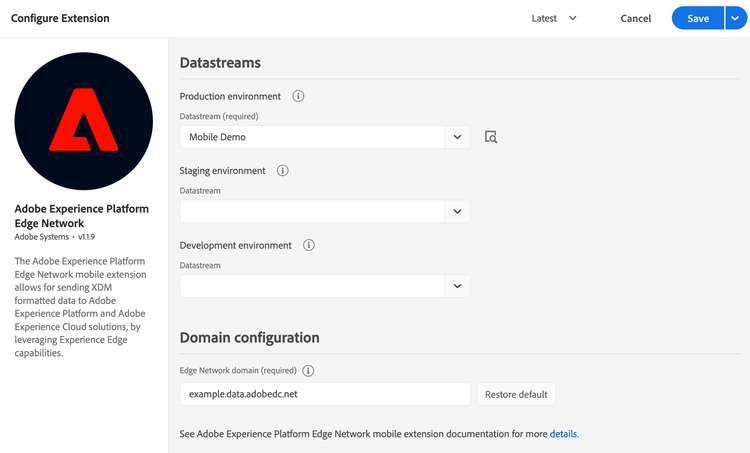
Datastreams
If no datastream was previously created, see Configure datastreams before moving to the next step.
You may configure only the required datastream for the production environment, and by default the staging and development environments will use the same datastream. Alternatively, if you want to use different datastreams per each environment, select the desired ones from the corresponding drop-down lists.
data-variant=info
data-slots=text
The datastream used by the client-side implementation is one of the followings:
- the
Production environmentconfiguration when the tag library is published to production (in the Published column in the publishing flow). - the
Staging environmentconfiguration when the tag library is published to staging (in the Submitted column in the publishing flow). - the
Development environmentconfiguration when the tag library is in development.
Domain configuration
The value under the Edge Network domain field is used for requests to Adobe Experience Platform Edge Network and it usually follows the format <company>.data.adobedc.net, where <company> is the unique namespace associated to your Adobe organization.
If you have a first-party domain mapped to the Adobe-provisioned Edge Network domain, you can enter it here. For more details about how to configure or maintain a first-party domain, see Adobe-Managed Certificate Program.
Note: The domain name is expected to be just the domain without any protocol or trailing slashes. If no domain is provided, by default the edge.adobedc.net domain is used.
Add the Edge Network extension to your app
Include Edge Network extension as an app dependency
Add MobileCore, Edge and EdgeIdentity extensions as dependencies to your project.
Android Kotlin
Add the required dependencies to your project by including them in the app's Gradle file.
implementation(platform("com.adobe.marketing.mobile:sdk-bom:3.+"))
implementation("com.adobe.marketing.mobile:core")
implementation("com.adobe.marketing.mobile:edge")
implementation("com.adobe.marketing.mobile:edgeidentity")
data-variant=warning
data-slots=text
Android Groovy
Add the required dependencies to your project by including them in the app's Gradle file.
implementation platform('com.adobe.marketing.mobile:sdk-bom:3.+')
implementation 'com.adobe.marketing.mobile:core'
implementation 'com.adobe.marketing.mobile:edge'
implementation 'com.adobe.marketing.mobile:edgeidentity'
data-variant=warning
data-slots=text
iOS CocoaPods
Add the required dependencies to your project using CocoaPods. Add following pods in your Podfile:
use_frameworks!

target 'YourTargetApp' do
  pod 'AEPCore', '~> 5.0'
  pod 'AEPEdge', '~> 5.0'
  pod 'AEPEdgeIdentity', '~> 5.0'
end
Initialize Adobe Experience Platform SDK with Edge Network Extension
Next, initialize the SDK by registering all the solution extensions that have been added as dependencies to your project with Mobile Core. For detailed instructions, refer to the initialization section of the getting started page.
Using the MobileCore.initialize API to initialize the Adobe Experience Platform Mobile SDK simplifies the process by automatically registering solution extensions and enabling lifecycle tracking.
Android Kotlin
data-variant=warning
data-slots=text
import com.adobe.marketing.mobile.LoggingMode
import com.adobe.marketing.mobile.MobileCore
...
import android.app.Application
...

class MainApp : Application() {
  override fun onCreate() {
    super.onCreate()
    MobileCore.setLogLevel(LoggingMode.DEBUG)
    MobileCore.initialize(this, "ENVIRONMENT_ID")
  }
}
Android Java
data-variant=warning
data-slots=text
import com.adobe.marketing.mobile.LoggingMode;
import com.adobe.marketing.mobile.MobileCore;
...
import android.app.Application;
...
public class MainApp extends Application {
  @Override
  public void onCreate(){
    super.onCreate();
    MobileCore.setLogLevel(LoggingMode.DEBUG);
    MobileCore.initialize(this, "ENVIRONMENT_ID");
  }
}
iOS Swift
data-variant=warning
data-slots=text
// AppDelegate.swift
import AEPCore
import AEPServices
...

final class AppDelegate: NSObject, UIApplicationDelegate {
  func application(_: UIApplication, didFinishLaunchingWithOptions _: [UIApplication.LaunchOptionsKey: Any]? = nil) -> Bool {
    MobileCore.setLogLevel(.debug)
    MobileCore.initialize(appId: "ENVIRONMENT_ID")
    ...
  }
}
iOS Objective-C
data-variant=warning
data-slots=text
// AppDelegate.m
#import "AppDelegate.h"
@import AEPCore;
@import AEPServices;
...
@implementation AppDelegate
- (BOOL)application:(UIApplication *)application didFinishLaunchingWithOptions:(NSDictionary *)launchOptions {
  [AEPMobileCore setLogLevel: AEPLogLevelDebug];
  [AEPMobileCore initializeWithAppId:@"ENVIRONMENT_ID" completion:^{
      NSLog(@"AEP Mobile SDK is initialized");
  }];
  ...
  return YES;
}
@end
Next steps
Install other extensions based on your use-case:
- If your application requires user consent preferences collection and enforcement, install and configure the Consent for Edge Network extension.
- Lifecycle extension now supports application lifecycle metrics collection for Edge Network. If you would like to start collecting this type of data, follow the installation instruction for Lifecycle for Edge Network.
- If your application uses push notifications, see also the Adobe Journey Optimizer extension.
Configuration keys
To update the SDK configuration programmatically, use the following information to change the Edge configuration values.