Define conditional webhooks
You may decide that you want to trigger a webhook only if its payload meets certain conditions. For example, you could decide to calculate taxes using a third-party service for specific postal codes only. If the postal code provided in the payload does not match the selected postal code, there is no value in triggering the webhook.
A conditional webhook can significantly reduce the number of API calls, which reduces the waiting time for clients.
Conditional webhooks can have one or more rules. The webhook triggers only when all of the rule conditions are true. Each rule contains the following attributes:
-
field- The field to be evaluated. For nested fields, use the dot-separated format, such asdata.order.product.id.-
The field attribute value used in the hook
rulerefers to the actual path in the initial webhook payload, not thenameattribute value defined in the hookfieldmapping. -
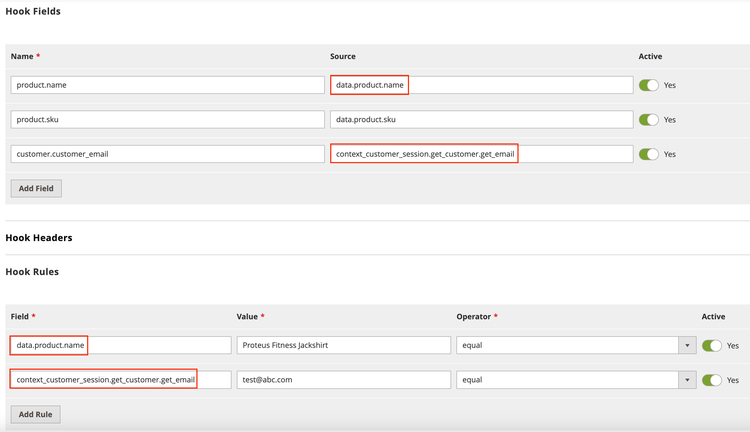
The rule field attribute value must directly refer to the
sourceattribute value defined in the hook's field, such asdata.product.nameorcontext_customer_session.get_customer.get_email, which are shown in the configuration screen below.
-
-
operator- An operator, which is represented as a comparison statement between the value supplied in the webhook payload and the threshold value.The operator must be one of the following:
greaterThan— Checks whether the value supplied in the payload of the webhook is greater than a specified value. Applicable for integer and float data types.lessThan— Checks whether the payload value is less than a specified value. Applicable for integer and float data types.equal— Checks whether the payload value matches the specified value. For Boolean data types, use1to compare totrueand0to compare tofalse.notEqual— Checks whether the payload value does not match the specified value.regex— A regular expression that checks for matches. The specified value must be compatible with the regular expression match.in— Checks whether the payload value is one of multiple specified values. The value must be a comma-separated list. You do not need to provide additional escape characters.isEmpty— Checks whether the payload value is empty.notEmpty— Checks whether the payload value is not empty.
-
Value- The value to compare against. When you assign theregexoperator, you must delimit the regular expression value with valid characters, such as forward slashes (/). For example,/^TV .*/i, which checks whether the string starts withTV, ignoring the case of the letters. -
Example: Calculate tax
The following example creates and registers a conditional webhook for the event plugin.magento.tax.api.tax_calculation.calculate_tax. The webhook will be only triggered when all of the conditions are true:
- The value of
quoteDetails.shipping_address.country_idmust be equal toUS. - The
quoteDetails.billing_address.postcodemust begin with123.
data-slots=heading, code
data-repeat=2
data-languages=XML, YAML
webhooks.xml (PaaS)
<method name="plugin.magento.tax.api.tax_calculation.calculate_tax" type="after">
   <hooks>
      <batch name="Order_Updates">
         <hook name="update_order" url="{env:APP_URL}/calculate-taxes" method="POST" timeout="5000" softTimeout="1000" priority="300" required="false" fallbackErrorMessage="The taxes cannot be calculated">
            <fields>
               <field name="quoteDetails" />
               <field name="storeId" />
            </fields>
            <rules>
               <rule field="quoteDetails.shipping_address.country_id" operator="equal" value="US" />
               <rule field="quoteDetails.billing_address.postcode" operator="regex" value="/^123/" />
            </rules>
         </hook>
      </batch>
   </hooks>
</method>
Admin (SaaS)
Hook Settings

Webhook method: plugin.magento.tax.api.tax_calculation.calculate_tax
Webhook type: after
Batch name: Order_Updates
Hook name: update_order
Hook priority: 300
URL: <Host>/calculate-taxes
Timeout: 5000
Soft timeout: 1000
Fallback Error Message: The taxes cannot be calculated
Required: `false`
Active: `true`

Hook Fields

Name: quoteDetails
Active: Yes

Name: storeId
Active: Yes

Hook Rules

Name: quoteDetails.shipping_address.country_id
Operation: equal
Value: US
Active: Yes

Name: quoteDetails.billing_address.postcode
Operation: regex
Value: /^123/
Active: Yes
Example: Generate short descriptions for products
The following example sends a webhook to a third-party service when the product short description is empty. The service generates the text for the description. The webhook returns the operation with information to update the product short description. As a result, the webhook will not be triggered again for the same product.
data-slots=heading, code
data-repeat=2
data-languages=XML, YAML
webhooks.xml (PaaS)
       <method name="observer.catalog_product_save_before" type="before">
       <hooks>
           <batch name ="Product_Updates">
               <hook name="generate_description" url="{env:APP_URL}/generate-product-description" timeout="5000" softTimeout="1000" priority="300" required="true" fallbackErrorMessage="The product could not be updated">
                   <fields>
                       <field name="product.name" source="data.product.name" />
                       <field name="product.category_ids" source="data.product.category_ids" />
                       <field name="product.sku" source="data.product.sku" />
                   </fields>
                   <rules>
                       <rule field="data.product.description" operation="isEmpty" />
                   </rules>
               </hook>
           </batch>
       </hooks>
   </method>
Admin (SaaS)
Hook Settings

Webhook method: observer.catalog_product_save_before
Webhook type: before
Batch name: Product_Updates
Hook name: generate_description
Hook priority: 300
URL: <Host>/generate-product-description
Timeout: 5000
Soft timeout: 1000
Fallback Error Message: The product could not be updated
Required: `true`
Active: `true`

Hook Fields

Name: product.name
Source: data.product.name
Active: Yes

Name: product.category_ids
Source: data.product.category_ids
Active: Yes

Name: product.sku
Source: data.product.sku
Active: Yes

Hook Rules

Name: data.product.description
Operation: isEmpty
Active: Yes
Command line
You can use the bin/magento webhooks:list command to display the contents of your subscribed webhooks, including rules information.