DateColumn component
The DateColumn component implements a table column that displays dates.
Options
Option
Description
Type
Default
dateFormatDate format for the displayed column's values.
String
MMM d, YYYY h:mm:ss AskipTimeZoneConversionConverts the given date to default (UTC) timezone.
Boolean
truetimezoneEnables date conversion based on the timezone configuration.
Boolean
trueSource files
Extends Column:
Examples
Integration
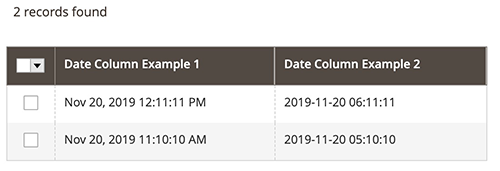
This is an example of how the DateColumn component integrates with the Listing component:
<listing>
    ...
    <columns>
        <column name="date_column_example_1" class="Magento\Ui\Component\Listing\Columns\Date" component="Magento_Ui/js/grid/columns/date">
            <settings>
                <filter>dateRange</filter>
                <dataType>date</dataType>
                <label translate="true">Date Column Example 1</label>
            </settings>
        </column>
        <column name="date_column_example_2" class="Magento\Ui\Component\Listing\Columns\Date" component="Magento_Ui/js/grid/columns/date">
            <settings>
                <filter>dateRange</filter>
                <dataType>date</dataType>
                <dateFormat>yyyy-MM-dd hh:mm:ss</dateFormat>
                <label translate="true">Date Column Example 2</label>
                <timezone>false</timezone>
            </settings>
        </column>
        ...
    </columns>
    ...
</listing>
Result