Add a custom boolean attribute
This tutorial describes how you create a custom boolean (Yes/No) attribute for the Customer entity using code. The attribute appears in both the Customer Grid and the Customer Form in the Admin.
Use this customer attribute as an example to store a simple Yes/No flag on a customer record. You create it as an EAV attribute in a data patch. The EAV model lets you extend entities without changing core database schemas. Data patches run once, so this code creates the attribute on the first run only. This tutorial also implements PatchRevertableInterface, so you can remove the attribute by running bin/magento setup:rollback.
Data patch implementation
The following sections show the PHP you add to your module.
Create the data patch class
Create a data patch class called AddCustomerAttributeBoolean under the \ExampleCorp\Customer\Setup\Patch\Data namespace. Magento runs this data patch automatically when you run bin/magento setup:upgrade. This class implements both \Magento\Framework\Setup\Patch\DataPatchInterface and \Magento\Framework\Setup\Patch\PatchRevertableInterface. Adding the revertable interface requires implementing a revert() method that removes the attribute when the patch is rolled back.
<?php
declare(strict_types=1);

namespace ExampleCorp\Customer\Setup\Patch\Data;

use \Magento\Framework\Setup\Patch\DataPatchInterface;
use \Magento\Framework\Setup\Patch\PatchRevertableInterface;

class AddCustomerAttributeBoolean implements DataPatchInterface, PatchRevertableInterface
{
    public function apply(): void
    {
        // will be implemented in the next steps.
    }

    public function revert(): void
    {
        // will be implemented in the next steps.
    }

    public function getAliases(): array
    {
        // will be implemented in the next steps.
    }

    public static function getDependencies(): array
    {
        // will be implemented in the next steps.
    }
}
Inject the dependencies
The dependencies to the data patch are injected using constructor DI and are listed below:
\Magento\Framework\Setup\ModuleDataSetupInterfacefor initializing and ending the setup.\Magento\Customer\Setup\CustomerSetupFactoryfor creating a model of\Magento\Customer\Setup\CustomerSetupwhich is required to add and remove the custom attribute.\Magento\Customer\Model\ResourceModel\Attributealiased asAttributeResourcefor saving the attribute after adding custom data to it.\Psr\Log\LoggerInterfacefor logging exceptions thrown during the execution.
The factory is stored rather than a single CustomerSetup instance, because both apply() and revert() need to create their own instance.
/**
 * Constructor
 *
 * @param ModuleDataSetupInterface $moduleDataSetup
 * @param CustomerSetupFactory $customerSetupFactory
 * @param AttributeResource $attributeResource
 * @param LoggerInterface $logger
 */
public function __construct(
    ModuleDataSetupInterface $moduleDataSetup,
    CustomerSetupFactory $customerSetupFactory,
    AttributeResource $attributeResource,
    LoggerInterface $logger
) {
    $this->moduleDataSetup = $moduleDataSetup;
    $this->customerSetupFactory = $customerSetupFactory;
    $this->attributeResource = $attributeResource;
    $this->logger = $logger;
}
Implement the apply method
There are five steps in developing a data patch. All the steps below are written inside the apply method.
-
Start and end the setup execution.
This turns off foreign key checks and sets the SQL mode.
$this->moduleDataSetup->getConnection()->startSetup(); /* Attribute creation code must be run between these two lines to ensure that the attribute is created smoothly. */ $this->moduleDataSetup->getConnection()->endSetup(); -
Add the boolean customer attribute with the required settings.
Boolean attributes are stored as integers (
0for No,1for Yes). Settypetoint,inputtoboolean, and assign the built-inBooleansource model, which provides the Yes/No option list.The third parameter for
addAttributeis an array of settings required to configure the attribute. Passing an empty array uses all the default values for each possible setting. To keep the code to a minimum, just declare the settings needing to be overridden and the rest of the settings will be used from the defaults.The
\Magento\Customer\Api\CustomerMetadataInterfaceinterface contains constants like the customer entity's code and the default attribute set code, which can be referenced./** @var CustomerSetup $customerSetup */ $customerSetup = $this->customerSetupFactory->create(['setup' => $this->moduleDataSetup]); $customerSetup->addAttribute( CustomerMetadataInterface::ENTITY_TYPE_CUSTOMER, // entity type code 'custom_boolean_attribute', // unique attribute code [ 'label' => 'Custom Boolean Attribute', 'type' => 'int', 'input' => 'boolean', 'source' => \Magento\Eav\Model\Entity\Attribute\Source\Boolean::class, 'required' => false, 'position' => 333, 'system' => false, 'user_defined' => true, 'is_used_in_grid' => true, 'is_visible_in_grid' => true, 'is_filterable_in_grid' => true, 'is_searchable_in_grid' => false, ] );Table Setting Key Description labelCustom Boolean Attribute- Label for displaying the attribute valuetypeint- Stored as an integer in the database (0or1)inputboolean- Renders as a Yes/No select in the customer formsourceProvides the Yes/No option list for the boolean input requiredfalse- Attribute will be an optional field in the customer formposition333- Sort order in the customer formsystemfalse- Not a system-defined attributeuser_definedtrue- A user-defined attributeis_used_in_gridtrue- Ready for use in the customer gridis_visible_in_gridtrue- Visible in the customer gridis_filterable_in_gridtrue- Filterable in the customer gridis_searchable_in_gridfalse- Not searchable in the customer grid (boolean fields are filtered, not searched) -
Add the attribute to an attribute set and group.
There is only one attribute set and group for the customer entity. The default attribute set ID is a constant defined in the
CustomerMetadataInterfaceinterface and setting the attribute group ID to null makes the application use the default attribute group ID for the customer entity.$customerSetup->addAttributeToSet( CustomerMetadataInterface::ENTITY_TYPE_CUSTOMER, // entity type code CustomerMetadataInterface::ATTRIBUTE_SET_ID_CUSTOMER, // attribute set ID null, // attribute group ID 'custom_boolean_attribute' // unique attribute code ); -
Make the attribute visible in the customer form.
// Get the newly created attribute's model
$attribute = $customerSetup->getEavConfig()
    ->getAttribute(CustomerMetadataInterface::ENTITY_TYPE_CUSTOMER, 'custom_boolean_attribute');

// Make attribute visible in Admin customer form and storefront forms
$attribute->setData('used_in_forms', [
    'adminhtml_customer',
    'customer_account_create',
    'customer_account_edit',
]);

// Save modified attribute model using its resource model
$this->attributeResource->save($attribute);
Unlike the text field attribute, which is visible only in the Admin, the boolean attribute is also registered for the storefront registration and account edit forms. Adjust the
used_in_formsvalues to match the visibility requirements of your project. -
Handle exceptions in a try/catch block.
try {
    // All the code inside the apply method goes into the try block.
} catch (Exception $exception) {
    $this->logger->error($exception->getMessage());
}
Implement the revert method
Because this class implements PatchRevertableInterface, it must also define a revert() method. This method is called when bin/magento setup:rollback targets this patch and removes the attribute from the system.
public function revert(): void
{
    $this->moduleDataSetup->getConnection()->startSetup();

    /** @var CustomerSetup $customerSetup */
    $customerSetup = $this->customerSetupFactory->create(['setup' => $this->moduleDataSetup]);

    try {
        $customerSetup->removeAttribute(
            CustomerMetadataInterface::ENTITY_TYPE_CUSTOMER,
            'custom_boolean_attribute'
        );
    } catch (Exception $e) {
        $this->logger->error($e->getMessage());
    }

    $this->moduleDataSetup->getConnection()->endSetup();
}
Implement the rest of the interface
This data patch does not have any other patch as a dependency, and this data patch was not renamed earlier, so both getDependencies and getAliases can return an empty array.
public static function getDependencies(): array
{
    return [];
}

public function getAliases(): array
{
    return [];
}
Execute the data patch
Run bin/magento setup:upgrade from the project root to execute the newly added data patch.
-
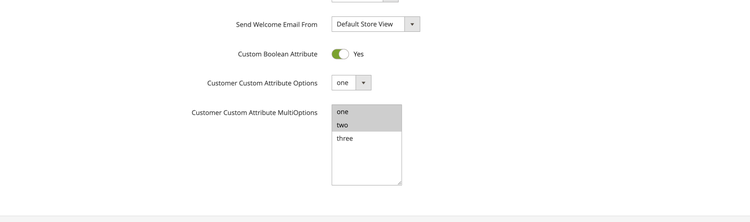
The attribute is created in the customer form under the Account Information section.
-
The attribute is displayed in the customer grid and can be filtered using a Yes/No dropdown menu.

To remove the attribute, run bin/magento setup:rollback and target this patch. The revert() method will execute and delete the attribute from the system.
Code reference
<?php
declare(strict_types=1);

namespace ExampleCorp\Customer\Setup\Patch\Data;

use Exception;
use Psr\Log\LoggerInterface;
use Magento\Customer\Api\CustomerMetadataInterface;
use Magento\Customer\Model\ResourceModel\Attribute as AttributeResource;
use Magento\Customer\Setup\CustomerSetup;
use Magento\Customer\Setup\CustomerSetupFactory;
use Magento\Eav\Model\Entity\Attribute\Source\Boolean;
use Magento\Framework\Setup\ModuleDataSetupInterface;
use Magento\Framework\Setup\Patch\DataPatchInterface;
use Magento\Framework\Setup\Patch\PatchRevertableInterface;

/**
 * Creates a customer attribute for managing a customer's boolean flag
 */
class AddCustomerAttributeBoolean implements DataPatchInterface, PatchRevertableInterface
{
    /**
     * @var ModuleDataSetupInterface
     */
    private $moduleDataSetup;

    /**
     * @var CustomerSetupFactory
     */
    private $customerSetupFactory;

    /**
     * @var AttributeResource
     */
    private $attributeResource;

    /**
     * @var LoggerInterface
     */
    private $logger;

    /**
     * Constructor
     *
     * @param ModuleDataSetupInterface $moduleDataSetup
     * @param CustomerSetupFactory $customerSetupFactory
     * @param AttributeResource $attributeResource
     * @param LoggerInterface $logger
     */
    public function __construct(
        ModuleDataSetupInterface $moduleDataSetup,
        CustomerSetupFactory $customerSetupFactory,
        AttributeResource $attributeResource,
        LoggerInterface $logger
    ) {
        $this->moduleDataSetup = $moduleDataSetup;
        $this->customerSetupFactory = $customerSetupFactory;
        $this->attributeResource = $attributeResource;
        $this->logger = $logger;
    }

    /**
     * Get array of patches that have to be executed prior to this.
     *
     * @return string[]
     */
    public static function getDependencies(): array
    {
        return [];
    }

    /**
     * Get aliases (previous names) for the patch.
     *
     * @return string[]
     */
    public function getAliases(): array
    {
        return [];
    }

    /**
     * Run code inside patch
     */
    public function apply(): void
    {
        // Start setup
        $this->moduleDataSetup->getConnection()->startSetup();

        /** @var CustomerSetup $customerSetup */
        $customerSetup = $this->customerSetupFactory->create(['setup' => $this->moduleDataSetup]);

        try {
            // Add customer attribute with settings
            $customerSetup->addAttribute(
                CustomerMetadataInterface::ENTITY_TYPE_CUSTOMER,
                'custom_boolean_attribute',
                [
                    'label' => 'Custom Boolean Attribute',
                    'type' => 'int',
                    'input' => 'boolean',
                    'source' => Boolean::class,
                    'required' => false,
                    'position' => 333,
                    'system' => false,
                    'user_defined' => true,
                    'is_used_in_grid' => true,
                    'is_visible_in_grid' => true,
                    'is_filterable_in_grid' => true,
                    'is_searchable_in_grid' => false,
                ]
            );

            // Add attribute to default attribute set and group
            $customerSetup->addAttributeToSet(
                CustomerMetadataInterface::ENTITY_TYPE_CUSTOMER,
                CustomerMetadataInterface::ATTRIBUTE_SET_ID_CUSTOMER,
                null,
                'custom_boolean_attribute'
            );

            // Get the newly created attribute's model
            $attribute = $customerSetup->getEavConfig()
                ->getAttribute(CustomerMetadataInterface::ENTITY_TYPE_CUSTOMER, 'custom_boolean_attribute');

            // Make attribute visible in Admin customer form and storefront forms
            $attribute->setData('used_in_forms', [
                'adminhtml_customer',
                'customer_account_create',
                'customer_account_edit',
            ]);

            // Save attribute using its resource model
            $this->attributeResource->save($attribute);
        } catch (Exception $e) {
            $this->logger->error($e->getMessage());
        }

        // End setup
        $this->moduleDataSetup->getConnection()->endSetup();
    }

    /**
     * Rollback all changes, done by this patch
     */
    public function revert(): void
    {
        // Start setup
        $this->moduleDataSetup->getConnection()->startSetup();

        /** @var CustomerSetup $customerSetup */
        $customerSetup = $this->customerSetupFactory->create(['setup' => $this->moduleDataSetup]);

        try {
            $customerSetup->removeAttribute(
                CustomerMetadataInterface::ENTITY_TYPE_CUSTOMER,
                'custom_boolean_attribute'
            );
        } catch (Exception $e) {
            $this->logger->error($e->getMessage());
        }

        // End setup
        $this->moduleDataSetup->getConnection()->endSetup();
    }
}