PDF Electronic Seal API
API Parameters
Signature Format (signatureFormat)
Specifies a supported digital signature format:
- PADES : This is the latest and improved signature format which is more strict, concrete, and secure. For details, see ISO 32000-2 and ETSI EN 319 142-1.
- PKCS7 : This signature format is less stringent than PADES since it permits more PDF changes without invalidating the digital signature. This is the default signature format. For details, see ISO 32000-1.
Document Level Permission (documentLevelPermission)
Specifies the DocMDP (i.e. Document Modification Detection and Prevention) permissions. These permissions are applied to the output electronically sealed document.
- NO_CHANGES_ALLOWED : No changes to the document are permitted. Any change to the document will invalidate the signature.
- FORM_FILLING : Allowed changes are filling in forms, instantiating page templates, and performing approval signatures. This is also the default document level permission, if not specified by the user.
- FORM_FILLING_AND_ANNOTATIONS : In addition to above, annotation creation, deletion, and modification are also allowed.
data-slots=text
TSP Credential Information (cscCredentialOptions) : Required
TSP parameters encapsulate the sealer's certificate credential as well as the associated authentication and authorization data.
-
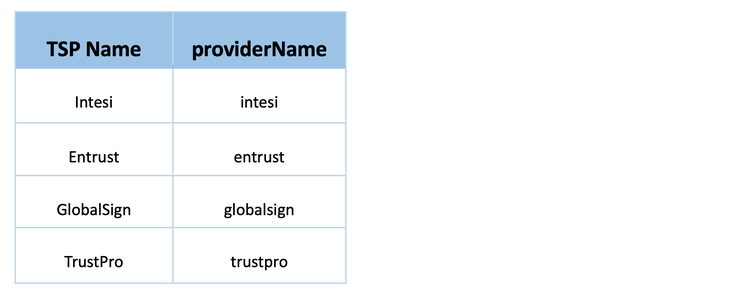
TSP Name (providerName) : Required : Specifies the name of the Trust Service Provider used to generate the certificate. Presently, only TSPs supporting the OAuth 2.0 client credential authorization flow are supported. The table below provides the provider name mapping for each supported Trust Service Provider.
-
TSP Credential Id (credentialId) : Required : Specifies the Digital ID stored with the TSP that should be used for sealing.
-
TSP Authorization Context (authorizationContext) : Required : Encapsulates the authorization data required to communicate with the TSPs.
- Access Token (accessToken) : Required : Specifies the access token used to authorize access to the CSC provider hosted APIs.
- Token Type (tokenType): Specifies the type of access token. Default value is "Bearer".
-
TSP Credential Authorization Parameter (credentialAuthParameters) : Required : Encapsulates the credential authorization information required to authorize access to their digital certificate.
- PIN (pin) : Required : Specifies the PIN associated with TSP provided credential ID.
TSA Information (tsaOptions) :
TSA parameters encapsulate the timestamping URL and credentials.
-
TSA URL (url) : Required : Specifies the TSA URL to be used for getting timestamp token.
-
TSA Credential Authorization Parameter (credentialAuthParameters) : Encapsulates the credential information required to authenticate the TSA URL.
- TSA Username (username) : Specify the username for authenticating TSA URL.
- TSA Password (password) : Specify the password for authenticating TSA URL.
Seal Field Parameters (sealFieldOptions) : Required
The seal field parameters are required to create a new signature field or use an existing signature field.
-
Field Name (fieldName) : Required : Specifies the signature field's name. This must be a non-empty string. If signature field with this field name already exists, that field is used. else a signature field with this name will be created.
-
Visible (visible): Specifies whether the signature field should be visible or hidden. The default value of
truecreates a visible seal. -
Page Number (pageNumber) : Required : Specifies the page number to which the signature field should be attached. Page numbers are 1-based. It is only required if the signature field needs to be visible and, it does not exist in the pdf document. If this is provided along with the signature field then the page number should be same on which signature field is present in the document, else an error is thrown. This parameter will be ignored in case of invisible signature field.
-
Location (location) : Required : Specifies the coordinates of the seal appearance's bounding box in default PDF user space units. The location is only required if the signature field does not exist in the pdf document. If this is provided along with the existing signature field, then it is ignored. This parameter will also be ignored for invisible signature field.
- Left (left) : Required : The left x-coordinate
- Bottom (bottom) : Required : The bottom y-coordinate
- Right (right) : Required : The right x-coordinate
- Top (top) : Required : The top y-coordinate
To add the signature field explicitly, see how to place a signature field in a PDF.
Seal Appearance Parameters (sealAppearanceOptions)
Specifies seal field appearance parameters. These are an enumerated set of display items: NAME, DATE, DISTINGUISHED_NAME, LABELS and SEAL_IMAGE.
-
Display Options (displayOptions): Specifies the information to display in the seal. NAME and LABELS are the default values.
- NAME: Specifies that the certificate owner's name should be displayed.

- DATE: Specifies that the sealing date/time should be displayed. This value should not be mistaken for a signed timestamp from a timestamp authority.

- DISTINGUISHED_NAME: Specifies that the distinguished name information from the digital certificate should be displayed.

- LABELS: Specifies that text labels should be displayed.

- SEAL_IMAGE: Specifies the seal image should be displayed.


- NAME: Specifies that the certificate owner's name should be displayed.
Example JSON
{
  "signatureFormat": "PADES",
  "documentLevelPermission": "FORM_FILLING",
  "cscCredentialOptions": {
    "authorizationContext": {
      "accessToken": "<ACCESS_TOKEN>",
      "tokenType": "Bearer"
    },
    "credentialAuthParameters": {
      "pin": "<PIN>"
    },
    "providerName": "<PROVIDER_NAME>",
    "credentialId": "<CREDENTIAL_ID>"
  },
  "tsaOptions": {
    "url": "<TIMESTAMP_URL>",
    "credentialAuthParameters": {
      "username": "<USERNAME>",
      "password": "<PASSWORD>"
    }
  },
  "sealFieldOptions": {
    "pageNumber": 1,
    "fieldName": "Signature1",
    "visible": true,
    "location": {
      "left" : 150,
      "top": 250,
      "bottom": 350,
      "right": 200
    }
  },
  "sealAppearanceOptions": {
    "displayOptions": [
      "NAME",
      "DATE",
      "LABELS",
      "DISTINGUISHED_NAME",
      "SEAL_IMAGE"
    ]
  }
}
data-slots=text
API limitations
<br/>
- Input PDF size: Input PDF files up to a maximum of 100 MB are supported.
- Seal Image size: Seal Image files up to a maximum of 5 MB are supported.
- Seal Image formats: Supported Seal Image formats are JPEG(image/jpeg), PNG(image/png) and PDF(application/pdf).
- Password-protected Files: Encrypted or Password-protected PDFs are not supported for applying electronic seal.
- Signed/Sealed Files: Any PDF which is already signed, certified or sealed cannot be used for applying electronic seal.
- Input PDF version: Input PDF with version less than 1.3 are not supported.
- Usage Rights File: Input PDF having usage rights are not supported.
REST API
See our public API Reference for PDF Electronic Seal API.
Apply Electronic Seal with default appearance on PDF
The sample below performs electronic seal operation with default appearance on a given PDF.
Please refer to the API usage guide to understand how to use our APIs.
data-slots=heading, code
data-repeat=4
data-languages=Java, .NET, Node JS, Rest API
Java
// Get the samples from https://www.adobe.com/go/pdftoolsapi_java_samples
// Run the sample:
// mvn -f pom.xml exec:java -Dexec.mainClass=com.adobe.pdfservices.operation.samples.electronicseal.ElectronicSeal

package com.adobe.pdfservices.operation.samples.electronicseal;

public class ElectronicSeal {

    // Initialize the logger.
    private static final Logger LOGGER = LoggerFactory.getLogger(ElectronicSeal.class);

    public static void main(String[] args) {
        try {

            // Initial setup, create credentials instance.
            Credentials credentials = Credentials.servicePrincipalCredentialsBuilder()
                .withClientId("PDF_SERVICES_CLIENT_ID")
                .withClientSecret("PDF_SERVICES_CLIENT_SECRET")
                .build();

            // Create an ExecutionContext using credentials.
            ExecutionContext executionContext = ExecutionContext.create(credentials);

            //Get the input document to perform the sealing operation
            FileRef sourceFile = FileRef.createFromLocalFile("src/main/resources/sampleInvoice.pdf");

            //Get the background seal image for signature , if required.
            FileRef sealImageFile = FileRef.createFromLocalFile("src/main/resources/sampleSealImage.png");

            // Set the document level permission to be applied for output document
            DocumentLevelPermission documentLevelPermission = DocumentLevelPermission.FORM_FILLING;

            //Set the Seal Field Name to be created in input PDF document.
            String sealFieldName = "Signature1";

            //Set the page number in input document for applying seal.
            Integer sealPageNumber = 1;

            //Set if seal should be visible or invisible.
            Boolean sealVisible = true;

            //Create FieldLocation instance and set the coordinates for applying signature
            FieldLocation fieldLocation = new FieldLocation(150, 250, 350, 200);

            //Create FieldOptions instance with required details.
            FieldOptions fieldOptions = new FieldOptions.Builder(sealFieldName)
                .setFieldLocation(fieldLocation)
                .setPageNumber(sealPageNumber)
                .setVisible(sealVisible)
                .build();

            //Set the name of TSP Provider being used.
            String providerName = "<PROVIDER_NAME>";

            //Set the access token to be used to access TSP provider hosted APIs.
            String accessToken = "<ACCESS_TOKEN>";

            //Set the credential ID.
            String credentialID = "<CREDENTIAL_ID>";

            //Set the PIN generated while creating credentials.
            String pin = "<PIN>";

            //Create CSCAuthContext instance using access token and token type.
            CSCAuthContext cscAuthContext = new CSCAuthContext(accessToken, "Bearer");

            //Create CertificateCredentials instance with required certificate details.
            CertificateCredentials certificateCredentials = CertificateCredentials.cscCredentialBuilder()
                .withProviderName(providerName)
                .withCredentialID(credentialID)
                .withPin(pin)
                .withCSCAuthContext(cscAuthContext)
                .build();

            //Create SealOptions instance with sealing parameters.
            SealOptions sealOptions = new SealOptions.Builder(certificateCredentials, fieldOptions).
                        withDocumentLevelPermission(documentLevelPermission).build();

            //Create the PDFElectronicSealOperation instance using the SealOptions instance
            PDFElectronicSealOperation pdfElectronicSealOperation = PDFElectronicSealOperation.createNew(sealOptions);

            //Set the input source file for PDFElectronicSealOperation instance
            pdfElectronicSealOperation.setInput(sourceFile);

            //Set the optional input seal image for PDFElectronicSealOperation instance
            pdfElectronicSealOperation.setSealImage(sealImageFile);

            //Execute the operation
            FileRef result = pdfElectronicSealOperation.execute(executionContext);

            //Save the output at specified location
            result.saveAs("output/sealedOutput.pdf");


        } catch (ServiceApiException | IOException | SdkException | ServiceUsageException ex) {
            LOGGER.error("Exception encountered while executing operation", ex);
        }
    }
}
.NET
// Get the samples from https://www.adobe.com/go/pdftoolsapi_net_samples
// Run the sample:
// cd ElectronicSeal/
// dotnet run ElectronicSeal.csproj

namespace ElectronicSeal
{
    class Program
    {
        // Initialize the logger.
        private static readonly ILog log = LogManager.GetLogger(typeof(Program));
        static void Main()
        {
            //Configure the logging
            ConfigureLogging();

            try
            {
                // Initial setup, create credentials instance.
                Credentials credentials = Credentials.ServicePrincipalCredentialsBuilder()
                    .WithClientId("PDF_SERVICES_CLIENT_ID")
                    .WithClientSecret("PDF_SERVICES_CLIENT_SECRET")
                    .Build();

                // Create an ExecutionContext using credentials.
                ExecutionContext executionContext = ExecutionContext.Create(credentials);

                //Set the input document to perform the sealing operation
                FileRef sourceFile = FileRef.CreateFromLocalFile(@"SampleInvoice.pdf");

                //Set the background seal image for signature , if required.
                FileRef sealImageFile = FileRef.CreateFromLocalFile(@"sampleSealImage.png");

                //Set the Seal Field Name to be created in input PDF document.
                string sealFieldName = "Signature1";

                //Set the page number in input document for applying seal.
                int sealPageNumber = 1;

                //Set if seal should be visible or invisible.
                bool sealVisible = true;

                //Create FieldLocation instance and set the coordinates for applying signature
                FieldLocation fieldLocation = new FieldLocation(150, 250, 350, 200);

                //Create FieldOptions instance with required details.
                FieldOptions sealFieldOptions = new FieldOptions.Builder(sealFieldName)
                .SetVisible(sealVisible)
                .SetFieldLocation(fieldLocation)
                .SetPageNumber(sealPageNumber)
                .Build();

                //Set the name of TSP Provider being used.
                string providerName = "<PROVIDER_NAME>";

                //Set the access token to be used to access TSP provider hosted APIs.
                string accessToken = "<ACCESS_TOKEN>";

                //Set the credential ID.
                string credentialID = "<CREDENTIAL_ID>";

                //Set the PIN generated while creating credentials.
                string pin = "<PIN>";

                CSCAuthContext cscAuthContext = new CSCAuthContext(accessToken, "Bearer");

                //Create CertificateCredentials instance with required certificate details.
                CertificateCredentials certificateCredentials = CertificateCredentials.CSCCredentialBuilder()
                .WithProviderName(providerName)
                .WithCredentialID(credentialID)
                .WithPin(pin)
                .WithCSCAuthContext(cscAuthContext)
                .Build();

                //Create SealingOptions instance with all the sealing parameters.
                SealOptions sealOptions = new SealOptions.Builder(certificateCredentials, fieldOptions).build();

                //Create the PDFElectronicSealOperation instance using the PDFElectronicSealOptions instance
                PDFElectronicSealOperation pdfElectronicSealOperation = PDFElectronicSealOperation.CreateNew(sealOptions);

                //Set the input source file for PDFElectronicSealOperation instance
                pdfElectronicSealOperation.SetInput(sourceFile);

                //Set the optional input seal image for PDFElectronicSealOperation instance
                pdfElectronicSealOperation.SetSealImage(sealImageFile);

                //Execute the operation
                FileRef result = pdfElectronicSealOperation.Execute(executionContext);

                // Save the output at specified location.
                result.SaveAs(output/sealedOutput.pdf);
            }
            catch (ServiceUsageException ex)
            {
                log.Error("Exception encountered while executing operation", ex);
            }
            catch (ServiceApiException ex)
            {
                log.Error("Exception encountered while executing operation", ex);
            }
            catch (SDKException ex)
            {
                log.Error("Exception encountered while executing operation", ex);
            }
            catch (IOException ex)
            {
                log.Error("Exception encountered while executing operation", ex);
            }
            catch (Exception ex)
            {
                log.Error("Exception encountered while executing operation", ex);
            }

        }
        static void ConfigureLogging()
        {
            ILoggerRepository logRepository = LogManager.GetRepository(Assembly.GetEntryAssembly());
            XmlConfigurator.Configure(logRepository, new FileInfo("log4net.config"));
        }
    }
}
Node JS
// Get the samples from http://www.adobe.com/go/pdftoolsapi_node_sample
// Run the sample:
// node src/electronicseal/electronic-seal.js

const PDFServicesSdk = require('@adobe/pdfservices-node-sdk');

try {
        // Initial setup, create credentials instance.
        const credentials =  PDFServicesSdk.Credentials
            .servicePrincipalCredentialsBuilder()
            .withClientId("PDF_SERVICES_CLIENT_ID")
            .withClientSecret("PDF_SERVICES_CLIENT_SECRET")
            .build();

        // Create an ExecutionContext using credentials
        const executionContext = PDFServicesSdk.ExecutionContext.create(credentials);

        const pdfElectronicSeal = PDFServicesSdk.PDFElectronicSeal,
            options = pdfElectronicSeal.options;

        //Get the input document to perform the sealing operation
        const sourceFile = PDFServicesSdk.FileRef.createFromLocalFile('resources/sampleInvoice.pdf'),

        //Get the background seal image for signature , if required.
        sealImageFile = PDFServicesSdk.FileRef.createFromLocalFile('resources/sampleSealImage.png');

        // Set the Seal Field Name to be created in input PDF document.
        sealFieldName = "Signature1";

        // Set the page number in input document for applying seal.
        sealPageNumber = 1;

        // Set if seal should be visible or invisible.
        sealVisible = true;

        //Create FieldLocation instance and set the coordinates for applying signature
        fieldLocation = new options.FieldLocation(150,250,350,200);

        //Create FieldOptions instance with required details.
        fieldOptions = new options.FieldOptions.Builder(sealFieldName)
            .setFieldLocation(fieldLocation)
            .setPageNumber(sealPageNumber)
            .setVisible(sealVisible)
            .build();

        //Set the name of TSP Provider being used.
        providerName = "<PROVIDER_NAME>";

        //Set the access token to be used to access TSP provider hosted APIs.
        accessToken = "<ACCESS_TOKEN>";

        //Set the credential ID.
        credentialID = "<CREDENTIAL_ID>";

        //Set the PIN generated while creating credentials.
        pin = "<PIN>";

        //Create CSCAuthContext instance using access token and token type.
        cscAuthContext = new options.CSCAuthContext(accessToken, "Bearer");

        //Create CertificateCredentials instance with required certificate details.
        certificateCredentials = options.CertificateCredentials.cscCredentialBuilder()
            .withProviderName(providerName)
            .withCredentialID(credentialID)
            .withPin(pin)
            .withCSCAuthContext(cscAuthContext)
            .build();

        //Create SealOptions instance with sealing parameters.
        sealOptions = new options.SealOptions.Builder(certificateCredentials, fieldOptions)
            .build()

        //Create the PDFElectronicSealOperation instance using the SealOptions instance
        const pdfElectronicSealOperation = pdfElectronicSeal.Operation.createNew(sealOptions);

        //Set the input source file for PDFElectronicSealOperation instance
        pdfElectronicSealOperation.setInput(sourceFile);

        //Set the optional input seal image for PDFElectronicSealOperation instance
        pdfElectronicSealOperation.setSealImage(sealImageFile);

        // Execute the operation and Save the result to the specified location.
        pdfElectronicSealOperation.execute(executionContext)
            .then(result => result.saveAsFile("output/sealedOutput.pdf"))
            .catch(err => {
                if(err instanceof PDFServicesSdk.Error.ServiceApiError
                    || err instanceof PDFServicesSdk.Error.ServiceUsageError) {
                    console.log('Exception encountered while executing operation', err);
                } else {
                    console.log('Exception encountered while executing operation', err);
                }
            });

    } catch (err) {
    console.log('Exception encountered while executing operation', err);
}
REST API
curl --location --request POST 'https://pdf-services.adobe.io/operation/electronicseal' \
--header 'x-api-key: {{Placeholder for client_id}}' \
--header 'Content-Type: application/json' \
--header 'Authorization: Bearer {{Placeholder for token}}' \
--data-raw '{
    "inputDocumentAssetID": "urn:aaid:AS:UE1:23c30ee0-2c4d-xxxx-xxxx-087832fca718",
    "sealImageAssetID": "urn:aaid:AS:UE1:23c30ee0-2e4d-xxxx-xxxx-087832fca718",
    "sealOptions": {
        "signatureFormat": "PKCS7",
        "documentLevelPermission": "FORM_FILLING",
        "cscCredentialOptions": {
            "credentialId": "<CREDENTIAL_ID>",
            "providerName": "<PROVIDER_NAME>",
            "authorizationContext": {
                "tokenType": "Bearer",
                "accessToken": "<ACCESS_TOKEN>"
            },
            "credentialAuthParameters": {
                "pin": "<PIN>"
            }
        },
        "sealFieldOptions": {
            "location": {
                "left": 150,
                "top": 250,
                "right": 350,
                "bottom": 200
            },
            "fieldName": "Signature1",
            "pageNumber": 1
        }
    }
}'
Apply Electronic Seal with customized appearance on PDF
The sample below performs electronic seal operation with customized appearance on a given PDF.
Please refer to the API usage guide to understand how to use our APIs.
data-slots=heading, code
data-repeat=4
data-languages=Java, .NET, Node JS, Rest API
Java
// Get the samples from https://github.com/adobe/pdfservices-java-sdk-samples/tree/beta
// Run the sample:
// mvn -f pom.xml exec:java -Dexec.mainClass=com.adobe.pdfservices.operation.samples.electronicseal.ElectronicSealWithAppearanceOptions

package com.adobe.pdfservices.operation.samples.electronicseal;

public class ElectronicSealWithAppearanceOptions {

    // Initialize the logger.
    private static final Logger LOGGER = LoggerFactory.getLogger(ElectronicSealWithAppearanceOptions.class);

    public static void main(String[] args) {
        try {

            // Initial setup, create credentials instance.
            Credentials credentials = Credentials.servicePrincipalCredentialsBuilder()
                .withClientId("PDF_SERVICES_CLIENT_ID")
                .withClientSecret("PDF_SERVICES_CLIENT_SECRET")
                .build();

            // Create an ExecutionContext using credentials.
            ExecutionContext executionContext = ExecutionContext.create(credentials);

            //Get the input document to perform the sealing operation
            FileRef sourceFile = FileRef.createFromLocalFile("src/main/resources/sampleInvoice.pdf");

            //Get the background seal image for signature , if required.
            FileRef sealImageFile = FileRef.createFromLocalFile("src/main/resources/sampleSealImage.png");

            // Set the document level permission to be applied for output document
            DocumentLevelPermission documentLevelPermission = DocumentLevelPermission.FORM_FILLING;

            //Create AppearanceOptions and add the required signature display items to it
            AppearanceOptions appearanceOptions = new AppearanceOptions();
            appearanceOptions.addItem(AppearanceItem.NAME);
            appearanceOptions.addItem(AppearanceItem.LABELS);
            appearanceOptions.addItem(AppearanceItem.DATE);
            appearanceOptions.addItem(AppearanceItem.SEAL_IMAGE);
            appearanceOptions.addItem(AppearanceItem.DISTINGUISHED_NAME);

            //Set the Seal Field Name to be created in input PDF document.
            String sealFieldName = "Signature1";

            //Set the page number in input document for applying seal.
            Integer sealPageNumber = 1;

            //Set if seal should be visible or invisible.
            Boolean sealVisible = true;

            //Create FieldLocation instance and set the coordinates for applying signature
            FieldLocation fieldLocation = new FieldLocation(150, 250, 350, 200);

            //Create FieldOptions instance with required details.
            FieldOptions fieldOptions = new FieldOptions.Builder(sealFieldName)
                .setFieldLocation(fieldLocation)
                .setPageNumber(sealPageNumber)
                .setVisible(sealVisible)
                .build();

            //Set the name of TSP Provider being used.
            String providerName = "<PROVIDER_NAME>";

            //Set the access token to be used to access TSP provider hosted APIs.
            String accessToken = "<ACCESS_TOKEN>";

            //Set the credential ID.
            String credentialID = "<CREDENTIAL_ID>";

            //Set the PIN generated while creating credentials.
            String pin = "<PIN>";

            //Create CSCAuthContext instance using access token and token type.
            CSCAuthContext cscAuthContext = new CSCAuthContext(accessToken, "Bearer");

            //Create CertificateCredentials instance with required certificate details.
            CertificateCredentials certificateCredentials = CertificateCredentials.cscCredentialBuilder()
                .withProviderName(providerName)
                .withCredentialID(credentialID)
                .withPin(pin)
                .withCSCAuthContext(cscAuthContext)
                .build();

            //Create SealOptions instance with all the sealing parameters.
            SealOptions sealOptions = new SealOptions.Builder(certificateCredentials, fieldOptions)
                    .withDocumentLevelPermission(documentLevelPermission)
                    .withAppearanceOptions(appearanceOptions).build();

            //Create the PDFElectronicSealOperation instance using the SealOptions instance
            PDFElectronicSealOperation pdfElectronicSealOperation = PDFElectronicSealOperation.createNew(sealOptions);

            //Set the input source file for PDFElectronicSealOperation instance
            pdfElectronicSealOperation.setInput(sourceFile);

            //Set the optional input seal image for PDFElectronicSealOperation instance
            pdfElectronicSealOperation.setSealImage(sealImageFile);

            //Execute the operation
            FileRef result = pdfElectronicSealOperation.execute(executionContext);

            //Save the output at specified location
            result.saveAs("output/sealedOutput.pdf");


        } catch (ServiceApiException | IOException | SdkException | ServiceUsageException ex) {
            LOGGER.error("Exception encountered while executing operation", ex);
        }
    }
}
.NET
// Get the samples from https://www.adobe.com/go/pdftoolsapi_net_samples
// Run the sample:
// cd ElectronicSealWithAppearanceOptions/
// dotnet run ElectronicSealWithAppearanceOptions.csproj

namespace ElectronicSealWithAppearanceOptions
{
    class Program
    {
        // Initialize the logger.
        private static readonly ILog log = LogManager.GetLogger(typeof(Program));
        static void Main()
        {
            //Configure the logging
            ConfigureLogging();

            try
            {
                // Initial setup, create credentials instance.
                Credentials credentials = Credentials.ServicePrincipalCredentialsBuilder()
                    .WithClientId("PDF_SERVICES_CLIENT_ID")
                    .WithClientSecret("PDF_SERVICES_CLIENT_SECRET")
                    .Build();


                // Create an ExecutionContext using credentials.
                ExecutionContext executionContext = ExecutionContext.Create(credentials);

                //Set the input document to perform the sealing operation
                FileRef sourceFile = FileRef.CreateFromLocalFile(@"SampleInvoice.pdf");

                //Set the background seal image for signature , if required.
                FileRef sealImageFile = FileRef.CreateFromLocalFile(@"sampleSealImage.png");

                //Create AppearanceOptions and add the required signature appearance items
                AppearanceOptions appearanceOptions = new AppearanceOptions();
                appearanceOptions.AddItem(AppearanceItem.NAME);
                appearanceOptions.AddItem(AppearanceItem.LABELS);
                appearanceOptions.AddItem(AppearanceItem.DATE);
                appearanceOptions.AddItem(AppearanceItem.SEAL_IMAGE);
                appearanceOptions.AddItem(AppearanceItem.DISTINGUISHED_NAME);

                //Set the Seal Field Name to be created in input PDF document.
                string sealFieldName = "Signature1";

                //Set the page number in input document for applying seal.
                int sealPageNumber = 1;

                //Set if seal should be visible or invisible.
                bool sealVisible = true;

                //Create FieldLocation instance and set the coordinates for applying signature
                FieldLocation fieldLocation = new FieldLocation(150, 250, 350, 200);

                //Create FieldOptions instance with required details.
                FieldOptions fieldOptions = new FieldOptions.Builder(sealFieldName)
                    .SetVisible(sealVisible)
                    .SetFieldLocation(fieldLocation)
                    .SetPageNumber(sealPageNumber)
                    .Build();

                //Set the name of TSP Provider being used.
                string providerName = "<PROVIDER_NAME>";

                //Set the access token to be used to access TSP provider hosted APIs.
                string accessToken = "<ACCESS_TOKEN>";

                //Set the credential ID.
                string credentialID = "<CREDENTIAL_ID>";

                //Set the PIN generated while creating credentials.
                string pin = "<PIN>";

                CSCAuthContext cscAuthContext = new CSCAuthContext(accessToken, "Bearer");

                //Create CertificateCredentials instance with required certificate details.
                CertificateCredentials certificateCredentials = CertificateCredentials.CSCCredentialBuilder()
                    .WithProviderName(providerName)
                    .WithCredentialID(credentialID)
                    .WithPin(pin)
                    .WithCSCAuthContext(cscAuthContext)
                    .Build();


                //Create SealingOptions instance with all the sealing parameters.
                SealOptions sealOptions = new SealOptions.Builder(certificateCredentials, fieldOptions)
                    .WithAppearanceOptions(appearanceOptions).Build();

                //Create the PDFElectronicSealOperation instance using the SealOptions instance
                PDFElectronicSealOperation pdfElectronicSealOperation = PDFElectronicSealOperation.CreateNew(sealOptions);

                //Set the input source file for PDFElectronicSealOperation instance
                pdfElectronicSealOperation.SetInput(sourceFile);

                //Set the optional input seal image for PDFElectronicSealOperation instance
                pdfElectronicSealOperation.SetSealImage(sealImageFile);

                //Execute the operation
                FileRef result = pdfElectronicSealOperation.Execute(executionContext);

                // Save the output at specified location.
                result.SaveAs(output/sealedOutput.pdf);
            }
            catch (ServiceUsageException ex)
            {
                log.Error("Exception encountered while executing operation", ex);
            }
            catch (ServiceApiException ex)
            {
                log.Error("Exception encountered while executing operation", ex);
            }
            catch (SDKException ex)
            {
                log.Error("Exception encountered while executing operation", ex);
            }
            catch (IOException ex)
            {
                log.Error("Exception encountered while executing operation", ex);
            }
            catch (Exception ex)
            {
                log.Error("Exception encountered while executing operation", ex);
            }

        }
        static void ConfigureLogging()
        {
            ILoggerRepository logRepository = LogManager.GetRepository(Assembly.GetEntryAssembly());
            XmlConfigurator.Configure(logRepository, new FileInfo("log4net.config"));
        }
    }
}
Node JS
// Get the samples from http://www.adobe.com/go/pdftoolsapi_node_sample
// Run the sample:
// node src/electronicseal/electronic-seal.js

const PDFServicesSdk = require('@adobe/pdfservices-node-sdk');

try {
        // Initial setup, create credentials instance.
        const credentials =  PDFServicesSdk.Credentials
            .servicePrincipalCredentialsBuilder()
            .withClientId("PDF_SERVICES_CLIENT_ID")
            .withClientSecret("PDF_SERVICES_CLIENT_SECRET")
            .build();

        // Create an ExecutionContext using credentials
        const executionContext = PDFServicesSdk.ExecutionContext.create(credentials);

        const pdfElectronicSeal = PDFServicesSdk.PDFElectronicSeal,
            options = pdfElectronicSeal.options;

        //Get the input document to perform the sealing operation
        const sourceFile = PDFServicesSdk.FileRef.createFromLocalFile('resources/sampleInvoice.pdf'),

            //Get the background seal image for signature , if required.
            sealImageFile = PDFServicesSdk.FileRef.createFromLocalFile('resources/sampleSealImage.png');

        //Create AppearanceOptions and add the required signature appearance items
        appearanceOptions = new options.AppearanceOptions();
        appearanceOptions.addItem(options.AppearanceOptions.AppearanceItem.DATE);
        appearanceOptions.addItem(options.AppearanceOptions.AppearanceItem.SEAL_IMAGE);
        appearanceOptions.addItem(options.AppearanceOptions.AppearanceItem.NAME);
        appearanceOptions.addItem(options.AppearanceOptions.AppearanceItem.LABELS);
        appearanceOptions.addItem(options.AppearanceOptions.AppearanceItem.DISTINGUISHED_NAME);

        // Set the Seal Field Name to be created in input PDF document.
        sealFieldName = "Signature1";

        // Set the page number in input document for applying seal.
        sealPageNumber = 1;

        // Set if seal should be visible or invisible.
        sealVisible = true;

        //Create FieldLocation instance and set the coordinates for applying signature
        fieldLocation = new options.FieldLocation(150,250,350,200);

        //Create FieldOptions instance with required details.
        fieldOptions = new options.FieldOptions.Builder(sealFieldName)
            .setFieldLocation(fieldLocation)
            .setPageNumber(sealPageNumber)
            .setVisible(sealVisible)
            .build();

        //Set the name of TSP Provider being used.
        providerName = "<PROVIDER_NAME>";

        //Set the access token to be used to access TSP provider hosted APIs.
        accessToken = "<ACCESS_TOKEN>";

        //Set the credential ID.
        credentialID = "<CREDENTIAL_ID>";

        //Set the PIN generated while creating credentials.
        pin = "<PIN>";

        //Create CSCAuthContext instance using access token and token type.
        cscAuthContext = new options.CSCAuthContext(accessToken, "Bearer");

        //Create CertificateCredentials instance with required certificate details.
        certificateCredentials = options.CertificateCredentials.cscCredentialBuilder()
            .withProviderName(providerName)
            .withCredentialID(credentialID)
            .withPin(pin)
            .withCSCAuthContext(cscAuthContext)
            .build();

        //Create SealOptions instance with sealing parameters.
        sealOptions = new options.SealOptions.Builder(certificateCredentials, fieldOptions)
            .withAppearanceOptions(appearanceOptions)
            .build()

        //Create the PDFElectronicSealOperation instance using the SealOptions instance
        const pdfElectronicSealOperation = pdfElectronicSeal.Operation.createNew(sealOptions);

        //Set the input source file for PDFElectronicSealOperation instance
        pdfElectronicSealOperation.setInput(sourceFile);

        //Set the optional input seal image for PDFElectronicSealOperation instance
        pdfElectronicSealOperation.setSealImage(sealImageFile);

        // Execute the operation and Save the result to the specified location.
        pdfElectronicSealOperation.execute(executionContext)
            .then(result => result.saveAsFile("output/sealedOutput.pdf"))
            .catch(err => {
                if(err instanceof PDFServicesSdk.Error.ServiceApiError
                    || err instanceof PDFServicesSdk.Error.ServiceUsageError) {
                    console.log('Exception encountered while executing operation', err);
                } else {
                    console.log('Exception encountered while executing operation', err);
                }
            });

    } catch (err) {
    console.log('Exception encountered while executing operation', err);
}
REST API
curl --location --request POST 'https://pdf-services.adobe.io/operation/electronicseal' \
--header 'x-api-key: {{Placeholder for client_id}}' \
--header 'Content-Type: application/json' \
--header 'Authorization: Bearer {{Placeholder for token}}' \
--data-raw '{
    "inputDocumentAssetID": "urn:aaid:AS:UE1:23c30ee0-2c4d-xxxx-xxxx-087832fca718",
    "sealImageAssetID": "urn:aaid:AS:UE1:23c30ee0-2e4d-xxxx-xxxx-087832fca718",
    "sealOptions": {
        "signatureFormat": "PKCS7",
        "documentLevelPermission": "FORM_FILLING",
        "cscCredentialOptions": {
            "credentialId": "<CREDENTIAL_ID>",
            "providerName": "<PROVIDER_NAME>",
            "authorizationContext": {
                "tokenType": "Bearer",
                "accessToken": "<ACCESS_TOKEN>"
            },
            "credentialAuthParameters": {
                "pin": "<PIN>"
            }
        },
        "sealFieldOptions": {
            "location": {
                "left": 150,
                "top": 250,
                "right": 350,
                "bottom": 200
            },
            "fieldName": "Signature1",
            "pageNumber": 1
        },
        "sealAppearanceOptions": {
            "displayOptions": [
                "NAME",
                "DATE",
                "DISTINGUISHED_NAME",
                "LABELS",
                "SEAL_IMAGE"
            ]
        }
    }
}'
Apply Electronic Seal with trusted timestamp on PDF
The sample below performs electronic seal operation with a trusted timestamp on given PDF.
Please refer to the API usage guide to understand how to use our APIs.
data-slots=heading, code
data-repeat=2
data-languages=Java, Rest API
Java
// Get the samples from https://github.com/adobe/pdfservices-java-sdk-samples/tree/beta
// Run the sample:
// mvn -f pom.xml exec:java -Dexec.mainClass=com.adobe.pdfservices.operation.samples.electronicseal.ElectronicSealWithAppearanceOptions

package com.adobe.pdfservices.operation.samples.electronicseal;

public class ElectronicSealWithTimeStampAuthority {

    // Initialize the logger.
    private static final Logger LOGGER = LoggerFactory.getLogger(ElectronicSealWithTimeStampAuthority.class);

    public static void main(String[] args) {
        try {

            // Initial setup, create credentials instance.
            Credentials credentials = Credentials.servicePrincipalCredentialsBuilder()
                .withClientId("PDF_SERVICES_CLIENT_ID")
                .withClientSecret("PDF_SERVICES_CLIENT_SECRET")
                .build();

            // Create an ExecutionContext using credentials.
            ExecutionContext executionContext = ExecutionContext.create(credentials);

            //Get the input document to perform the sealing operation
            FileRef sourceFile = FileRef.createFromLocalFile("src/main/resources/sampleInvoice.pdf");

            //Get the background seal image for signature , if required.
            FileRef sealImageFile = FileRef.createFromLocalFile("src/main/resources/sampleSealImage.png");

            // Set the document level permission to be applied for output document
            DocumentLevelPermission documentLevelPermission = DocumentLevelPermission.FORM_FILLING;

            //Set the Seal Field Name to be created in input PDF document.
            String sealFieldName = "Signature1";

            //Set the page number in input document for applying seal.
            Integer sealPageNumber = 1;

            //Set if seal should be visible or invisible.
            Boolean sealVisible = true;

            //Create FieldLocation instance and set the coordinates for applying signature
            FieldLocation fieldLocation = new FieldLocation(150, 250, 350, 200);

            //Create FieldOptions instance with required details.
            FieldOptions fieldOptions = new FieldOptions.Builder(sealFieldName)
                .setFieldLocation(fieldLocation)
                .setPageNumber(sealPageNumber)
                .setVisible(sealVisible)
                .build();

            //Set the name of TSP Provider being used.
            String providerName = "<PROVIDER_NAME>";

            //Set the access token to be used to access TSP provider hosted APIs.
            String accessToken = "<ACCESS_TOKEN>";

            //Set the credential ID.
            String credentialID = "<CREDENTIAL_ID>";

            //Set the PIN generated while creating credentials.
            String pin = "<PIN>";

            //Create CSCAuthContext instance using access token and token type.
            CSCAuthContext cscAuthContext = new CSCAuthContext(accessToken, "Bearer");

            //Create CertificateCredentials instance with required certificate details.
            CertificateCredentials certificateCredentials = CertificateCredentials.cscCredentialBuilder()
                .withProviderName(providerName)
                .withCredentialID(credentialID)
                .withPin(pin)
                .withCSCAuthContext(cscAuthContext)
                .build();

            //Create TSABasicAuthCredentials using username and password
            TSABasicAuthCredentials tsaBasicAuthCredentials = new TSABasicAuthCredentials("<USERNAME>", "<PASSWORD>");

            //Set the Time Stamp Authority Options using url and TSA Auth credentials
            TSAOptions tsaOptions = new RFC3161TSAOptions("<TIMESTAMP_URL>", tsaBasicAuthCredentials);

            //Create SealOptions instance with all the sealing parameters.
            SealOptions sealOptions = new SealOptions.Builder(certificateCredentials, fieldOptions)
                .withDocumentLevelPermission(documentLevelPermission)
                .withTSAOptions(tsaOptions).build();

            //Create the PDFElectronicSealOperation instance using the SealOptions instance
            PDFElectronicSealOperation pdfElectronicSealOperation = PDFElectronicSealOperation.createNew(sealOptions);

            //Set the input source file for PDFElectronicSealOperation instance
            pdfElectronicSealOperation.setInput(sourceFile);

            //Set the optional input seal image for PDFElectronicSealOperation instance
            pdfElectronicSealOperation.setSealImage(sealImageFile);

            //Execute the operation
            FileRef result = pdfElectronicSealOperation.execute(executionContext);

            //Save the output at specified location
            result.saveAs("output/sealedOutput.pdf");


        } catch (ServiceApiException | IOException | SdkException | ServiceUsageException ex) {
            LOGGER.error("Exception encountered while executing operation", ex);
        }
    }
}
Rest API
curl --location --request POST 'https://pdf-services.adobe.io/operation/electronicseal' \
--header 'x-api-key: {{Placeholder for client_id}}' \
--header 'Content-Type: application/json' \
--header 'Authorization: Bearer {{Placeholder for token}}' \
--data-raw '{
    "inputDocumentAssetID": "urn:aaid:AS:UE1:23c30ee0-2c4d-xxxx-xxxx-087832fca718",
    "sealImageAssetID": "urn:aaid:AS:UE1:23c30ee0-2e4d-xxxx-xxxx-087832fca718",
    "sealOptions": {
        "signatureFormat": "PKCS7",
        "documentLevelPermission": "FORM_FILLING",
        "cscCredentialOptions": {
            "credentialId": "<CREDENTIAL_ID>",
            "providerName": "<PROVIDER_NAME>",
            "authorizationContext": {
                "tokenType": "Bearer",
                "accessToken": "<ACCESS_TOKEN>"
            },
            "credentialAuthParameters": {
                "pin": "<PIN>"
            }
        },
        "tsaOptions": {
            "url" : "<TIMESTAMP_URL>",
            "credentialAuthParameters": {
                "username" : "<USERNAME>",
                "password" : "<PASSWORD>"
        },
        "sealFieldOptions": {
            "location": {
                "left": 150,
                "top": 250,
                "right": 350,
                "bottom": 200
            },
            "fieldName": "Signature1",
            "pageNumber": 1
        },
        "sealAppearanceOptions": {
            "displayOptions": [
                "NAME",
                "DATE",
                "DISTINGUISHED_NAME",
                "LABELS",
                "SEAL_IMAGE"
            ]
        }
    }
}'