Extract PDF
Structured Information Output Format
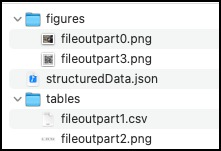
The output of an SDK extract operation is a zip package containing the following:
- The structuredData.json file with the extracted content & PDF element structure. See the JSON schema for a description of the default output. (Please refer to the Styling JSON schema for a description of the output when the styling option is enabled.)
- A renditions folder(s) containing renditions for each element type selected as input. The folder name is either "tables" or "figures" depending on your specified element type. Each folder contains renditions with filenames that correspond to the element information in the JSON file.
The following is a summary of key elements in the extracted JSON (see additional descriptions in the JSON schema):
-
Elements : Ordered list of semantic elements (like headings, paragraphs, tables, figures) found in the document, on the basis of position in the structure tree of the document.The output does not include headers or footers.In addition, headings that repeat across pages are reported for the first occurrence only.
-
Bounds : Bounding box enclosing the content items forming this element. Not reported for elements which don't have any content items (like empty table cells). The bounds are as per PDF specification coordinates. PDF pages are generally specified in inches (like A4 page is 8.3 inches x 11.7 inches). If values are required in coordinates, we need a DPI value i.e. dots per inches. As per PDF specification, 72 DPI is used when creating a PDF. So, width of an A4 page is specified to be ~= 598 units (8.3 inches x 72) when creating the PDF. All values reported in Extract use this 72 dpi based coordinates. Again as per PDF spec, absolute values of bounds are in a coordinate system where origin is (0,0), up and right directions are positive. Going by this coordinate system, for all rects reported in Extract, bottom < top and left < right. In Extract JSON schema, all rects are of type #/definitions/rect and rect is defined as:
description: Rectangle/Box in PDF coordinate system (bottom-left is origin). Values are in PDF user space units. Order of values - left, bottom, right, top.
-
Font : Font description for the font associated with the first character. Only reported for text elements.
-
TextSize : Text size (in points) of the last character. Only reported for text elements.
-
Attributes: Includes additional properties like line height and text alignment.
-
Path : The Path describes the location of elements in the structure tree including the element type and the instance number. Path along with bounds defines the reading order of the document. Element types are based on the ISO standard , a summary is included below for convenience :
- Aside : Content which is not part of regular content flow of the document
- Figure : Non-reflowable constructs like graphs, images, flowcharts
- Footnote : FootNote
- H, H1, H2, etc : Heading Level
- L : List
- Li : List Item
- Lbl : List Item label
- Lbody : List item body
- P : Paragraph
- ParagraphSpan : Denotes part of a paragraph. Reported when paragraph is broken (generally due to page break or column break)
- Reference : Link
- Sect : Logical section of the document
- StyleSpan : Denotes difference in styling of text relative to the parent container
- Sub : Single line of a multiline paragraph (e.g. addresses). Such paras are created in html using <br> inside <p> tags
- Table : Table
- TD : Table cell
- TH : Table header cell
- TR : Table row
- Title : Title of the document. This is the most prominent heading which can define the whole document.
- TOC : Table of contents
- TOCI : Table of contents item
- Watermark : Watermark
-
Text : Text for the element in UTF-8 format, only reported for text elements. When inline elements are reported separately from parent block element, then this value has references to those inline elements.
-
Figures : Identified as a Figure in the Path attribute, saved as a PNG in the figures folder with the filename identified in the filePaths attribute.
-
Tables : Identified as a Table in the Path attribute, saved as a .CSV, .XLSX, and .PNG in the tables folder with the filename identified in the filePaths attribute.
-
FilePaths : List of file paths to additional output files (images and spreadsheets)
-
Pages : A list of properties for each page of the PDF including page number, width, height, and rotation.
-
Reading Order : The reading order of content within columns, across page breaks, and inclusive of asides is represented by the order of the elements in the Elements array. In the normal mode, exceptions can occur for elements extracted from their container (eg. A reference link in the middle of a paragraph). However, the order is preserved in Styling mode where all Elements and their Kids are represented in the natural reading order. Reading order is determined by Bounds and path element provided in the .json file.
API limitations
<br/>
- File size: Files up to a maximum of 100MB are supported.
- Number of Pages: Non-scanned PDFs have a limit of 400 pages. Scanned PDFs have a limit of 150 pages or less. Limits may be lower for files with multiple tables. For larger files or those with complex layouts, it is recommended to split the file into smaller sections before processing.
- Rate limits: Keep request rate below 25 requests per minutes.
- Page Size: The API supports standard page sizes not to exceed 17.5” or less than 6” in either dimension.
- Hidden Objects: PDF files that contain content that is not visible on the page like javascript, OCG (optional content groups), etc are not supported. Files that contain such hidden information may fail to process. For such cases, removing hidden content prior to processing files again may return a successful result.
- Language: The API is currently optimized for English language content. Files containing content in other Latin languages should return good results, but may have issues with non-English punctuation.
- OCR and Scan quality: The quality of text extracted from scanned files is dependent on the clarity of content in the input file. Conditions like skewed pages, shadowing, obscured or overlapping fonts, and page resolution less than 200 DPI can all result in lower quality text output.
- Form fields: Files containing XFA and other fillable form elements are not supported.
- Unprotected files: The API supports files that are unprotected or where security restrictions allow copying of content. Files that are secured and do not allow copying of content will not be processed.
- Annotations: Content in PDF files containing annotations such as highlights and sticky notes will be processed, but annotations that obscure text could impact output quality. Text within annotations will not be included in the output.
- PDF Producers: The Extract API is designed to extract content from files that contain text, table data, and figures. Files created from applications that produce other types of content like illustrations, CAD drawings or other types of vector art may not return quality results.
Error codes
| Timeout | TIMEOUT | Processing timeout. Please try splitting the file into multiple files with fewer pages. | | Unknown error / failure | ERROR | Unable to extract content - Internal error. |
Rest API
See our public API Reference for Extract PDF.
Extract Text from a PDF
The sample below extracts text element information from a PDF document and returns a JSON file.
Please refer the API usage guide to understand how to use our APIs.
data-slots=heading, code
data-repeat=5
data-languages=Java, .NET, Node JS, Python, Rest API
Java
// Get the samples from https://www.adobe.com/go/pdftoolsapi_java_samples
// Run the sample:
// mvn -f pom.xml exec:java -Dexec.mainClass=com.adobe.pdfservices.operation.samples.extractpdf.ExtractTextInfoFromPDF

public class ExtractTextInfoFromPDF {

    private static final org.slf4j.Logger LOGGER = LoggerFactory.getLogger(ExtractTextInfoFromPDF.class);

    public static void main(String[] args) {

        try {

            // Initial setup, create credentials instance.
            Credentials credentials = Credentials.servicePrincipalCredentialsBuilder()
                .withClientId("PDF_SERVICES_CLIENT_ID")
                .withClientSecret("PDF_SERVICES_CLIENT_SECRET")
                .build();

            // Create an ExecutionContext using credentials.
            ExecutionContext executionContext = ExecutionContext.create(credentials);

            ExtractPDFOperation extractPDFOperation = ExtractPDFOperation.createNew();

            // Provide an input FileRef for the operation
            FileRef source = FileRef.createFromLocalFile("src/main/resources/extractPdfInput.pdf");
            extractPDFOperation.setInputFile(source);

            // Build ExtractPDF options and set them into the operation
            ExtractPDFOptions extractPDFOptions = ExtractPDFOptions.extractPdfOptionsBuilder()
                    .addElementsToExtract(Arrays.asList(ExtractElementType.TEXT))
                    .build();
            extractPDFOperation.setOptions(extractPDFOptions);

            // Execute the operation
            FileRef result = extractPDFOperation.execute(executionContext);

            // Save the result at the specified location
            result.saveAs("output/ExtractTextInfoFromPDF.zip");

        } catch (ServiceApiException | IOException | SdkException | ServiceUsageException e) {
            LOGGER.error("Exception encountered while executing operation", e);
        }
    }
}
.NET
// Get the samples from https://www.adobe.com/go/pdftoolsapi_net_samples
// Run the sample:
// cd ExtractTextInfoFromPDF/
// dotnet run ExtractTextInfoFromPDF.csproj

namespace ExtractTextInfoFromPDF
{
    class Program
    {
        private static readonly ILog log = LogManager.GetLogger(typeof(Program));
        static void Main()
        {
            // Configure the logging.
            ConfigureLogging();
            try
            {
                // Initial setup, create credentials instance.
                Credentials credentials = Credentials.ServicePrincipalCredentialsBuilder()
                    .WithClientId("PDF_SERVICES_CLIENT_ID")
                    .WithClientSecret("PDF_SERVICES_CLIENT_SECRET")
                    .Build();

                //Create an ExecutionContext using credentials and create a new operation instance.
                ExecutionContext executionContext = ExecutionContext.Create(credentials);
                ExtractPDFOperation extractPdfOperation = ExtractPDFOperation.CreateNew();

                // Set operation input from a source file.
                FileRef sourceFileRef = FileRef.CreateFromLocalFile(@"extractPDFInput.pdf");
                extractPdfOperation.SetInputFile(sourceFileRef);

                // Build ExtractPDF options and set them into the operation.
                ExtractPDFOptions extractPdfOptions = ExtractPDFOptions.ExtractPDFOptionsBuilder()
                    .AddElementsToExtract(new List<ExtractElementType>(new []{ ExtractElementType.TEXT}))
                    .Build();
                extractPdfOperation .SetOptions(extractPdfOptions);

                // Execute the operation.
                FileRef result = extractPdfOperation.Execute(executionContext);

                // Save the result to the specified location.
                result.SaveAs(Directory.GetCurrentDirectory() + "/output/ExtractTextInfoFromPDF.zip");
            }
            catch (ServiceUsageException ex)
            {
                log.Error("Exception encountered while executing operation", ex);
            }
            catch (ServiceApiException ex)
            {
                log.Error("Exception encountered while executing operation", ex);
            }
            catch (SDKException ex)
            {
                log.Error("Exception encountered while executing operation", ex);
            }
            catch (IOException ex)
            {
                log.Error("Exception encountered while executing operation", ex);
            }
            catch (Exception ex)
            {
                log.Error("Exception encountered while executing operation", ex);
            }
        }

        static void ConfigureLogging()
        {
            ILoggerRepository logRepository = LogManager.GetRepository(Assembly.GetEntryAssembly());
            XmlConfigurator.Configure(logRepository, new FileInfo("log4net.config"));
        }
    }
}
Node JS
// Get the samples from http://www.adobe.com/go/pdftoolsapi_node_sample
// Run the sample:
// node src/extractpdf/extract-text-info-from-pdf.js

  const PDFServicesSdk = require('@adobe/pdfservices-node-sdk');
  try {
      // Initial setup, create credentials instance.
      const credentials =  PDFServicesSdk.Credentials
            .servicePrincipalCredentialsBuilder()
            .withClientId("PDF_SERVICES_CLIENT_ID")
            .withClientSecret("PDF_SERVICES_CLIENT_SECRET")
            .build();

      // Create an ExecutionContext using credentials
      const executionContext = PDFServicesSdk.ExecutionContext.create(credentials);

      // Build extractPDF options
      const options = new PDFServicesSdk.ExtractPDF.options.ExtractPdfOptions.Builder()
          .addElementsToExtract(PDFServicesSdk.ExtractPDF.options.ExtractElementType.TEXT).build();

      // Create a new operation instance.
      const extractPDFOperation = PDFServicesSdk.ExtractPDF.Operation.createNew(),
          input = PDFServicesSdk.FileRef.createFromLocalFile(
              'resources/extractPDFInput.pdf',
              PDFServicesSdk.ExtractPDF.SupportedSourceFormat.pdf
          );

      // Set operation input from a source file.
      extractPDFOperation.setInput(input);

      // Set options
      extractPDFOperation.setOptions(options);

      extractPDFOperation.execute(executionContext)
          .then(result => result.saveAsFile('output/ExtractTextInfoFromPDF.zip'))
          .catch(err => {
              if(err instanceof PDFServicesSdk.Error.ServiceApiError
                  || err instanceof PDFServicesSdk.Error.ServiceUsageError) {
                  console.log('Exception encountered while executing operation', err);
              } else {
                  console.log('Exception encountered while executing operation', err);
              }
          });
  } catch (err) {
      console.log('Exception encountered while executing operation', err);
  }
Python
# Get the samples from http://www.adobe.com/go/pdftoolsapi_python_sample
# Run the sample:
# python src/extractpdf/extract_txt_from_pdf.py

     logging.basicConfig(level=os.environ.get("LOGLEVEL", "INFO"))

     try:
         #get base path.
         base_path = os.path.dirname(os.path.dirname(os.path.dirname(os.path.abspath(__file__))))

         #Initial setup, create credentials instance.
        credentials = Credentials.service_principal_credentials_builder()
            .with_client_id('PDF_SERVICES_CLIENT_ID')
            .with_client_secret('PDF_SERVICES_CLIENT_SECRET')
            .build()

         #Create an ExecutionContext using credentials and create a new operation instance.
         execution_context = ExecutionContext.create(credentials)
         extract_pdf_operation = ExtractPDFOperation.create_new()

         #Set operation input from a source file.
         source = FileRef.create_from_local_file(base_path + "/resources/extractPdfInput.pdf")
         extract_pdf_operation.set_input(source)

         #Build ExtractPDF options and set them into the operation
         extract_pdf_options: ExtractPDFOptions = ExtractPDFOptions.builder() \
             .with_element_to_extract(ExtractElementType.TEXT) \
             .build()
         extract_pdf_operation.set_options(extract_pdf_options)

         #Execute the operation.
         result: FileRef = extract_pdf_operation.execute(execution_context)

         #Save the result to the specified location.
         result.save_as(base_path + "/output/ExtractTextInfoFromPDF.zip")
     except (ServiceApiException, ServiceUsageException, SdkException):
         logging.exception("Exception encountered while executing operation")
Rest API
// Please refer our Rest API docs for more information
// https://developer.adobe.com/document-services/docs/apis/#tag/Extract-PDF

curl --location --request POST 'https://pdf-services.adobe.io/operation/extractpdf' \
--header 'x-api-key: {{Placeholder for client_id}}' \
--header 'Content-Type: application/json' \
--header 'Authorization: Bearer {{Placeholder for token}}' \
--data-raw '{
    "assetID": "urn:aaid:AS:UE1:23c30ee0-2e4d-46d6-87f2-087832fca718",
    "elementsToExtract": [
        "text"
    ]
}'

// Legacy API can be found here
// https://documentcloud.adobe.com/document-services/index.html#post-extractPDF
Extract Text and Tables
The sample below extracts text and table element information from a PDF document and returns a JSON file along with table data in XLSX format.
Please refer the API usage guide to understand how to use our APIs.
data-slots=heading, code
data-repeat=5
data-languages=Java,.NET, Node JS, Python, Rest API
Java
// Get the samples from https://www.adobe.com/go/pdftoolsapi_java_samples
// Run the sample:
// mvn -f pom.xml exec:java -Dexec.mainClass=com.adobe.pdfservices.operation.samples.extractpdf.ExtractTextTableInfoFromPDF

public class ExtractTextTableInfoFromPDF {

    private static final org.slf4j.Logger LOGGER = LoggerFactory.getLogger(ExtractTextTableInfoFromPDF.class);

    public static void main(String[] args) {

        try {

            // Initial setup, create credentials instance.
            Credentials credentials = Credentials.servicePrincipalCredentialsBuilder()
                .withClientId("PDF_SERVICES_CLIENT_ID")
                .withClientSecret("PDF_SERVICES_CLIENT_SECRET")
                .build();

            // Create an ExecutionContext using credentials.
            ExecutionContext executionContext = ExecutionContext.create(credentials);

            ExtractPDFOperation extractPDFOperation = ExtractPDFOperation.createNew();

            // Provide an input FileRef for the operation
            FileRef source = FileRef.createFromLocalFile("src/main/resources/extractPdfInput.pdf");
            extractPDFOperation.setInputFile(source);

            // Build ExtractPDF options and set them into the operation
            ExtractPDFOptions extractPDFOptions = ExtractPDFOptions.extractPdfOptionsBuilder()
                    .addElementsToExtract(Arrays.asList(ExtractElementType.TEXT, ExtractElementType.TABLES))
                    .build();
            extractPDFOperation.setOptions(extractPDFOptions);

            // Execute the operation
            FileRef result = extractPDFOperation.execute(executionContext);

            // Save the result at the specified location
            result.saveAs("output/ExtractTextTableInfoFromPDF.zip");

        } catch (ServiceApiException | IOException | SdkException | ServiceUsageException e) {
            LOGGER.error("Exception encountered while executing operation", e);
        }
    }
}
.NET
// Get the samples from https://www.adobe.com/go/pdftoolsapi_net_samples
// Run the sample:
// cd ExtractTextTableInfoFromPDF/
// dotnet run ExtractTextTableInfoFromPDF.csproj

namespace ExtractTextTableInfoFromPDF
{
    class Program
    {
        private static readonly ILog log = LogManager.GetLogger(typeof(Program));
        static void Main()
        {
            // Configure the logging
            ConfigureLogging();
            try
            {
                // Initial setup, create credentials instance.
                Credentials credentials = Credentials.ServicePrincipalCredentialsBuilder()
                    .WithClientId("PDF_SERVICES_CLIENT_ID")
                    .WithClientSecret("PDF_SERVICES_CLIENT_SECRET")
                    .Build();

                // Create an ExecutionContext using credentials and create a new operation instance.
                ExecutionContext executionContext = ExecutionContext.Create(credentials);
                ExtractPDFOperation extractPdfOperation = ExtractPDFOperation.CreateNew();

                // Set operation input from a source file.
                FileRef sourceFileRef = FileRef.CreateFromLocalFile(@"extractPDFInput.pdf");
                extractPdfOperation.SetInputFile(sourceFileRef);

                // Build ExtractPDF options and set them into the operation.
                ExtractPDFOptions extractPdfOptions = ExtractPDFOptions.ExtractPDFOptionsBuilder()
                    .AddElementsToExtract(new List<ExtractElementType>(new []{ ExtractElementType.TEXT, ExtractElementType.TABLES}))
                    .Build();
                extractPdfOperation.SetOptions(extractPdfOptions);

                // Execute the operation.
                FileRef result = extractPdfOperation.Execute(executionContext);

                // Save the result to the specified location.
                result.SaveAs(Directory.GetCurrentDirectory() + "/output/ExtractTextTableInfoFromPDF.zip");
            }
            catch (ServiceUsageException ex)
            {
                log.Error("Exception encountered while executing operation", ex);
            }
            catch (ServiceApiException ex)
            {
                log.Error("Exception encountered while executing operation", ex);
            }
            catch (SDKException ex)
            {
                log.Error("Exception encountered while executing operation", ex);
            }
            catch (IOException ex)
            {
                log.Error("Exception encountered while executing operation", ex);
            }
            catch (Exception ex)
            {
                log.Error("Exception encountered while executing operation", ex);
            }
        }

        static void ConfigureLogging()
        {
            ILoggerRepository logRepository = LogManager.GetRepository(Assembly.GetEntryAssembly());
            XmlConfigurator.Configure(logRepository, new FileInfo("log4net.config"));
        }
    }
}
Node JS
// Get the samples from http://www.adobe.com/go/pdftoolsapi_node_sample
// Run the sample:
// node src/extractpdf/extract-text-table-info-from-pdf.js


  const PDFServicesSdk = require('@adobe/pdfservices-node-sdk');
  try {
      // Initial setup, create credentials instance.
      const credentials =  PDFServicesSdk.Credentials
            .servicePrincipalCredentialsBuilder()
            .withClientId("PDF_SERVICES_CLIENT_ID")
            .withClientSecret("PDF_SERVICES_CLIENT_SECRET")
            .build();

      // Create an ExecutionContext using credentials
      const executionContext = PDFServicesSdk.ExecutionContext.create(credentials);

      // Build extractPDF options
      const options = new PDFServicesSdk.ExtractPDF.options.ExtractPdfOptions.Builder()
          .addElementsToExtract(PDFServicesSdk.ExtractPDF.options.ExtractElementType.TEXT, PDFServicesSdk.ExtractPDF.options.ExtractElementType.TABLES)
          .build();

      // Create a new operation instance.
      const extractPDFOperation = PDFServicesSdk.ExtractPDF.Operation.createNew(),
          input = PDFServicesSdk.FileRef.createFromLocalFile(
              'resources/extractPDFInput.pdf',
              PDFServicesSdk.ExtractPDF.SupportedSourceFormat.pdf
          );

      // Set operation input from a source file.
      extractPDFOperation.setInput(input);

      // Set options
      extractPDFOperation.setOptions(options);

      extractPDFOperation.execute(executionContext)
          .then(result => result.saveAsFile('output/ExtractTextTableInfoFromPDF.zip'))
          .catch(err => {
              if(err instanceof PDFServicesSdk.Error.ServiceApiError
                  || err instanceof PDFServicesSdk.Error.ServiceUsageError) {
                  console.log('Exception encountered while executing operation', err);
              } else {
                  console.log('Exception encountered while executing operation', err);
              }
          });
  } catch (err) {
      console.log('Exception encountered while executing operation', err);
  }
Python
# Get the samples from http://www.adobe.com/go/pdftoolsapi_python_sample
# Run the sample:
# python src/extractpdf/extract_txt_table_info_from_pdf.py

  logging.basicConfig(level=os.environ.get("LOGLEVEL", "INFO"))

  try:
      #get base path.
      base_path = os.path.dirname(os.path.dirname(os.path.dirname(os.path.abspath(__file__))))

      #Initial setup, create credentials instance.
      credentials = Credentials.service_principal_credentials_builder()
            .with_client_id('PDF_SERVICES_CLIENT_ID')
            .with_client_secret('PDF_SERVICES_CLIENT_SECRET')
            .build()

      #Create an ExecutionContext using credentials and create a new operation instance.
      execution_context = ExecutionContext.create(credentials)
      extract_pdf_operation = ExtractPDFOperation.create_new()

      #Set operation input from a source file.
      source = FileRef.create_from_local_file(base_path + "/resources/extractPdfInput.pdf")
      extract_pdf_operation.set_input(source)

      #Build ExtractPDF options and set them into the operation
      extract_pdf_options: ExtractPDFOptions = ExtractPDFOptions.builder() \
          .with_element_to_extract(ExtractElementType.TEXT) \
          .with_element_to_extract(ExtractElementType.TABLES) \
          .build()
      extract_pdf_operation.set_options(extract_pdf_options)

      #Execute the operation.
      result: FileRef = extract_pdf_operation.execute(execution_context)

      #Save the result to the specified location.
      result.save_as(base_path + "/output/ExtractTextTableInfoFromPDF.zip")
  except (ServiceApiException, ServiceUsageException, SdkException):
      logging.exception("Exception encountered while executing operation")
Rest API
// Please refer our Rest API docs for more information
// https://developer.adobe.com/document-services/docs/apis/#tag/Extract-PDF

curl --location --request POST 'https://pdf-services.adobe.io/operation/extractpdf' \
--header 'x-api-key: {{Placeholder for client_id}}' \
--header 'Content-Type: application/json' \
--header 'Authorization: Bearer {{Placeholder for token}}' \
--data-raw '{
    "assetID": "urn:aaid:AS:UE1:23c30ee0-2e4d-46d6-87f2-087832fca718",
    "elementsToExtract": [
        "text",
        "tables"
    ]
}'

// Legacy API can be found here
// https://documentcloud.adobe.com/document-services/index.html#post-extractPDF
Extract Text and Tables (w/ Tables Renditions)
The sample below extracts text and table element information as well as table renditions from a PDF Document. Note that the output is a zip containing the structured information in a JSON file along with table renditions in PNG and XLSX format.
Please refer the API usage guide to understand how to use our APIs.
data-slots=heading, code
data-repeat=5
data-languages=Java, .NET, Node JS, Python, Rest API
Java
// Get the samples from https://www.adobe.com/go/pdftoolsapi_java_samples
// Run the sample:
// mvn -f pom.xml exec:java -Dexec.mainClass=com.adobe.pdfservices.operation.samples.extractpdf.ExtractTextTableInfoWithRenditionsFromPDF

public class ExtractTextTableInfoWithRenditionsFromPDF {

    private static final org.slf4j.Logger LOGGER = LoggerFactory.getLogger(ExtractTextTableInfoWithRenditionsFromPDF.class);

    public static void main(String[] args) {

        try {

            // Initial setup, create credentials instance.
            Credentials credentials = Credentials.servicePrincipalCredentialsBuilder()
                .withClientId("PDF_SERVICES_CLIENT_ID")
                .withClientSecret("PDF_SERVICES_CLIENT_SECRET")
                .build();

            // Create an ExecutionContext using credentials.
            ExecutionContext executionContext = ExecutionContext.create(credentials);

            ExtractPDFOperation extractPDFOperation = ExtractPDFOperation.createNew();

            // Provide an input FileRef for the operation
            FileRef source = FileRef.createFromLocalFile("src/main/resources/extractPdfInput.pdf");
            extractPDFOperation.setInputFile(source);

            // Build ExtractPDF options and set them into the operation
            ExtractPDFOptions extractPDFOptions = ExtractPDFOptions.extractPdfOptionsBuilder()
                    .addElementsToExtract(Arrays.asList(ExtractElementType.TEXT, ExtractElementType.TABLES))
                    .addElementToExtractRenditions(ExtractRenditionsElementType.TABLES)
                    .build();
            extractPDFOperation.setOptions(extractPDFOptions);

            // Execute the operation
            FileRef result = extractPDFOperation.execute(executionContext);

            // Save the result at the specified location
            result.saveAs("output/ExtractTextTableInfoWithRenditionsFromPDF.zip");

        } catch (ServiceApiException | IOException | SdkException | ServiceUsageException e) {
            LOGGER.error("Exception encountered while executing operation", e);
        }
    }
}
.NET
// Get the samples from https://www.adobe.com/go/pdftoolsapi_net_samples
// Run the sample:
// cd ExtractTextTableInfoWithRenditionsFromPDF/
// dotnet run ExtractTextTableInfoWithRenditionsFromPDF.csproj

namespace ExtractTextTableInfoWithRenditionsFromPDF
{
    class Program
    {
        private static readonly ILog log = LogManager.GetLogger(typeof(Program));
        static void Main()
        {
            // Configure the logging.
            ConfigureLogging();
            try
            {
                // Initial setup, create credentials instance.
                Credentials credentials = Credentials.ServicePrincipalCredentialsBuilder()
                    .WithClientId("PDF_SERVICES_CLIENT_ID")
                    .WithClientSecret("PDF_SERVICES_CLIENT_SECRET")
                    .Build();

                // Create an ExecutionContext using credentials and create a new operation instance.
                ExecutionContext executionContext = ExecutionContext.Create(credentials);
                ExtractPDFOperation extractPdfOperation = ExtractPDFOperation.CreateNew();

                // Set operation input from a source file.
                FileRef sourceFileRef = FileRef.CreateFromLocalFile(@"extractPDFInput.pdf");
                extractPdfOperation.SetInputFile(sourceFileRef);

                // Build ExtractPDF options and set them into the operation
                ExtractPDFOptions extractPdfOptions = ExtractPDFOptions.ExtractPDFOptionsBuilder()
                    .AddElementsToExtract(new List<ExtractElementType>(new []{ ExtractElementType.TEXT, ExtractElementType.TABLES}))
                    .AddElementsToExtractRenditions(new List<ExtractRenditionsElementType> (new [] {ExtractRenditionsElementType.TABLES}))
                    .Build();

                extractPdfOperation.SetOptions(extractPdfOptions);

                // Execute the operation.
                FileRef result = extractPdfOperation.Execute(executionContext);

                // Save the result to the specified location.
                result.SaveAs(Directory.GetCurrentDirectory() + "/output/ExtractTextTableInfoWithRenditionsFromPDF.zip");
            }
            catch (ServiceUsageException ex)
            {
                log.Error("Exception encountered while executing operation", ex);
            }
            catch (ServiceApiException ex)
            {
                log.Error("Exception encountered while executing operation", ex);
            }
            catch (SDKException ex)
            {
                log.Error("Exception encountered while executing operation", ex);
            }
            catch (IOException ex)
            {
                log.Error("Exception encountered while executing operation", ex);
            }
            catch (Exception ex)
            {
                log.Error("Exception encountered while executing operation", ex);
            }
        }

        static void ConfigureLogging()
        {
            ILoggerRepository logRepository = LogManager.GetRepository(Assembly.GetEntryAssembly());
            XmlConfigurator.Configure(logRepository, new FileInfo("log4net.config"));
        }
    }
}
Node JS
// Get the samples from http://www.adobe.com/go/pdftoolsapi_node_sample
// Run the sample:
// node src/extractpdf/extract-text-table-info-with-tables-renditions-from-pdf.js

  const PDFServicesSdk = require('@adobe/pdfservices-node-sdk');
  try {
      // Initial setup, create credentials instance.
      const credentials =  PDFServicesSdk.Credentials
          .servicePrincipalCredentialsBuilder()
          .withClientId("PDF_SERVICES_CLIENT_ID")
          .withClientSecret("PDF_SERVICES_CLIENT_SECRET")
          .build();

      // Create an ExecutionContext using credentials
      const executionContext = PDFServicesSdk.ExecutionContext.create(credentials);

      // Build extractPDF options
      const options = new PDFServicesSdk.ExtractPDF.options.ExtractPdfOptions.Builder()
          .addElementsToExtract(PDFServicesSdk.ExtractPDF.options.ExtractElementType.TEXT, PDFServicesSdk.ExtractPDF.options.ExtractElementType.TABLES)
          .addElementsToExtractRenditions(PDFServicesSdk.ExtractPDF.options.ExtractRenditionsElementType.TABLES)
          .build();

      // Create a new operation instance.
      const extractPDFOperation = PDFServicesSdk.ExtractPDF.Operation.createNew(),
          input = PDFServicesSdk.FileRef.createFromLocalFile(
              'resources/extractPDFInput.pdf',
              PDFServicesSdk.ExtractPDF.SupportedSourceFormat.pdf
          );

      // Set operation input from a source file
      extractPDFOperation.setInput(input);

      // Set options
      extractPDFOperation.setOptions(options);

      extractPDFOperation.execute(executionContext)
          .then(result => result.saveAsFile('output/ExtractTextTableInfoWithTablesRenditionsFromPDF.zip'))
          .catch(err => {
              if(err instanceof PDFServicesSdk.Error.ServiceApiError
                  || err instanceof PDFServicesSdk.Error.ServiceUsageError) {
                  console.log('Exception encountered while executing operation', err);
              } else {
                  console.log('Exception encountered while executing operation', err);
              }
          });
  } catch (err) {
      console.log('Exception encountered while executing operation', err);
  }
Python
# Get the samples from http://www.adobe.com/go/pdftoolsapi_python_sample
# Run the sample:
# python src/extractpdf/extract_txt_table_info_with_rendition_from_pdf.py

  logging.basicConfig(level=os.environ.get("LOGLEVEL", "INFO"))

  try:
      #get base path.
      base_path = os.path.dirname(os.path.dirname(os.path.dirname(os.path.abspath(__file__))))

      #Initial setup, create credentials instance.
      credentials = Credentials.service_principal_credentials_builder()
            .with_client_id('PDF_SERVICES_CLIENT_ID')
            .with_client_secret('PDF_SERVICES_CLIENT_SECRET')
            .build()

      #Create an ExecutionContext using credentials and create a new operation instance.
      execution_context = ExecutionContext.create(credentials)
      extract_pdf_operation = ExtractPDFOperation.create_new()

      #Set operation input from a source file.
      source = FileRef.create_from_local_file(base_path + "/resources/extractPdfInput.pdf")
      extract_pdf_operation.set_input(source)

      #Build ExtractPDF options and set them into the operation
      extract_pdf_options: ExtractPDFOptions = ExtractPDFOptions.builder() \
          .with_elements_to_extract([ExtractElementType.TEXT, ExtractElementType.TABLES]) \
          .with_element_to_extract_renditions(ExtractRenditionsElementType.TABLES) \
          .build()
      extract_pdf_operation.set_options(extract_pdf_options)

      #Execute the operation.
      result: FileRef = extract_pdf_operation.execute(execution_context)

      #Save the result to the specified location.
      result.save_as(base_path + "/output/ExtractTextTableWithTableRendition.zip")
  except (ServiceApiException, ServiceUsageException, SdkException):
      logging.exception("Exception encountered while executing operation")
Rest API
// Please refer our Rest API docs for more information
// https://developer.adobe.com/document-services/docs/apis/#tag/Extract-PDF

curl --location --request POST 'https://pdf-services.adobe.io/operation/extractpdf' \
--header 'x-api-key: {{Placeholder for client_id}}' \
--header 'Content-Type: application/json' \
--header 'Authorization: Bearer {{Placeholder for token}}' \
--data-raw '{
    "assetID": "urn:aaid:AS:UE1:23c30ee0-2e4d-46d6-87f2-087832fca718",
    "renditionsToExtract": [
        "tables"
    ],
    "elementsToExtract": [
        "text",
        "tables"
    ],
}'

// Legacy API can be found here
// https://documentcloud.adobe.com/document-services/index.html#post-extractPDF
Extract Text and Tables (w/ Tables and Figures Renditions)
The sample below extracts text and table elements information as well as table and figure renditions from a PDF Document. Note that the output is a zip containing the structured information in a JSON file along with figure renditions as PNGs and table renditions in PNG and XLSX format.
Please refer the API usage guide to understand how to use our APIs.
data-slots=heading, code
data-repeat=5
data-languages=Java, .NET, Node JS, Python, Rest API
Java
// Get the samples from https://www.adobe.com/go/pdftoolsapi_java_samples
// Run the sample:
// mvn -f pom.xml exec:java -Dexec.mainClass=com.adobe.pdfservices.operation.samples.extractpdf.ExtractTextTableInfoWithRenditionsFromPDF

public class ExtractTextTableInfoWithFiguresTablesRenditionsFromPDF {

      private static final org.slf4j.Logger LOGGER = LoggerFactory.getLogger(ExtractTextTableInfoWithFiguresTablesRenditionsFromPDF.class);

      public static void main(String[] args) {

          try {

              // Initial setup, create credentials instance.
            Credentials credentials = Credentials.servicePrincipalCredentialsBuilder()
                .withClientId("PDF_SERVICES_CLIENT_ID")
                .withClientSecret("PDF_SERVICES_CLIENT_SECRET")
                .build();

              // Create an ExecutionContext using credentials.
              ExecutionContext executionContext = ExecutionContext.create(credentials);

              ExtractPDFOperation extractPDFOperation = ExtractPDFOperation.createNew();

              // Provide an input FileRef for the operation
              FileRef source = FileRef.createFromLocalFile("src/main/resources/extractPdfInput.pdf");
              extractPDFOperation.setInputFile(source);

              // Build ExtractPDF options and set them into the operation
              ExtractPDFOptions extractPDFOptions = ExtractPDFOptions.extractPdfOptionsBuilder()
                      .addElementsToExtract(Arrays.asList(ExtractElementType.TEXT, ExtractElementType.TABLES))
                      .addElementsToExtractRenditions(Arrays.asList(ExtractRenditionsElementType.TABLES, ExtractRenditionsElementType.FIGURES))
                      .build();
              extractPDFOperation.setOptions(extractPDFOptions);

              // Execute the operation
              FileRef result = extractPDFOperation.execute(executionContext);

              // Save the result at the specified location
              result.saveAs("output/ExtractTextTableInfoWithFiguresTablesRenditionsFromPDF.zip");

          } catch (ServiceApiException | IOException | SdkException | ServiceUsageException e) {
              LOGGER.error("Exception encountered while executing operation", e);
          }
      }
  }
.NET
// Get the samples from https://www.adobe.com/go/pdftoolsapi_net_samples
// Run the sample:
// cd ExtractTextTableInfoWithFiguresTablesRenditionsFromPDF/
// dotnet run ExtractTextTableInfoWithFiguresTablesRenditionsFromPDF.csproj

namespace ExtractTextTableInfoWithFiguresTablesRenditionsFromPDF
{
    class Program
    {
        private static readonly ILog log = LogManager.GetLogger(typeof(Program));
        static void Main()
        {
            // Configure the logging.
            ConfigureLogging();
            try
            {
                // Initial setup, create credentials instance.
                Credentials credentials = Credentials.ServicePrincipalCredentialsBuilder()
                    .WithClientId("PDF_SERVICES_CLIENT_ID")
                    .WithClientSecret("PDF_SERVICES_CLIENT_SECRET")
                    .Build();

                // Create an ExecutionContext using credentials and create a new operation instance.
                ExecutionContext executionContext = ExecutionContext.Create(credentials);
                ExtractPDFOperation extractPdfOperation = ExtractPDFOperation.CreateNew();

                // Set operation input from a source file.
                FileRef sourceFileRef = FileRef.CreateFromLocalFile(@"extractPDFInput.pdf");
                extractPdfOperation.SetInputFile(sourceFileRef);

                // Build ExtractPDF options and set them into the operation.
                ExtractPDFOptions extractPdfOptions = ExtractPDFOptions.ExtractPDFOptionsBuilder()
                    .AddElementsToExtract(new List<ExtractElementType>(new []{ ExtractElementType.TEXT, ExtractElementType.TABLES}))
                    .AddElementsToExtractRenditions(new List<ExtractRenditionsElementType> (new []{ExtractRenditionsElementType.FIGURES, ExtractRenditionsElementType.TABLES}))
                    .Build();

                extractPdfOperation.SetOptions(extractPdfOptions);

                // Execute the operation.
                FileRef result = extractPdfOperation.Execute(executionContext);

                // Save the result to the specified location.
                result.SaveAs(Directory.GetCurrentDirectory() + "/output/ExtractTextTableInfoWithFiguresTablesRenditionsFromPDF.zip");
            }
            catch (ServiceUsageException ex)
            {
                log.Error("Exception encountered while executing operation", ex);
            }
            catch (ServiceApiException ex)
            {
                log.Error("Exception encountered while executing operation", ex);
            }
            catch (SDKException ex)
            {
                log.Error("Exception encountered while executing operation", ex);
            }
            catch (IOException ex)
            {
                log.Error("Exception encountered while executing operation", ex);
            }
            catch (Exception ex)
            {
                log.Error("Exception encountered while executing operation", ex);
            }
        }

        static void ConfigureLogging()
        {
            ILoggerRepository logRepository = LogManager.GetRepository(Assembly.GetEntryAssembly());
            XmlConfigurator.Configure(logRepository, new FileInfo("log4net.config"));
        }
    }
}
Node JS
// Get the samples from http://www.adobe.com/go/pdftoolsapi_node_sample
// Run the sample:
// node src/extractpdf/extract-text-table-info-with-figures-tables-renditions-from-pdf.js

const PDFServicesSdk = require('@adobe/pdfservices-node-sdk');
try {
    // Initial setup, create credentials instance.
    const credentials =  PDFServicesSdk.Credentials
        .servicePrincipalCredentialsBuilder()
        .withClientId("PDF_SERVICES_CLIENT_ID")
        .withClientSecret("PDF_SERVICES_CLIENT_SECRET")
        .build();

    // Create an ExecutionContext using credentials
    const executionContext = PDFServicesSdk.ExecutionContext.create(credentials);

    // Build extractPDF options
    const options = new PDFServicesSdk.ExtractPDF.options.ExtractPdfOptions.Builder()
        .addElementsToExtract(PDFServicesSdk.ExtractPDF.options.ExtractElementType.TEXT, PDFServicesSdk.ExtractPDF.options.ExtractElementType.TABLES)
        .addElementsToExtractRenditions(PDFServicesSdk.ExtractPDF.options.ExtractRenditionsElementType.FIGURES, PDFServicesSdk.ExtractPDF.options.ExtractRenditionsElementType.TABLES)
        .build();

    // Create a new operation instance.
    const extractPDFOperation = PDFServicesSdk.ExtractPDF.Operation.createNew(),
        input = PDFServicesSdk.FileRef.createFromLocalFile(
            'resources/extractPDFInput.pdf',
            PDFServicesSdk.ExtractPDF.SupportedSourceFormat.pdf
        );

    // Set operation input from a source file
    extractPDFOperation.setInput(input);

    // Set options
    extractPDFOperation.setOptions(options);

    extractPDFOperation.execute(executionContext)
        .then(result => result.saveAsFile('output/ExtractTextTableWithFigureTableRendition.zip'))
        .catch(err => {
            if(err instanceof PDFServicesSdk.Error.ServiceApiError
                || err instanceof PDFServicesSdk.Error.ServiceUsageError) {
                console.log('Exception encountered while executing operation', err);
            } else {
                console.log('Exception encountered while executing operation', err);
            }
        });
} catch (err) {
    console.log('Exception encountered while executing operation', err);
}
Python
# Get the samples from http://www.adobe.com/go/pdftoolsapi_python_sample
# Run the sample:
# python src/extractpdf/extract_txt_table_info_with_figure_tables_rendition_from_pdf.py

  logging.basicConfig(level=os.environ.get("LOGLEVEL", "INFO"))

  try:
      #get base path.
      base_path = os.path.dirname(os.path.dirname(os.path.dirname(os.path.abspath(__file__))))

      #Initial setup, create credentials instance.
      credentials = Credentials.service_principal_credentials_builder()
            .with_client_id('PDF_SERVICES_CLIENT_ID')
            .with_client_secret('PDF_SERVICES_CLIENT_SECRET')
            .build()

      #Create an ExecutionContext using credentials and create a new operation instance.
      execution_context = ExecutionContext.create(credentials)
      extract_pdf_operation = ExtractPDFOperation.create_new()

      #Set operation input from a source file.
      source = FileRef.create_from_local_file(base_path + "/resources/extractPdfInput.pdf")
      extract_pdf_operation.set_input(source)

      #Build ExtractPDF options and set them into the operation
      extract_pdf_options: ExtractPDFOptions = ExtractPDFOptions.builder() \
          .with_elements_to_extract([ExtractElementType.TEXT, ExtractElementType.TABLES]) \
          .with_element_to_extract_renditions(ExtractRenditionsElementType.TABLES,ExtractRenditionsElementType.FIGURES]) \
          .build()
      extract_pdf_operation.set_options(extract_pdf_options)

      #Execute the operation.
      result: FileRef = extract_pdf_operation.execute(execution_context)

      #Save the result to the specified location.
      result.save_as(base_path + "/output/ExtractTextTableWithTableRendition.zip")
  except (ServiceApiException, ServiceUsageException, SdkException):
      logging.exception("Exception encountered while executing operation")
Rest API
// Please refer our Rest API docs for more information
// https://developer.adobe.com/document-services/docs/apis/#tag/Extract-PDF

curl --location --request POST 'https://pdf-services.adobe.io/operation/extractpdf' \
--header 'x-api-key: {{Placeholder for client_id}}' \
--header 'Content-Type: application/json' \
--header 'Authorization: Bearer {{Placeholder for token}}' \
--data-raw '{
    "assetID": "urn:aaid:AS:UE1:23c30ee0-2e4d-46d6-87f2-087832fca718",
    "renditionsToExtract": [
        "tables",
        "figures"
    ],
    "elementsToExtract": [
        "text",
        "tables"
    ]
}'

// Legacy API can be found here
// https://documentcloud.adobe.com/document-services/index.html#post-extractPDF
Extract Text and Tables and Character Bounding Boxes (w/ Renditions)
The sample below extracts table renditions and bounding boxes for characters present in text blocks (paragraphs, list, headings), in addition to text and table element information from a PDF Document. Note that the output is a zip containing the structured information along with table renditions in PNG and XLSX format.
Please refer the API usage guide to understand how to use our APIs.
data-slots=heading, code
data-repeat=5
data-languages=Java, .NET, Node JS, Python, Rest API
Java
// Get the samples from https://www.adobe.com/go/pdftoolsapi_java_samples
// Run the sample:
// mvn -f pom.xml exec:java -Dexec.mainClass=com.adobe.pdfservices.operation.samples.extractpdf.ExtractTextTableInfoWithCharBoundsFromPDF

public class ExtractTextTableInfoWithCharBoundsFromPDF {

    private static final org.slf4j.Logger LOGGER = LoggerFactory.getLogger(ExtractTextTableInfoWithCharBoundsFromPDF.class);

    public static void main(String[] args) {

        try {

            // Initial setup, create credentials instance.
            Credentials credentials = Credentials.servicePrincipalCredentialsBuilder()
                .withClientId("PDF_SERVICES_CLIENT_ID")
                .withClientSecret("PDF_SERVICES_CLIENT_SECRET")
                .build();

            // Create an ExecutionContext using credentials.
            ExecutionContext executionContext = ExecutionContext.create(credentials);

            ExtractPDFOperation extractPDFOperation = ExtractPDFOperation.createNew();

            // Provide an input FileRef for the operation
            FileRef source = FileRef.createFromLocalFile("src/main/resources/extractPdfInput.pdf");
            extractPDFOperation.setInputFile(source);

            // Build ExtractPDF options and set them into the operation
            ExtractPDFOptions extractPDFOptions = ExtractPDFOptions.extractPdfOptionsBuilder()
                    .addElementsToExtract(Arrays.asList(ExtractElementType.TEXT, ExtractElementType.TABLES))
                    .addCharInfo(true)
                    .build();
            extractPDFOperation.setOptions(extractPDFOptions);

            // Execute the operation
            FileRef result = extractPDFOperation.execute(executionContext);

            // Save the result at the specified location
            result.saveAs("output/ExtractTextTableInfoWithCharBoundsFromPDF.zip");

        } catch (ServiceApiException | IOException | SdkException | ServiceUsageException e) {
            LOGGER.error("Exception encountered while executing operation", e);
        }
    }
}
.NET
// Get the samples from https://www.adobe.com/go/pdftoolsapi_net_samples
// Run the sample:
// cd ExtractTextTableInfoWithCharBoundsFromPDF/
// dotnet run ExtractTextTableInfoWithCharBoundsFromPDF.csproj

namespace ExtractTextTableInfoWithCharBoundsFromPDF
{
    class Program
    {
        private static readonly ILog log = LogManager.GetLogger(typeof(Program));
        static void Main()
        {
            // Configure the logging.
            ConfigureLogging();
            try
            {
                // Initial setup, create credentials instance.
                Credentials credentials = Credentials.ServicePrincipalCredentialsBuilder()
                    .WithClientId("PDF_SERVICES_CLIENT_ID")
                    .WithClientSecret("PDF_SERVICES_CLIENT_SECRET")
                    .Build();

                // Create an ExecutionContext using credentials and create a new operation instance.
                ExecutionContext executionContext = ExecutionContext.Create(credentials);
                ExtractPDFOperation extractPdfOperation = ExtractPDFOperation.CreateNew();

                // Set operation input from a source file.
                FileRef sourceFileRef = FileRef.CreateFromLocalFile(@"extractPDFInput.pdf");
                extractPdfOperation.SetInputFile(sourceFileRef);

                // Build ExtractPDF options and set them into the operation.
                ExtractPDFOptions extractPdfOptions = ExtractPDFOptions.ExtractPDFOptionsBuilder()
                    .AddElementsToExtract(new List<ExtractElementType>(new []{ ExtractElementType.TEXT, ExtractElementType.TABLES}))
                    .AddCharsInfo(true)
                    .Build();

                extractPdfOperation.SetOptions(extractPdfOptions);

                // Execute the operation.
                FileRef result = extractPdfOperation.Execute(executionContext);

                // Save the result to the specified location.
                result.SaveAs(Directory.GetCurrentDirectory() + "/output/ExtractTextTableInfoWithCharBoundsFromPDF.zip");
            }
            catch (ServiceUsageException ex)
            {
                log.Error("Exception encountered while executing operation", ex);
            }
            catch (ServiceApiException ex)
            {
                log.Error("Exception encountered while executing operation", ex);
            }
            catch (SDKException ex)
            {
                log.Error("Exception encountered while executing operation", ex);
            }
            catch (IOException ex)
            {
                log.Error("Exception encountered while executing operation", ex);
            }
            catch (Exception ex)
            {
                log.Error("Exception encountered while executing operation", ex);
            }
        }

        static void ConfigureLogging()
        {
            ILoggerRepository logRepository = LogManager.GetRepository(Assembly.GetEntryAssembly());
            XmlConfigurator.Configure(logRepository, new FileInfo("log4net.config"));
        }
    }
}
Node JS
// Get the samples from http://www.adobe.com/go/pdftoolsapi_node_sample
// Run the sample:
// node src/extractpdf/extract-text-table-info-with-char-bounds-from-pdf.js

  const PDFServicesSdk = require('@adobe/pdfservices-node-sdk');
  try {
      // Initial setup, create credentials instance.
      const credentials =  PDFServicesSdk.Credentials
          .servicePrincipalCredentialsBuilder()
          .withClientId("PDF_SERVICES_CLIENT_ID")
          .withClientSecret("PDF_SERVICES_CLIENT_SECRET")
          .build();

      // Create an ExecutionContext using credentials
      const executionContext = PDFServicesSdk.ExecutionContext.create(credentials);

      // Build extractPDF options
      const options = new PDFServicesSdk.ExtractPDF.options.ExtractPdfOptions.Builder()
          .addElementsToExtract(PDFServicesSdk.ExtractPDF.options.ExtractElementType.TEXT, PDFServicesSdk.ExtractPDF.options.ExtractElementType.TABLES)
          .addCharInfo(true)
          .build();

      // Create a new operation instance.
      const extractPDFOperation = PDFServicesSdk.ExtractPDF.Operation.createNew(),
          input = PDFServicesSdk.FileRef.createFromLocalFile(
              'resources/extractPDFInput.pdf',
              PDFServicesSdk.ExtractPDF.SupportedSourceFormat.pdf
          );

      // Set operation input from a source file.
      extractPDFOperation.setInput(input);

      // Set options
      extractPDFOperation.setOptions(options);

      extractPDFOperation.execute(executionContext)
          .then(result => result.saveAsFile('output/ExtractTextTableInfoWithCharBoundsFromPDF.zip'))
          .catch(err => {
              if(err instanceof PDFServicesSdk.Error.ServiceApiError
                  || err instanceof PDFServicesSdk.Error.ServiceUsageError) {
                  console.log('Exception encountered while executing operation', err);
              } else {
                  console.log('Exception encountered while executing operation', err);
              }
          });
  } catch (err) {
      console.log('Exception encountered while executing operation', err);
  }
Python
# Get the samples from http://www.adobe.com/go/pdftoolsapi_python_sample
# Run the sample:
# python src/extractpdf/extract_txt_table_info_with_char_bounds_from_pdf.py

  logging.basicConfig(level=os.environ.get("LOGLEVEL", "INFO"))

  try:
      #get base path.
      base_path = os.path.dirname(os.path.dirname(os.path.dirname(os.path.abspath(__file__))))

      #Initial setup, create credentials instance.
      credentials = Credentials.service_principal_credentials_builder()
            .with_client_id('PDF_SERVICES_CLIENT_ID')
            .with_client_secret('PDF_SERVICES_CLIENT_SECRET')
            .build()

      #Create an ExecutionContext using credentials and create a new operation instance.
      execution_context = ExecutionContext.create(credentials)
      extract_pdf_operation = ExtractPDFOperation.create_new()

      #Set operation input from a source file.
      source = FileRef.create_from_local_file(base_path + "/resources/extractPdfInput.pdf")
      extract_pdf_operation.set_input(source)

      #Build ExtractPDF options and set them into the operation
      extract_pdf_options: ExtractPDFOptions = ExtractPDFOptions.builder() \
          .with_element_to_extract(ExtractElementType.TEXT) \
          .with_get_char_info(True) \
          .build()
      extract_pdf_operation.set_options(extract_pdf_options)

      #Execute the operation.
      result: FileRef = extract_pdf_operation.execute(execution_context)

      #Save the result to the specified location.
      result.save_as(base_path + "/output/ExtractTextInfoWithCharBoundsFromPDF.zip")
  except (ServiceApiException, ServiceUsageException, SdkException):
      logging.exception("Exception encountered while executing operation")
Rest API
// Please refer our Rest API docs for more information
// https://developer.adobe.com/document-services/docs/apis/#tag/Extract-PDF

curl --location --request POST 'https://pdf-services.adobe.io/operation/extractpdf' \
--header 'x-api-key: {{Placeholder for client_id}}' \
--header 'Content-Type: application/json' \
--header 'Authorization: Bearer {{Placeholder for token}}' \
--data-raw '{
    "assetID": "urn:aaid:AS:UE1:23c30ee0-2e4d-46d6-87f2-087832fca718",
    "renditionsToExtract": [
        "tables",
        "figures"
    ],
    "elementsToExtract": [
        "text",
        "tables"
    ],
    "getCharBounds": true
}'

// Legacy API can be found here
// https://documentcloud.adobe.com/document-services/index.html#post-extractPDF
Extract Text and Tables and Table Structure as CSV (w/ Renditions)
The sample below adds option to get CSV output for tables in addition to extracting text and table element information as well as table renditions from a PDF Document. Note that the output is a zip containing the structured information along with table renditions in PNG and CSV format.
Please refer the API usage guide to understand how to use our APIs.
data-slots=heading, code
data-repeat=5
data-languages=Java, .NET, Node JS, Python, Rest API
Java
// Get the samples from https://www.adobe.com/go/pdftoolsapi_java_samples
// Run the sample:
// mvn -f pom.xml exec:java -Dexec.mainClass=com.adobe.pdfservices.operation.samples.extractpdf.ExtractTextTableInfoWithTableStructureFromPdf

public class ExtractTextTableInfoWithTableStructureFromPdf {

    private static final org.slf4j.Logger LOGGER = LoggerFactory.getLogger(ExtractTextTableInfoWithTableStructureFromPdf.class);

    public static void main(String[] args) {

        try {

            // Initial setup, create credentials instance.
            Credentials credentials = Credentials.servicePrincipalCredentialsBuilder()
                .withClientId("PDF_SERVICES_CLIENT_ID")
                .withClientSecret("PDF_SERVICES_CLIENT_SECRET")
                .build();

            // Create an ExecutionContext using credentials.
            ExecutionContext executionContext = ExecutionContext.create(credentials);

            ExtractPDFOperation extractPDFOperation = ExtractPDFOperation.createNew();

            // Provide an input FileRef for the operation
            FileRef source = FileRef.createFromLocalFile("src/main/resources/extractPdfInput.pdf");
            extractPDFOperation.setInputFile(source);

            // Build ExtractPDF options and set them into the operation
            ExtractPDFOptions extractPDFOptions = ExtractPDFOptions.extractPdfOptionsBuilder()
                    .addElementsToExtract(Arrays.asList(ExtractElementType.TEXT, ExtractElementType.TABLES))
                    .addElementToExtractRenditions(ExtractRenditionsElementType.TABLES)
                    .addTableStructureFormat(TableStructureType.CSV)
                    .build();
            extractPDFOperation.setOptions(extractPDFOptions);

            // Execute the operation
            FileRef result = extractPDFOperation.execute(executionContext);

            // Save the result at the specified location
            result.saveAs("output/ExtractTextTableInfoWithTableStructureFromPdf.zip");

        } catch (ServiceApiException | IOException | SdkException | ServiceUsageException e) {
            LOGGER.error("Exception encountered while executing operation", e);
        }
    }
}
.NET
// Get the samples from https://www.adobe.com/go/pdftoolsapi_net_samples
// Run the sample:
// cd ExtractTextTableInfoWithTableStructureFromPDF/
// dotnet run ExtractTextTableInfoWithTableStructureFromPDF.csproj

namespace ExtractTextTableInfoWithTableStructureFromPDF
{
    class Program
    {
        private static readonly ILog log = LogManager.GetLogger(typeof(Program));
        static void Main()
        {
            // Configure the logging.
            ConfigureLogging();
            try
            {
                // Initial setup, create credentials instance.
                Credentials credentials = Credentials.ServicePrincipalCredentialsBuilder()
                    .WithClientId("PDF_SERVICES_CLIENT_ID")
                    .WithClientSecret("PDF_SERVICES_CLIENT_SECRET")
                    .Build();

                // Create an ExecutionContext using credentials and create a new operation instance.
                ExecutionContext executionContext = ExecutionContext.Create(credentials);
                ExtractPDFOperation extractPdfOperation = ExtractPDFOperation.CreateNew();

                // Set operation input from a source file.
                FileRef sourceFileRef = FileRef.CreateFromLocalFile(@"extractPDFInput.pdf");
                extractPdfOperation.SetInputFile(sourceFileRef);

                // Build ExtractPDF options and set them into the operation.
                ExtractPDFOptions extractPdfOptions = ExtractPDFOptions.ExtractPDFOptionsBuilder()
                    .AddElementsToExtract(new List<ExtractElementType>(new []{ ExtractElementType.TEXT, ExtractElementType.TABLES}))
                    .AddElementsToExtractRenditions(new List<ExtractRenditionsElementType>(new [] {ExtractRenditionsElementType.TABLES}))
                    .AddTableStructureFormat(TableStructureType.CSV)
                    .Build();

                extractPdfOperation.SetOptions(extractPdfOptions);

                // Execute the operation.
                FileRef result = extractPdfOperation.Execute(executionContext);

                // Save the result to the specified location.
                result.SaveAs(Directory.GetCurrentDirectory() + "/output/ExtractTextTableInfoWithTableStructureFromPDF.zip");
            }
            catch (ServiceUsageException ex)
            {
                log.Error("Exception encountered while executing operation", ex);
            }
            catch (ServiceApiException ex)
            {
                log.Error("Exception encountered while executing operation", ex);
            }
            catch (SDKException ex)
            {
                log.Error("Exception encountered while executing operation", ex);
            }
            catch (IOException ex)
            {
                log.Error("Exception encountered while executing operation", ex);
            }
            catch (Exception ex)
            {
                log.Error("Exception encountered while executing operation", ex);
            }
        }

        static void ConfigureLogging()
        {
            ILoggerRepository logRepository = LogManager.GetRepository(Assembly.GetEntryAssembly());
            XmlConfigurator.Configure(logRepository, new FileInfo("log4net.config"));
        }
    }
}
Node JS
// Get the samples from http://www.adobe.com/go/pdftoolsapi_node_sample
// Run the sample:
// node src/extractpdf/extract-text-table-info-with-tables-renditions-from-pdf.js

    const PDFServicesSdk = require('@adobe/pdfservices-node-sdk');
    try {
        // Initial setup, create credentials instance.
        const credentials =  PDFServicesSdk.Credentials
            .servicePrincipalCredentialsBuilder()
            .withClientId("PDF_SERVICES_CLIENT_ID")
            .withClientSecret("PDF_SERVICES_CLIENT_SECRET")
            .build();

        // Create an ExecutionContext using credentials
        const executionContext = PDFServicesSdk.ExecutionContext.create(credentials);

        // Build extractPDF options
        const options = new PDFServicesSdk.ExtractPDF.options.ExtractPdfOptions.Builder()
            .addElementsToExtract(PDFServicesSdk.ExtractPDF.options.ExtractElementType.TEXT, PDFServicesSdk.ExtractPDF.options.ExtractElementType.TABLES)
            .addElementsToExtractRenditions(PDFServicesSdk.ExtractPDF.options.ExtractRenditionsElementType.TABLES)
            .addTableStructureFormat(PDFServicesSdk.ExtractPDF.options.TableStructureType.CSV)
            .build();

        // Create a new operation instance.
        const extractPDFOperation = PDFServicesSdk.ExtractPDF.Operation.createNew(),
            input = PDFServicesSdk.FileRef.createFromLocalFile(
                'resources/extractPDFInput.pdf',
                PDFServicesSdk.ExtractPDF.SupportedSourceFormat.pdf
            );

        // Set operation input from a source file.
        extractPDFOperation.setInput(input);

        // Set options
        extractPDFOperation.setOptions(options);

        extractPDFOperation.execute(executionContext)
            .then(result => result.saveAsFile('output/ExtractTextTableWithTableStructure.zip'))
            .catch(err => {
                if(err instanceof PDFServicesSdk.Error.ServiceApiError
                    || err instanceof PDFServicesSdk.Error.ServiceUsageError) {
                    console.log('Exception encountered while executing operation', err);
                } else {
                    console.log('Exception encountered while executing operation', err);
                }
            });
    } catch (err) {
        console.log('Exception encountered while executing operation', err);
    }
Python
# Get the samples from http://www.adobe.com/go/pdftoolsapi_python_sample
# Run the sample:
# python src/extractpdf/extract_txt_table_info_with_table_structure_from_pdf.py

  logging.basicConfig(level=os.environ.get("LOGLEVEL", "INFO"))

  try:
      #get base path.
      base_path = os.path.dirname(os.path.dirname(os.path.dirname(os.path.abspath(__file__))))

      #Initial setup, create credentials instance.
      credentials = Credentials.service_principal_credentials_builder()
            .with_client_id('PDF_SERVICES_CLIENT_ID')
            .with_client_secret('PDF_SERVICES_CLIENT_SECRET')
            .build()

      #Create an ExecutionContext using credentials and create a new operation instance.
      execution_context = ExecutionContext.create(credentials)
      extract_pdf_operation = ExtractPDFOperation.create_new()

      #Set operation input from a source file.
      source = FileRef.create_from_local_file(base_path + "/resources/extractPdfInput.pdf")
      extract_pdf_operation.set_input(source)

      #Build ExtractPDF options and set them into the operation
      extract_pdf_options: ExtractPDFOptions = ExtractPDFOptions.builder() \
          .with_elements_to_extract([ExtractElementType.TEXT, ExtractElementType.TABLES]) \
          .with_element_to_extract_renditions(ExtractRenditionsElementType.TABLES) \
          .with_table_structure_format(TableStructureType.CSV) \
          .build()
      extract_pdf_operation.set_options(extract_pdf_options)

      #Execute the operation.
      result: FileRef = extract_pdf_operation.execute(execution_context)

      #Save the result to the specified location.
      result.save_as(base_path + "/output/ExtractTextTableWithTableStructure.zip")
  except (ServiceApiException, ServiceUsageException, SdkException):
      logging.exception("Exception encountered while executing operation")
Rest API
// Please refer our Rest API docs for more information
// https://developer.adobe.com/document-services/docs/apis/#tag/Extract-PDF

curl --location --request POST 'https://pdf-services.adobe.io/operation/extractpdf' \
--header 'x-api-key: {{Placeholder for client_id}}' \
--header 'Content-Type: application/json' \
--header 'Authorization: Bearer {{Placeholder for token}}' \
--data-raw '{
    "assetID": "urn:aaid:AS:UE1:23c30ee0-2e4d-46d6-87f2-087832fca718",
    "renditionsToExtract": [
        "tables"
    ],
    "elementsToExtract": [
        "text",
        "tables"
    ],
    "tableOutputFormat": "csv"
}'

// Legacy API can be found here
// https://documentcloud.adobe.com/document-services/index.html#post-extractPDF
Extract Text and Tables and Styling Info
The sample below adds an option to get styling information for each text element (Bold / Italics / Superscript etc) in addition to extracting text and table element information. Note that the output is a zip containing the structured information along with table renditions in PNG and XLSX format. Please see the Styling JSON schema for reference.
Please refer the API usage guide to understand how to use our APIs.
data-slots=heading, code
data-repeat=5
data-languages=Java,.NET, Node JS, Python, Rest API
Java
// Get the samples from https://www.adobe.com/go/pdftoolsapi_java_samples
// Run the sample:
// mvn -f pom.xml exec:java -Dexec.mainClass=com.adobe.pdfservices.operation.samples.extractpdf.ExtractTextTableWithStylingInfoFromPdf

public class ExtractTextTableInfoWithStylingFromPDF {

    private static final org.slf4j.Logger LOGGER = LoggerFactory.getLogger(ExtractTextTableInfoWithStylingFromPDF.class);

    public static void main(String[] args) {

        try {

            // Initial setup, create credentials instance.
            Credentials credentials = Credentials.servicePrincipalCredentialsBuilder()
                    .withClientId("PDF_SERVICES_CLIENT_ID")
                    .withClientSecret("PDF_SERVICES_CLIENT_SECRET")
                    .build();

            // Create an ExecutionContext using credentials.
            ExecutionContext executionContext = ExecutionContext.create(credentials);

            ExtractPDFOperation extractPDFOperation = ExtractPDFOperation.createNew();

            // Provide an input FileRef for the operation
            FileRef source = FileRef.createFromLocalFile("src/main/resources/extractPdfInput.pdf");
            extractPDFOperation.setInputFile(source);

            // Build ExtractPDF options and set them into the operation
            ExtractPDFOptions extractPDFOptions = ExtractPDFOptions.extractPdfOptionsBuilder()
                    .addElementsToExtract(Arrays.asList(ExtractElementType.TEXT, ExtractElementType.TABLES))
                    .addGetStylingInfo(true)
                    .build();
            extractPDFOperation.setOptions(extractPDFOptions);

            // Execute the operation
            FileRef result = extractPDFOperation.execute(executionContext);

            // Save the result at the specified location
            result.saveAs("output/ExtractTextTableInfoWithStylingFromPDF.zip");

        } catch (ServiceApiException | IOException | SdkException | ServiceUsageException e) {
            LOGGER.error("Exception encountered while executing operation", e);
        }
    }
}
.NET
// Get the samples from https://www.adobe.com/go/pdftoolsapi_net_samples
// Run the sample:
// cd ExtractTextTableInfoWithStylingFromPDF/
// dotnet run ExtractTextTableInfoWithStylingFromPDF.csproj

namespace ExtractTextTableInfoWithStylingFromPDF
{
    class Program
    {
        private static readonly ILog log = LogManager.GetLogger(typeof(Program));
        static void Main()
        {
            // Configure the logging.
            ConfigureLogging();
            try
            {
                // Initial setup, create credentials instance.
                Credentials credentials = Credentials.ServicePrincipalCredentialsBuilder()
                    .WithClientId("PDF_SERVICES_CLIENT_ID")
                    .WithClientSecret("PDF_SERVICES_CLIENT_SECRET")
                    .Build();

                // Create an ExecutionContext using credentials and create a new operation instance.
                ExecutionContext executionContext = ExecutionContext.Create(credentials);
                ExtractPDFOperation extractPdfOperation = ExtractPDFOperation.CreateNew();

                // Set operation input from a source file.
                FileRef sourceFileRef = FileRef.CreateFromLocalFile(@"extractPDFInput.pdf");
                extractPdfOperation.SetInputFile(sourceFileRef);

                // Build ExtractPDF options and set them into the operation.
                ExtractPDFOptions extractPdfOptions = ExtractPDFOptions.ExtractPDFOptionsBuilder()
                    .AddElementsToExtract(new List<ExtractElementType>(new []{ ExtractElementType.TEXT, ExtractElementType.TABLES}))
                    .AddGetStylingInfo(true)
                    .Build();

                extractPdfOperation.SetOptions(extractPdfOptions);

                // Execute the operation.
                FileRef result = extractPdfOperation.Execute(executionContext);

                // Save the result to the specified location.
                result.SaveAs(Directory.GetCurrentDirectory() + "/output/ExtractTextTableInfoWithStylingFromPDF.zip");
            }
            catch (ServiceUsageException ex)
            {
                log.Error("Exception encountered while executing operation", ex);
            }
            catch (ServiceApiException ex)
            {
                log.Error("Exception encountered while executing operation", ex);
            }
            catch (SDKException ex)
            {
                log.Error("Exception encountered while executing operation", ex);
            }
            catch (IOException ex)
            {
                log.Error("Exception encountered while executing operation", ex);
            }
            catch (Exception ex)
            {
                log.Error("Exception encountered while executing operation", ex);
            }
        }

        static void ConfigureLogging()
        {
            ILoggerRepository logRepository = LogManager.GetRepository(Assembly.GetEntryAssembly());
            XmlConfigurator.Configure(logRepository, new FileInfo("log4net.config"));
        }
    }
}
Node JS
// Get the samples from http://www.adobe.com/go/pdftoolsapi_node_sample
// Run the sample:
// node src/extractpdf/extract-text-table-with-styling-info-from-pdf.js


  const PDFServicesSdk = require('@adobe/pdfservices-node-sdk');
  try {
      // Initial setup, create credentials instance.
      const credentials =  PDFServicesSdk.Credentials
          .servicePrincipalCredentialsBuilder()
          .withClientId("PDF_SERVICES_CLIENT_ID")
          .withClientSecret("PDF_SERVICES_CLIENT_SECRET")
          .build();

      // Create an ExecutionContext using credentials
      const executionContext = PDFServicesSdk.ExecutionContext.create(credentials);

      // Build extractPDF options
      const options = new PDFServicesSdk.ExtractPDF.options.ExtractPdfOptions.Builder()
          .addElementsToExtract(PDFServicesSdk.ExtractPDF.options.ExtractElementType.TEXT, PDFServicesSdk.ExtractPDF.options.ExtractElementType.TABLES)
          .getStylingInfo(true)
          .build();

      // Create a new operation instance.
      const extractPDFOperation = PDFServicesSdk.ExtractPDF.Operation.createNew(),
          input = PDFServicesSdk.FileRef.createFromLocalFile(
              'resources/extractPDFInput.pdf',
              PDFServicesSdk.ExtractPDF.SupportedSourceFormat.pdf
          );

      // Set operation input from a source file.
      extractPDFOperation.setInput(input);

      // Set options
      extractPDFOperation.setOptions(options);

      extractPDFOperation.execute(executionContext)
          .then(result => result.saveAsFile('output/ExtractTextTableInfoWithStylingInfoFromPDF.zip'))
          .catch(err => {
              if(err instanceof PDFServicesSdk.Error.ServiceApiError
                  || err instanceof PDFServicesSdk.Error.ServiceUsageError) {
                  console.log('Exception encountered while executing operation', err);
              } else {
                  console.log('Exception encountered while executing operation', err);
              }
          });
  } catch (err) {
      console.log('Exception encountered while executing operation', err);
  }
Python
# Get the samples from http://www.adobe.com/go/pdftoolsapi_python_sample
# Run the sample:
# python src/extractpdf/extract_txt_table_with_styling_info_from_pdf.py

  logging.basicConfig(level=os.environ.get("LOGLEVEL", "INFO"))

  try:
      #get base path.
      base_path = os.path.dirname(os.path.dirname(os.path.dirname(os.path.abspath(__file__))))

      #Initial setup, create credentials instance.
      credentials = Credentials.service_principal_credentials_builder()
            .with_client_id('PDF_SERVICES_CLIENT_ID')
            .with_client_secret('PDF_SERVICES_CLIENT_SECRET')
            .build()

      #Create an ExecutionContext using credentials and create a new operation instance.
      execution_context = ExecutionContext.create(credentials)
      extract_pdf_operation = ExtractPDFOperation.create_new()

      #Set operation input from a source file.
      source = FileRef.create_from_local_file(base_path + "/resources/extractPdfInput.pdf")
      extract_pdf_operation.set_input(source)

      #Build ExtractPDF options and set them into the operation
      extract_pdf_options: ExtractPDFOptions = ExtractPDFOptions.builder() \
          .with_element_to_extract(ExtractElementType.TEXT) \
          .with_include_styling_info(True) \
          .build()
      extract_pdf_operation.set_options(extract_pdf_options)

      #Execute the operation.
      result: FileRef = extract_pdf_operation.execute(execution_context)

      #Save the result to the specified location.
      result.save_as(base_path + "/output/ExtractTextInfoWithStylingInfoFromPDF.zip")
  except (ServiceApiException, ServiceUsageException, SdkException):
      logging.exception("Exception encountered while executing operation")
Rest API
// Please refer our Rest API docs for more information
// https://developer.adobe.com/document-services/docs/apis/#tag/Extract-PDF

curl --location --request POST 'https://pdf-services.adobe.io/operation/extractpdf' \
--header 'x-api-key: {{Placeholder for client_id}}' \
--header 'Content-Type: application/json' \
--header 'Authorization: Bearer {{Placeholder for token}}' \
--data-raw '{
    "assetID": "urn:aaid:AS:UE1:23c30ee0-2e4d-46d6-87f2-087832fca718"
  "elementsToExtract": [
        "text",
        "tables"
    ],
    "includeStyling": true
}'

// Legacy API can be found here
// https://documentcloud.adobe.com/document-services/index.html#post-extractPDF