Quickstart for Adobe PDF Services API (Java)
To get started using Adobe PDF Services API, let's walk through a simple scenario - taking an input PDF document and exporting it to Microsoft Word. In this guide, we will walk you through the complete process for creating a program that will accomplish this task.
Prerequisites
To complete this guide, you will need:
- Java - Java 8 or higher is required.
- Maven
- An Adobe ID. If you do not have one, the credential setup will walk you through creating one.
- A way to edit code. No specific editor is required for this guide.
Step One: Getting credentials
- To begin, open your browser to https://acrobatservices.adobe.com/dc-integration-creation-app-cdn/main.html?api=pdf-services-api. If you are not already logged in to Adobe.com, you will need to sign in or create a new user. Using a personal email account is recommend and not a federated ID.

-
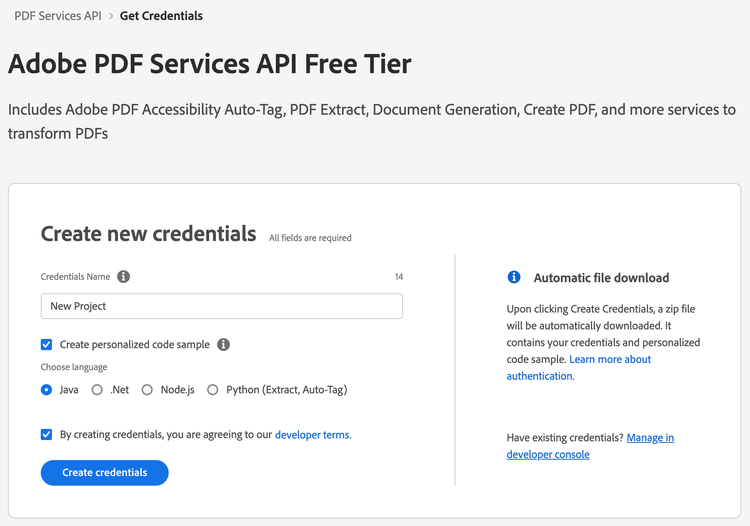
After registering or logging in, you will then be asked to name your new credentials. Use the name, "New Project".
-
Change the "Choose language" setting to "Java".
-
Also note the checkbox by, "Create personalized code sample." This will include a large set of samples along with your credentials. These can be helpful for learning more later.
-
Click the checkbox saying you agree to the developer terms and then click "Create credentials."
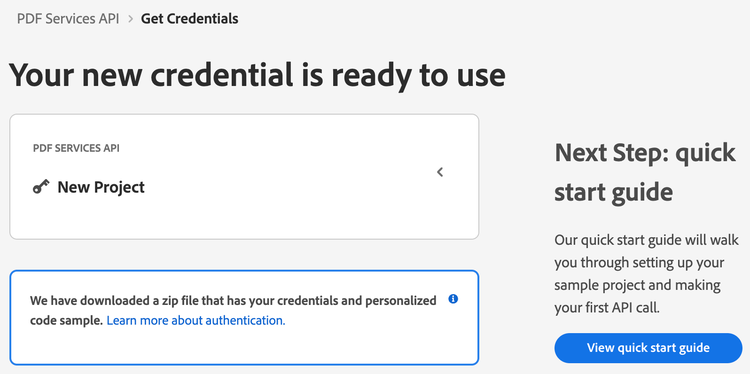
- After your credentials are created, they are automatically downloaded:
Step Two: Setting up the project
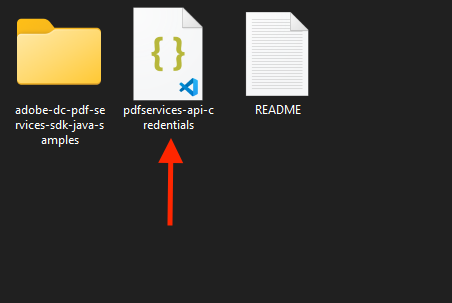
- In your Downloads folder, find the ZIP file with your credentials: PDFServicesSDK-JavaSamples.zip. If you unzip that archive, you will find a folder of samples and the
pdfservices-api-credentials.jsonfile.
-
Take the
pdfservices-api-credentials.jsonand place it in a new directory. -
In this directory, create a new file named
pom.xmland copy the following contents:
<?xml version="1.0" encoding="UTF-8"?>

<project xmlns="http://maven.apache.org/POM/4.0.0"
         xmlns:xsi="http://www.w3.org/2001/XMLSchema-instance"
         xsi:schemaLocation="http://maven.apache.org/POM/4.0.0 http://maven.apache.org/xsd/maven-4.0.0.xsd">
  <modelVersion>4.0.0</modelVersion>

  <groupId>com.adobe.documentservices</groupId>
  <artifactId>pdfservices-sdk-pds-guide</artifactId>
  <version>1</version>

  <name>PDF Services Java SDK Samples</name>

  <properties>
    <project.build.sourceEncoding>UTF-8</project.build.sourceEncoding>
    <maven.compiler.source>1.8</maven.compiler.source>
    <maven.compiler.target>1.8</maven.compiler.target>
    <pdfservices.sdk.version>3.5.1</pdfservices.sdk.version>
  </properties>

  <dependencies>

    <dependency>
      <groupId>com.adobe.documentservices</groupId>
      <artifactId>pdfservices-sdk</artifactId>
      <version>${pdfservices.sdk.version}</version>
    </dependency>

    <!--		log4j2 dependency to showcase the use of log4j2 with slf4j API-->
    <!-- https://mvnrepository.com/artifact/org.slf4j/slf4j-log4j12 -->
    <dependency>
      <groupId>org.apache.logging.log4j</groupId>
      <artifactId>log4j-slf4j-impl</artifactId>
      <version>2.17.1</version>
    </dependency>
  </dependencies>

  <build>
    <plugins>
      <plugin>
        <groupId>org.apache.maven.plugins</groupId>
        <artifactId>maven-compiler-plugin</artifactId>
        <version>3.8.0</version>
        <configuration>
          <source>${maven.compiler.source}</source>
          <target>${maven.compiler.target}</target>
        </configuration>
      </plugin>
      <plugin>
        <groupId>org.apache.maven.plugins</groupId>
        <artifactId>maven-shade-plugin</artifactId>
        <version>3.2.4</version>
        <configuration>
          <filters>
            <filter>
              <artifact>*:*</artifact>
              <excludes>
                <exclude>META-INF/*.SF</exclude>
                <exclude>META-INF/*.DSA</exclude>
                <exclude>META-INF/*.RSA</exclude>
              </excludes>
            </filter>
          </filters>
        </configuration>
        <executions>
          <execution>
            <phase>package</phase>
            <goals>
              <goal>shade</goal>
            </goals>
          </execution>
        </executions>
      </plugin>
      <plugin>
        <groupId>org.apache.maven.plugins</groupId>
        <artifactId>maven-jar-plugin</artifactId>
        <version>3.0.2</version>
        <configuration>
          <archive>
            <manifest>
              <addClasspath>true</addClasspath>
              <classpathPrefix>lib/</classpathPrefix>
              <mainClass>ExportPDFToWord</mainClass>
            </manifest>
          </archive>
        </configuration>
      </plugin>
      <plugin>
        <groupId>org.codehaus.mojo</groupId>
        <artifactId>exec-maven-plugin</artifactId>
        <version>1.5.0</version>
        <executions>
          <execution>
            <goals>
              <goal>java</goal>
            </goals>
          </execution>
        </executions>
      </plugin>
    </plugins>
  </build>
</project>
This file will define what dependencies we need and how the application will be built.
Our application will take a PDF, Bodea Brochure.pdf (downloadable from here) and convert it to a Microsoft Word document, Bodea Brochure.docx.
- In your editor, open the directory where you previously copied the credentials, and create a new directory,
src/main/java. In that directory, createExportPDFToWord.java.
Now you're ready to begin coding.
Step Three: Creating the application
- We'll begin by including our required dependencies:
import com.adobe.pdfservices.operation.ExecutionContext;
import com.adobe.pdfservices.operation.auth.Credentials;
import com.adobe.pdfservices.operation.exception.SdkException;
import com.adobe.pdfservices.operation.exception.ServiceApiException;
import com.adobe.pdfservices.operation.exception.ServiceUsageException;
import com.adobe.pdfservices.operation.io.FileRef;
import com.adobe.pdfservices.operation.pdfops.ExportPDFOperation;
import com.adobe.pdfservices.operation.pdfops.options.exportpdf.ExportPDFTargetFormat;
import org.slf4j.LoggerFactory;

import java.io.IOException;
import java.nio.file.Files;
import java.nio.file.Paths;
- Now let's define our main class:
public class ExportPDFToWord {

    private static final org.slf4j.Logger LOGGER = LoggerFactory.getLogger(ExportPDFToWord.class);

    public static void main(String[] args) {

	}

}
- Inside our class, we'll begin by defining our input PDF and output filenames. If the output file already exists, it will be deleted:
String output_file = "./Bodea Brochure.docx";
Files.deleteIfExists(Paths.get(output_file));

String input_file = "./Bodea Brochure.pdf";

System.out.println("Exporting " + input_file + " to " + output_file + "\n");
- Set the environment variables
PDF_SERVICES_CLIENT_IDandPDF_SERVICES_CLIENT_SECRETby running the following commands and replacing placeholdersYOUR CLIENT IDandYOUR CLIENT SECRETwith the credentials present inpdfservices-api-credentials.jsonfile:
-
Windows:
set PDF_SERVICES_CLIENT_ID=<YOUR CLIENT ID>set PDF_SERVICES_CLIENT_SECRET=<YOUR CLIENT SECRET>
-
MacOS/Linux:
export PDF_SERVICES_CLIENT_ID=<YOUR CLIENT ID>export PDF_SERVICES_CLIENT_SECRET=<YOUR CLIENT SECRET>
- Next, we can create our credentials and use them:
// Initial setup, create credentials instance.
Credentials credentials = Credentials.servicePrincipalCredentialsBuilder()
        .withClientId(System.getenv("PDF_SERVICES_CLIENT_ID"))
        .withClientSecret(System.getenv("PDF_SERVICES_CLIENT_SECRET"))
        .build();

// Create an ExecutionContext using credentials.
ExecutionContext executionContext = ExecutionContext.create(credentials);
- Now, let's create the operation:
ExportPDFOperation exportPDFOperation = ExportPDFOperation.createNew(ExportPDFTargetFormat.DOCX);

// Provide an input FileRef for the operation
FileRef source = FileRef.createFromLocalFile(input_file);
exportPDFOperation.setInput(source);
This set of code defines what we're doing (an Export operation), points to our local file and specifies the input is a PDF, and then defines options for the Export call. In this example, the only option is the export format, DOCX.
- The next code block executes the operation:
// Execute the operation
FileRef result = exportPDFOperation.execute(executionContext);

// Save the result at the specified location
result.saveAs(output_file);
This code runs the Export process and then stores the result Word document to the file system.

Here's the complete application (src/main/java/ExportPDFToWord.java):
import com.adobe.pdfservices.operation.ExecutionContext;
import com.adobe.pdfservices.operation.auth.Credentials;
import com.adobe.pdfservices.operation.exception.SdkException;
import com.adobe.pdfservices.operation.exception.ServiceApiException;
import com.adobe.pdfservices.operation.exception.ServiceUsageException;
import com.adobe.pdfservices.operation.io.FileRef;
import com.adobe.pdfservices.operation.pdfops.ExportPDFOperation;
import com.adobe.pdfservices.operation.pdfops.options.exportpdf.ExportPDFTargetFormat;
import org.slf4j.LoggerFactory;

import java.io.IOException;
import java.nio.file.Files;
import java.nio.file.Paths;

public class ExportPDFToWord {

    private static final org.slf4j.Logger LOGGER = LoggerFactory.getLogger(ExportPDFToWord.class);

    public static void main(String[] args) {

        try {

            String output_file = "./Bodea Brochure.docx";
            Files.deleteIfExists(Paths.get(output_file));

            String input_file = "./Bodea Brochure.pdf";

      		System.out.println("Exporting " + input_file + " to " + output_file + "\n");

            // Initial setup, create credentials instance.
            Credentials credentials = Credentials.servicePrincipalCredentialsBuilder()
                .withClientId(System.getenv("PDF_SERVICES_CLIENT_ID"))
                .withClientSecret(System.getenv("PDF_SERVICES_CLIENT_SECRET"))
                .build();

            // Create an ExecutionContext using credentials.
            ExecutionContext executionContext = ExecutionContext.create(credentials);

            ExportPDFOperation exportPDFOperation = ExportPDFOperation.createNew(ExportPDFTargetFormat.DOCX);

            // Provide an input FileRef for the operation
            FileRef source = FileRef.createFromLocalFile(input_file);
            exportPDFOperation.setInput(source);

            // Execute the operation
            FileRef result = exportPDFOperation.execute(executionContext);

            // Save the result at the specified location
            result.saveAs(output_file);

      		System.out.println("All Done");


        } catch (ServiceApiException | IOException | SdkException | ServiceUsageException e) {
            LOGGER.error("Exception encountered while executing operation", e);
        }
    }
}
Next Steps
Now that you've successfully performed your first operation, review the documentation for many other examples and reach out on our forums with any questions. Also remember the samples you downloaded while creating your credentials also have many demos.