If Adobe I/O Events fails to receive a successful response code from your webhook within the configured timeout window, it retries the request, including a special header x-adobe-retry-count. This header indicates how many times the delivery of an event or a batch of events has been attempted.
- Default webhooks: The timeout is 10 seconds.
- Runtime Actions as webhooks: The timeout is 60 seconds.
Note: The timeout spans the entire delivery attempt, including the overhead of setting up the HTTP connection. This means that if your webhook handler responds in exactly 10 seconds (or 60 seconds for Runtime Actions), the delivery will still fail due to the additional overhead of setting up the connection.
data-variant=info
data-slots=text
Each event has an independent retry lifecycle. Adobe I/O Events retries each individual delivery to your webhook for up to 24 hours using exponential and fixed backoff strategies. The first retry is attempted after 1 minute and the period between retries doubles after each attempt, but is at most 15 minutes (see below table outlining the retry pattern). <br/>
Please note that above retry intervals are not guaranteed and may vary in few exception scenarios.
Adobe I/O Events determines the state of an event registration based on the below criteria:
- ACTIVE - Event registration is marked as active when in the last 24 hours there are less than 10 delivery attempts or at least 20% of them are successful.
- DISABLED - Event registration is marked as disabled when in the last 24 hours there are at least 10 delivery attempts and 80% of them are unsuccessful. However, a registration is first moved to an
UNSTABLEstate when the condition is first met while the registration isACTIVE. - UNSTABLE - Event registration is marked as unstable before switching to
DISABLED. AnUNSTABLEregistration is a registration that met the requirements for being disabled, but I/O Events waits at least for 24 hours to check the status again and transition the registration to the state as indicated by the above definitions (eitherACTIVEorDISABLED).
Important:
- For an Unstable event registration
Adobe I/O Eventscontinues attempting delivery. A registration will have at least 24 hours before being marked as DISABLED. - Recovery from Disabled state requires manual re-enablement via Adobe Developer Console.
- If all retry attempts are exhausted and the event still isn't delivered,
Adobe I/O Eventsdrops the event.
An email notification is sent to the admins of the organization when a webhook endpoint is marked as Unstable or Disabled.
Here you can see a sample email notification sent when a registration is marked as Unstable:
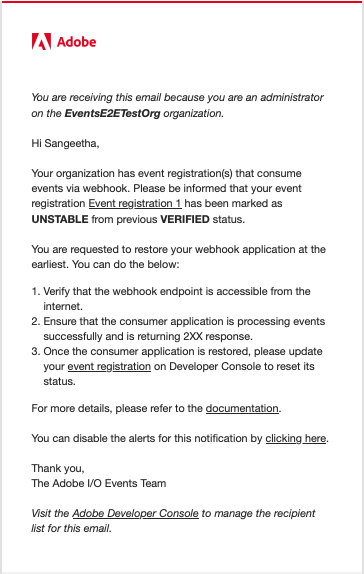
A similar email notification is sent when a registration is marked as Disabled.