Working with the Data Merge API
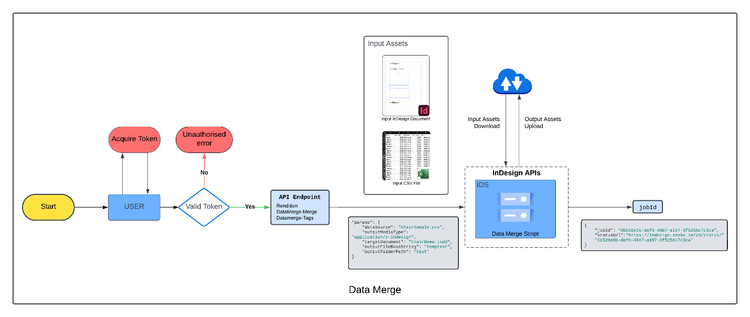
Data merge generates variations of a template document from data in a provided CSV file.
The Data Merge API supports UTF-16BE encoding for CSV files, which is necessary for languages or characters requiring multi-byte representation. For plain English characters, the CSV will function correctly even without this encoding.
The Data Merge API includes two components to complete the task: the data merge and the data merge tags.
Quickstart
The example below takes the data from Directory_Names.csv and creates different variations of dataMergeTemplate.indd. The output is a merged INDD file of all variations.
Merge data
This cURL command merges the data (from Directory_Names.csv into dataMergeTemplate.indd).
curl --location --request POST 'https://indesign.adobe.io/v3/merge-data' \
--header 'Authorization: Bearer {YOUR_OAUTH_TOKEN}' \
--header 'x-api-key: {YOUR_API_KEY}' \
--header 'Content-Type: application/json' \
--data-raw '{
  "assets": [
    {
      "source": {
        "url": "{PRE-SIGNED_URL}",
        "storageType": "Azure"
      },
      "destination": "dataMergeTemplate.indd"
    },
    {
      "source": {
        "url": "{PRE-SIGNED_URL}",
        "storageType": "Azure"
      },
      "destination": "Directory_Names.csv"
    }
  ],
  "params": {
    "targetDocument": "dataMergeTemplate.indd",
    "outputMediaType": "application/x-indesign",
    "outputFolderPath": {OUTPUT_FOLDER_PATH},
    "outputFileBaseString": "merged",
    "dataSource": "Directory_Names.csv",
    "hyphenationSettings": {
      "afterFirst": 3,
      "beforeLast": 3,
      "wordsLongerThan": 6,
      "ladderLimit": 2,
      "zone": 0.15,
      "capitalizedWords": false,
      "lastWord": true,
      "acrossColumns": false,
      "dictionarySettings": [
        {
          "language": "English: USA",
          "wordList": ["~word1", "ex~word2"]
        },
        {
          "language": "English: UK",
          "wordList": ["~word3", "~word4"]
        }
      ]
    }
  },
  "outputs": [
    {
      "destination": {
        "url": "{PUT-SIGNED_URL}"
      },
      "source": "{OUTPUT_FOLDER_PATH}/merged-1.pdf"
    }
  ]
}'
The raw data may include three parts:
- assets - Input assets for the request.
- params - Information about what to do with the input assets.
- outputs - Specify locations where the output assets are uploaded. Without an
outputsparameter, the output assets are stored in a temporary repository, and a pre-signed URL will be shared for those assets, which will be valid for 24hrs.
Consult this skeleton cURL request for more details.
Variable File Naming Support in Data Merge API
The Data Merge API supports variable file naming, allowing you to dynamically assign output file names using values from your input data.
How it works
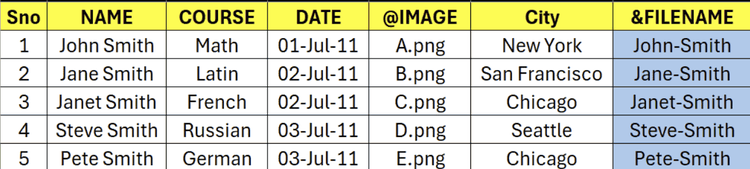
- Add a dedicated column in your input CSV for file names.
- Prefix the column header with & (for example: &FileName).
- Each row value in this column will be used as the output file name for that record.
Note: Only one variable file name column is allowed. If multiple columns have ‘&’ prefix the job will fail.
File Name Constraints
Certain special characters or words are not supported by the platform and are automatically normalized.
- Consecutive unsupported characters (e.g., <, >, :, ", /, , |, ?, *) are replaced with a single underscore (e.g.,
Ab5<>;d→Ab5_d) - Windows reserved names (e.g., CON, PRN, AUX, NUL as well as device names like COM1–COM9 and LPT1–LPT9) are wrapped with underscores (e.g.,
CON→_CON_) - File names (including extension) are limited to 255 characters, with longer names truncated automatically
Here is a sample CSV file demonstrating a column header with prefix ‘&’.
Example of input payload which is same as it is currently.
curl --location --request POST 'https://indesign.adobe.io/v3/merge-data' \
--header 'Authorization: Bearer {YOUR_OAUTH_TOKEN}' \
--header 'x-api-key: {YOUR_API_KEY}' \
--header 'Content-Type: application/json' \
--data-raw '{
  "assets": [
    {
      "source": {
        "url": "{PRE-SIGNED_URL}",
        "storageType": "Azure"
      },
      "destination": "dataMergeTemplate.indd"
    },
    {
      "source": {
        "url": "{PRE-SIGNED_URL}",
        "storageType": "Azure"
      },
      "destination": "FileNames.csv"
    }
  ],
  "params": {
    "targetDocument": "dataMergeTemplate.indd",
    "outputMediaType": "image/png",
    "outputFolderPath": {OUTPUT_FOLDER_PATH},
    "outputFileBaseString": "merged",
    "dataSource": "FileNames.csv",
    "recordRange": "All"
    "hyphenationSettings": {
      "afterFirst": 3,
      "beforeLast": 3,
      "wordsLongerThan": 6,
      "ladderLimit": 2,
      "zone": 0.15,
      "capitalizedWords": false,
      "lastWord": true,
      "acrossColumns": false,
      "dictionarySettings": [
        {
          "language": "English: USA",
          "wordList": ["~word1", "ex~word2"]
        },
        {
          "language": "English: UK",
          "wordList": ["~word3", "~word4"]
        }
      ]
    }
  },
  "outputs": [
    {
      "destination": {
        "url": "{PUT-SIGNED_URL}"
      },
      "source": "{OUTPUT_FOLDER_PATH}/{outputs}"
    }
  ]
}'
When file naming is NOT supported
Why: Variable file naming gives each data row a single output file name via the & column, so it only applies when the merge job has a clear one row–to–one name mapping. If allowMultipleRecordsPerPage is true, several records can share a page, so row-level names are ambiguous. If pagesPerDocument is not 1, records are merged into multi-page output documents (and for PDF and InDesign you typically get one file per range folder), so many rows contribute to the same file and per-row file names are no longer meaningful. In those situations, variable file naming is not available for the affected output types.
Multiline Records in Data Merge API
Multiline content can be included by enclosing field values in double quotes (""), and any line breaks within those values will be preserved during processing.
Here is a sample CSV file demonstrating multiline records compatible with the Data Merge API. Notice how line breaks within a field are preserved by enclosing the entire field value with double quotes:
Name,Address,Comments
Alice Smith,123 Main St,"First line of comment.
Second line of comment."
Bob Johnson,"456 Oak Ave
Suite 12
Riverside, CA","Single line comment."
Cara Lee,Newport,comment value
- Each field containing actual line breaks is wrapped in double quotes.
- The Data Merge API correctly interprets newlines within quoted fields as part of the field value.
- Unquoted field values (such as Bob Johnson's "Single line comment.") will be treated as single-line.
When uploading this CSV to the Data Merge API, the merged output will preserve all newlines in the relevant fields.
UTF-8 encoded CSV file support
The Data Merge API now supports CSV files encoded in UTF-8. This enables you to work with documents containing special characters such as emojis and international text, improving compatibility across different languages and symbols.
When preparing your CSV, ensure it is saved as UTF-8 (with or without BOM), especially if your data includes non-English or special characters.
Example UTF-8 CSV file
Below is a sample CSV file containing special (UTF-8) characters:
Name,Message,Emoji
Juan Pérez,"¡Bienvenido a la demostración!",😊
Chloé Dubois,"Bonjour de Paris!","🌍"
李华,"你好,世界","🌏"
Miyuki Satō,"東京へようこそ!","🗾"
- Fields like
Name,Message, orEmojimay contain accented Latin characters or emoji, which are represented correctly in UTF-8 encoding. - Save your file as UTF-8 in your text editor (for example, in VSCode: File > Save with Encoding > UTF-8).
When you upload this UTF-8 encoded CSV to the Data Merge API, the merged document will preserve these special characters and emojis in the output. Make sure applied font is available and have the required glyphs.
Output Path Variations in Data Merge API
When using the Data Merge API, the output file paths are determined by the outputFolderPath and outputFileBaseString parameters in the request. Here are the different scenarios and their corresponding output paths:
Case 1: Both Parameters Missing
When neither outputFolderPath nor outputFileBaseString is provided:
- Output is created in a temporary folder with a random number prefix (e.g. tmp0696)
- The output filename is derived from the original document filename
Example:
-
Source:
Template.indd -
Output:
tmp0696/range1/Template.indd -
In case of multiple output documents/pdf:
tmp0696/range1/Template.inddtmp0696/range2/Template.inddtmp0696/range1/Template.pdftmp0696/range2/Template.pdf
-
For PNG/JPEG outputs:
tmp0696/range1/Template.pngtmp0696/range1/Template2.pngtmp0696/range1/Template3.png
Case 2: Only outputFileBaseString Provided
When only outputFileBaseString is specified:
- Output is created in a temporary folder with a random number prefix (e.g. tmp0696)
- Filename uses the provided base string
Example:
-
Source:
Template.indd -
outputFileBaseString: "MergedOutput" -
Output:
tmp0696/range1/MergedOutput.indd -
In case of multiple output documents/pdf:
tmp0696/range1/MergedOutput.inddtmp0696/range2/MergedOutput.inddtmp0696/range1/MergedOutput.pdftmp0696/range2/MergedOutput.pdf
-
For PNG/JPEG outputs:
tmp0696/range1/MergedOutput.pngtmp0696/range1/MergedOutput2.pngtmp0696/range1/MergedOutput3.png
Case 3: Only outputFolderPath Provided
When only outputFolderPath is specified:
- Output is created in the specified folder
- Filename is derived from the original template
Example:
-
Source:
Template.indd -
outputFolderPath: "ResultFolder" -
Output:
ResultFolder/range1/Template.indd -
In case of multiple output documents/pdf:
ResultFolder/range1/Template.inddResultFolder/range2/Template.inddResultFolder/range1/Template.pdfResultFolder/range2/Template.pdf
-
For PNG/JPEG outputs:
ResultFolder/range1/Template.pngResultFolder/range1/Template2.pngResultFolder/range1/Template3.png
Case 4: Both Parameters Provided
When both parameters are specified:
- Output is created in the specified folder
- Filename uses the provided base string
Example:
-
Source:
Template.indd -
outputFileBaseString: "MergedOutput" -
outputFolderPath: "ResultFolder" -
Output:
ResultFolder/range1/MergedOutput.indd -
In case of multiple output documents/pdf:
ResultFolder/range1/MergedOutput.inddResultFolder/range2/MergedOutput.inddResultFolder/range1/MergedOutput.pdfResultFolder/range2/MergedOutput.pdf
-
For PNG/JPEG outputs:
ResultFolder/range1/MergedOutput.pngResultFolder/range1/MergedOutput2.pngResultFolder/range1/MergedOutput3.png
Note:
-
When generating multiple documents or different output formats (PNG/JPEG), a subfolder is created for each range, such as range1, range2, range3, etc., to maintain organized and unique filenames.
-
The rangeX subfolders (e.g. range1, range2, etc.) are created based on the
pagesPerDocumentvalue defined in the request. For example, ifpagesPerDocumentis set to 10 and the total number of records for the data merge is 20, then two folders—range1 and range2—will be generated. These will contain the output for record ranges 1–10 and 11–20, respectively. -
The number and type of output files within each rangeX folder depends on the selected
outputMediaType:- If
outputMediaTypeisapplication/x-indesign, orapplication/pdf, each rangeX folder will contain one InDesign document/pdf. - If
outputMediaTypeisimage/pngorimage/jpeg, each rangeX folder will contain multiple image files, corresponding to each record in that range (e.g., 10 images for 10 records).
- If
Retrieve data merge tags
This cURL command retrieves the data merge tags from the document.
curl --location --request POST 'https://indesign.adobe.io/v3/merge-data-tags' \
--header 'Authorization: Bearer {YOUR_OAUTH_TOKEN}' \
--header 'x-api-key: {YOUR_API_KEY}' \
--header 'Content-Type: application/json' \
--data-raw '{
  "assets": [
    {
      "source": {
        "url": "{PRE-SIGNED_URL}",
        "storageType": "Azure"
      },
      "destination": "dataMergeTemplate.indd"
    },
    {
      "source": {
        "url": "{PRE-SIGNED_URL}",
        "storageType": "Azure"
      },
      "destination": "batang.ttc"
    }
  ],
  "params": {
    "outputMediaType": "application/x-indesign",
    "targetDocument": "dataMergeTemplate.indd",
    "includePageItemIdentifiers": true
  }
}'