/v2/edit API Benchmarking
The tables below present benchmarking results for unified API workloads for asynchronous jobs completed via POST /v2/edit on the Photoshop APIs, for raster output at fixed image dimensions, broken out by JPEG quality and PNG compression in the request output options. Use them for capacity planning and rough expectations; they are not a performance SLA. Actual job time depends on which adjustments you apply, source imagery, I/O, and load.
For endpoint usage and adjustment parameters, see Edit Operations Migration.
data-variant=info
data-slots=header, text1
JPEG output (seconds)
The values correspond to JPEG input and JPEG output using the quality settings poor, medium, and photoshop_max. See Output Types Migration for all supported quality values and defaults.
JPEG chart
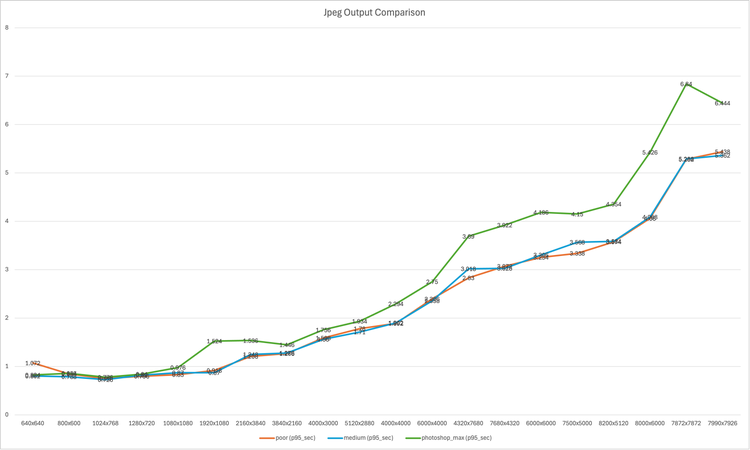
Chart series match the table columns below. Axis units are seconds.
poormediumphotoshop_maxPNG output (seconds)
The values correspond to PNG input and PNG output using the compression settings none, default, and maximum. See Output Types Migration for all supported compression values and defaults.
PNG chart
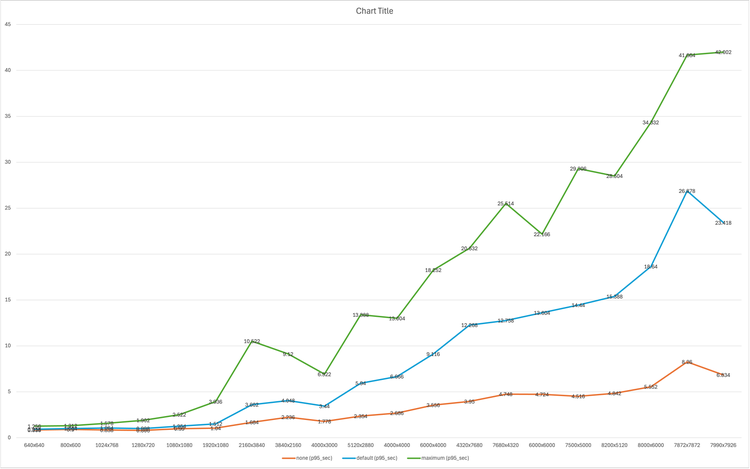
Chart series match the table columns below. Axis units are seconds.
nonedefaultmaximumN/A: The job timed out and the request could not be completed under the benchmark conditions for PNG maximum at that resolution. Note: Resolution 7500×5000 and higher will timeout.
Reading the numbers
PNG maximum compression increases encode time sharply at large resolutions compared to default. At the largest sizes, maximum may exceed job time limits for /v2/edit jobs (shown as N/A). For very large exports, prefer default or a lower compression level if you need reliable completion within typical job timeouts. For service limits, retries, and related behavior, see Technical Usage Notes.