[Admins only] Get credentials
data-variant=warning
data-slots=text
Access Adobe Developer Console
Navigate to the API and services section. Search for Workflow Builder API.
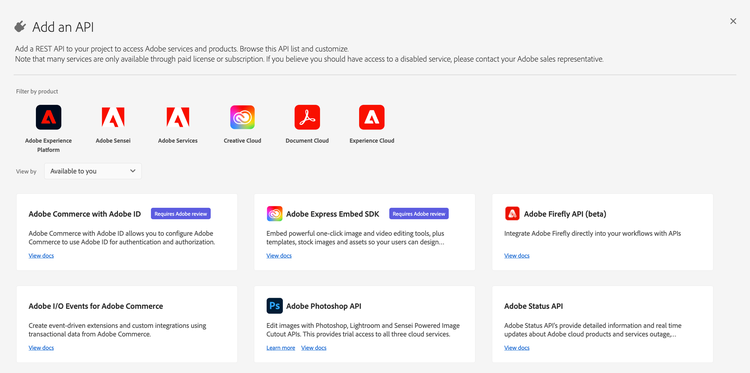
If you do not see the Workflow Builder API product card, wait a few minutes and try again. Contact your Adobe representative if the product still does not appear.
Create a new project
When you can see the Workflow Builder API product card, choose Create project.
- Register a project name so you can find the project later in Developer Console. You can change this name later.
- In the modal, choose Save configured API. On the next screen, you can see your client ID (API key).
- In the left navigation, open OAuth Server-to-Server and choose Retrieve client secret to get your client secret.
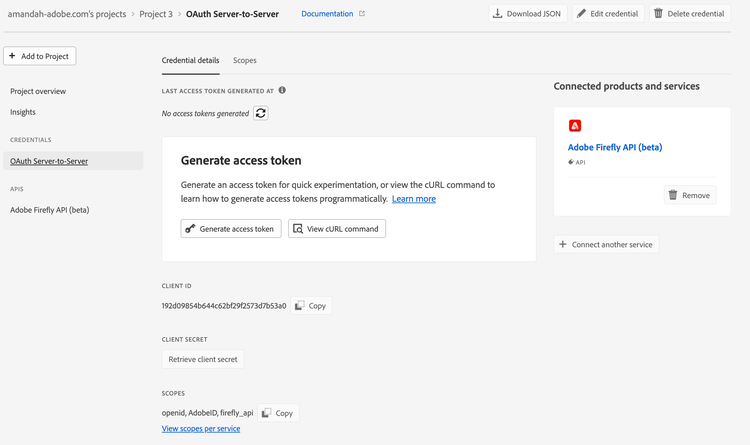
To call Workflow Builder API, developers need a valid client ID (API key) and an access token. Because organization admins are often the only people who can access these projects in the Console, relying on the Generate access token button on the credential overview page is not ideal for every team.
data-variant=warning
data-slots=text
After you configure your project in Developer Console:
- In the Generate access tokens block, select View cURL command.
- Copy the command and share it with developers in your organization. It should look similar to the following:
curl -X POST 'https://ims-na1.adobelogin.com/ims/token/v3' \
-H 'Content-Type: application/x-www-form-urlencoded' \
-d 'grant_type=client_credentials&client_id={client_id}&client_secret={client_secret}&scope=openid,AdobeID,session,additional_info,read_organizations,firefly_api,ff_apis'
Read more about generating access tokens in the Authentication guide. There you can also find steps for rotating your client secret programmatically.