Add a Command Entrypoint
Commands allow you to add a menu item directly to the Premiere user interface.
Overview
As we have seen in the Panels & Commands guide, commands can run any type of code, and even spin up a modal dialog UI if necessary.
They belong to their respective plugin in the Window > UXP Plugins menu.
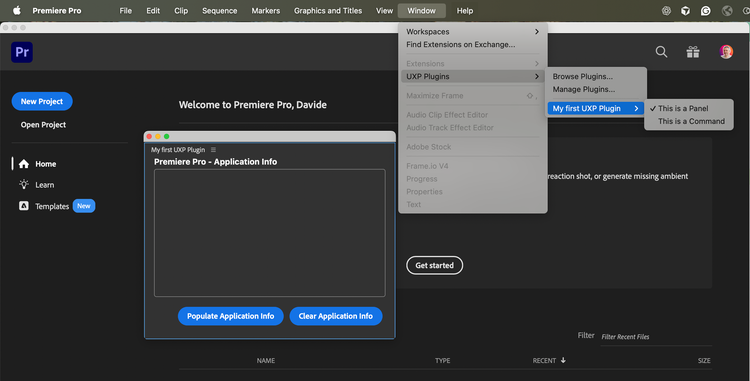
Adding a new command is a multi-step process.
1. Register a new Entrypoint
In your manifest.json file, add an Entrypoint of type "command".
{
  // ...
  "entrypoints": [
    {
      "type": "command",
      "id": "myCommand",
      "label": "This is a Command"
    }
  ]
}
data-slots=text1
label property, you can also use a LocalizedString to localize the command.2. Associate Entrypoint and Handler
In your index.js file, add a function to handle the command execution—i.e., when the user clicks on the command in the Premiere user interface.
// index.js
function myCommandHandler() { // The function name is not important.
  console.log("Command invoked!");
}
There are two ways to associate an Entrypoint and its Handler.
A. Use entrypoints.setup()
Complete index.js with the following code:
data-slots=heading, code
data-repeat=2
data-languages=JavaScript, JSON
index.js
const { entrypoints } = require("uxp");

function myCommandHandler() { console.log("Command invoked!"); }

entrypoints.setup({
  commands: {
    myCommand: myCommandHandler
  }
});
manifest.json
{
  // ...
  "entrypoints": [
    {
      "type": "command",
      "id": "myCommand",
      "label": "This is a Command"
    }
  ]
  // ...
}
As we have seen in the Entrypoints concept guide, the entrypoints.setup() method has a variety of functions—one of which is to associate an commands with their respective handlers. Note that myCommand is the ID of the command Entrypoint we registered in the manifest.
data-slots=text
data-variant=warning
entrypoints.setup() can be called only once; any subsequent calls will throw an error. If you need more entrypoints, add them all at once.B. Use module.exports
This method is especially useful for smaller plugins that only contain command entrypoints that don't rely on UIs, therefore don't need an HTML file.
If this is the case, set the main property to the path of your index.js file in your manifest.json; then, export an object with a commands property that maps the command IDs to their respective handlers in the index.js file.
data-slots=heading, code
data-repeat=2
data-languages=JavaScript, JSON
index.js
module.exports = {
  commands: {
    myCommand: myCommandHandler
  }
};
manifest.json
{
  // ...
  main: "index.js",
  // ...
  "entrypoints": [
   {
      "type": "command",
      "id": "myCommand",
      "label": "This is a Command"
    }
  ],
  // ...
}
Summary
Commands create menu items in the Window > UXP Plugins > <pluginName> menu that users can click to execute any code, with an optional modal dialog UI.
Key Steps:
-
Register the entrypoint: Add a
command-type entrypoint tomanifest.jsonwith anidandlabel. -
Create the handler: Write a JavaScript function to execute when the command is invoked.
-
Associate entrypoint and handler: Use either
entrypoints.setup(): Recommended for plugins with multiple entrypoint types.module.exports: Simpler approach for plugins with only commands.