sp-textarea
Since: UXP v4.1
Renders a text area with optional associated label.
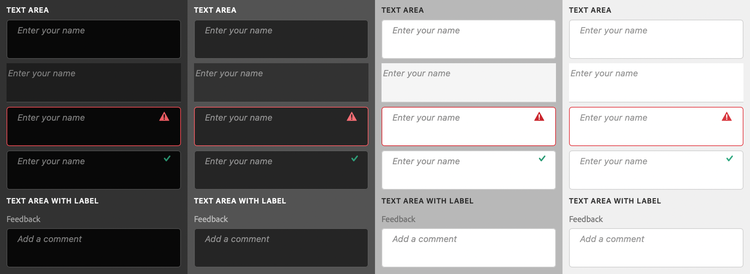
See:
- https://spectrum.adobe.com/page/text-area/
- https://opensource.adobe.com/spectrum-web-components/components/textarea
Example
<sp-textarea placeholder="Enter your name">
    <sp-label slot="label">Name</sp-label>
</sp-textarea>
Variants and states
There are several different variants for text areas.
Disabled
Indicates that the text area is disabled.
<sp-textarea disabled placeholder="Enter your name"></sp-textarea>
Valid
Indicates that the value of the text area is valid.
<sp-textarea valid placeholder="Enter your name"></sp-textarea>
Invalid
Indicates that the value of the text area is invalid.
<sp-textarea invalid placeholder="Enter your name"></sp-textarea>
Quiet
Styles the text area in a quieter, simpler appearance.
<sp-textarea quiet placeholder="Enter your name"></sp-textarea>
Responding to events
You can respond to changes on the text area using the change and input events.
document.querySelector(".yourTextArea").addEventListener("input", evt => {
    console.log(`New value: ${evt.target.value}`);
})