sp-textfield
Since: UXP v4.1
Renders a text field with optional associated label.
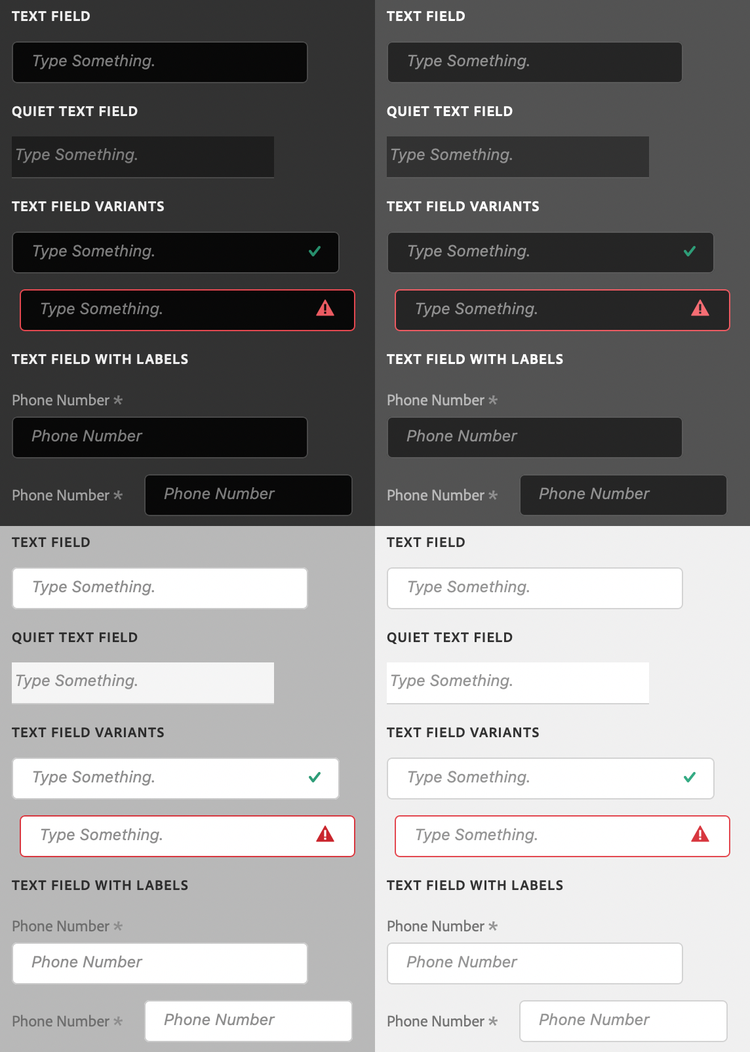
See:
- https://spectrum.adobe.com/page/text-field/
- https://opensource.adobe.com/spectrum-web-components/components/textfield
Example
<sp-textfield placeholder="Phone Number">
    <sp-label isrequired="true" slot="label">Phone Number</sp-label>
</sp-textfield>
Variants and states
There are several different variants for text fields.
Disabled
Indicates that the text field is disabled.
<sp-textfield disabled placeholder="Phone Number"><sp-textfield>
Valid
Indicates that the value of the text field is valid.
<sp-textfield valid placeholder="Phone Number"><sp-textfield>
Invalid
Indicates that the value of the text field is invalid.
<sp-textfield invalid placeholder="Phone Number"><sp-textfield>
Quiet
Styles the text field in a quieter, simpler appearance.
<sp-textfield quiet placeholder="Phone Number"><sp-textfield>
Numeric fields
Restricts the text field to numeric data. You cannot currently specify minimum, maximum, or steps. The numeric value must be between -214,748.36 and 214,748.36, or an error will be displayed and the value capped to the nearest acceptable value.
<sp-textfield type="number" placeholder="Age"><sp-textfield>
Search fields
Adds a search icon to indicate that the text will be used for searching.
<sp-textfield type="search" placeholder="Age"><sp-textfield>
Password fields
Styles the entered text in a way that it is not visible what is being typed.
<sp-textfield type="password" placeholder="Age"><sp-textfield>
data-variant=warning
data-slots=text
value cannot be read on macOS. This is a bug and will be fixed in the future. You can work around this by switching the type to text on focus, and then switching the type back to password on blur.Responding to events
You can respond to changes on the text area using the change and input events.
document.querySelector(".yourTextField").addEventListener("input", evt => {
    console.log(`New value: ${evt.target.value}`);
})