Asset Details
The Asset Details interface in AEM Assets Content Hub shows detailed information about the selected asset.
Extensions should use the unified aem/assets/contenthub/1 extension point to customize Asset Details. Asset Details capabilities are provided through the assetDetails namespace described below.
Custom panels
The extensibility feature allows adding new panels and corresponding icon buttons to the Asset Details side rail using the assetDetails namespace. Custom icons appear with the standard panel icons.
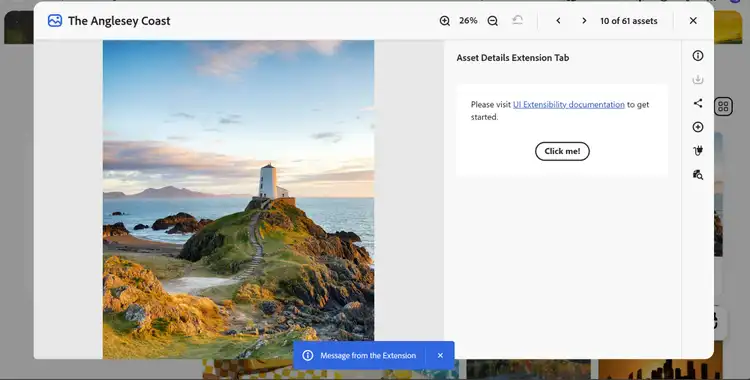
The host application fully manages UI interactions, including toggling the panel when a user selects its icon and updating the displayed panel when the current asset changes.
The host is also responsible for rendering the panel header.
The extension only declares the icon type, panel title, and URL for the custom panel content.
API Reference
This API reference is divided into two parts: the API provided by AEM Assets Content Hub to the extension and the API provided by the extension to AEM Assets Content Hub.
Host API Reference
In addition to the Common APIs provided by AEM Assets Content Hub to all extensions, the host application provides the following API specific to Asset Details.
assetDetails.getCurrentAsset()
Description: returns the ID of the asset currently displayed in Asset Details.
Returns (string): Current asset ID.
Example:
const assetId = await guestConnection.host.assetDetails.getCurrentAsset();
Extension API Reference
The extension definition object passed to the register() function defines the assetDetails namespace.
assetDetails namespace
The assetDetails namespace includes the following method:
getTabPanels()
assetDetails.getTabPanels()
Description: returns an array of custom panel descriptors that the extension wants to add to Asset Details.
Returns (array): An array of custom panel descriptors, or an empty array if no custom panels should be added.
Each array element is a custom panel descriptor with the following properties:
idstringtooltipstringtitlestringcontentUrlstringExample of adding a custom panel
These code snippets demonstrate how the AEM Assets Content Hub sample extension creates a custom panel using the UIX SDK and adds it to Asset Details. The examples focus on the relevant code and omit some imports and other non-essential details.
The main application defines default routes for the ExtensionRegistration component and an asset-details-extension-tab route for the PanelAssetDetailsExtensionTab component. AEM Assets Content Hub loads this route when the user selects the custom panel icon:
function App() {
  return (
    <Router>
      <ErrorBoundary onError={onError} FallbackComponent={fallbackComponent}>
        <Routes>
          <Route index element={<ExtensionRegistration />} />
          <Route exact path="index.html" element={<ExtensionRegistration />} />
          <Route
            path="asset-details-extension-tab"
            element={<PanelAssetDetailsExtensionTab />}
          />
        </Routes>
      </ErrorBoundary>
    </Router>
  );
}

export default App;
The ExtensionRegistration component initializes the extension by calling the register() function provided by @adobe/uix-guest. The object passed to register() declares the assetDetails namespace and its getTabPanels() method:
function ExtensionRegistration() {
  const init = async () => {
    await register({
      id: 'extension-id',
      methods: {
        assetDetails: {
          getTabPanels() {
            return [
              {
                id: 'asset-details-extension-tab',
                tooltip: 'Asset Details Extension Tab',
                icon: 'Extension',
                title: 'Asset Details Extension Tab',
                contentUrl: '/#asset-details-extension-tab'
              }
            ];
          }
        }
      }
    });
  };

  init().catch(console.error);

  return <Text>IFrame for integration with Host (Content Hub)...</Text>;
}

export default ExtensionRegistration;
The PanelAssetDetailsExtensionTab component renders the custom panel content. It uses the attach() function provided by @adobe/uix-guest to establish a connection with AEM Assets Content Hub. The component then uses this connection to display a toast message when the user selects the button:
export default function PanelAssetDetailsExtensionTab() {
  const [guestConnection, setGuestConnection] = useState();

  useEffect(() => {
    (async () => {
      const connection = await attach({id: 'extension-id'});
      setGuestConnection(connection);
    })();
  }, []);

  function displayToast(variant, message) {
    guestConnection.host.toast.display({variant, message});
  }

  return (
    <Provider theme={defaultTheme} height="100vh">
      <View backgroundColor="gray-50" padding="size-300">
        <Flex justifyContent="center" marginTop="size-400">
          <ButtonGroup>
            <Button
              variant="primary"
              onPress={() => displayToast('neutral', 'Message from the Extension')}
            >
              Click me!
            </Button>
          </ButtonGroup>
        </Flex>
      </View>
    </Provider>
  );
}
Panel content can also use assetDetails.getCurrentAsset() to retrieve the current asset ID:
const assetId = await guestConnection.host.assetDetails.getCurrentAsset();
See the complete registration component and custom panel component in the sample application.