Selection Bar
Selection Bar is the bar with actions that appears when one or more assets or collections in AEM Assets Content Hub are selected.
The Selection Bar API adds commands that operate on multiple selected resources. Content Hub displays these commands when the user selects assets or collections in a supported browsing surface.
In this example, a custom action is added to the Selection Bar after the built-in actions:
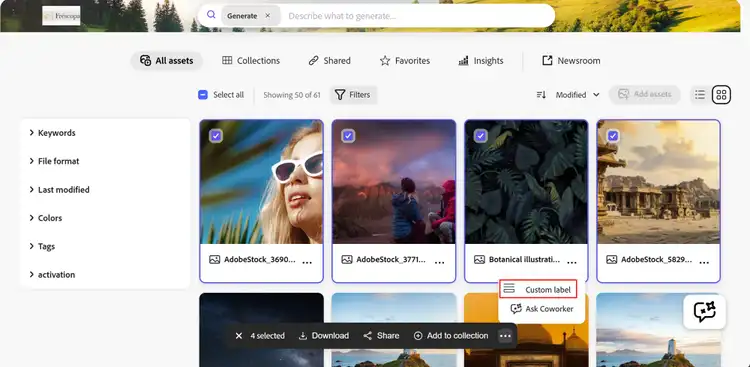
Register Selection Bar actions
Implement selectionBar.getActionButtons(actionContext) to return action buttons. The action context contains the current surface and selected resources:
{
  context: 'assets',
  resourceSelection: {
    resources: [{id: 'urn:aaid:aem:...'}]
  }
}
Implement selectionBar.onActionClick(buttonId, resourceIds) to handle a selected command. The array contains asset IDs when assets are selected and collection IDs when collections are selected.
const guestConnection = await register({
  id: 'extension-id',
  methods: {
    selectionBar: {
      getActionButtons({resourceSelection}) {
        if (resourceSelection.resources.length === 0) {
          return [];
        }

        return [
          {
            id: 'copy-urls',
            label: 'Copy URLs',
            icon: 'Link'
          }
        ];
      },
      async onActionClick(buttonId, resourceIds) {
        if (buttonId !== 'copy-urls') {
          return;
        }

        await guestConnection.host.modal.openDialog({
          title: 'Selected resources',
          contentUrl: `/#selected-resources?resourceIds=${encodeURIComponent(JSON.stringify(resourceIds))}`,
          type: 'modal',
          size: 'M'
        });
      }
    }
  }
});
Selection Bar buttons use the same id, label, and icon properties as card action buttons. Content Hub passes onActionClick() an array containing the IDs of the selected resources. Use actionContext.context in getActionButtons() to determine the current browsing surface and return actions appropriate for that resource type.
See the sample registration component and sample Selection Bar dialog for a complete implementation.