Create HTML elements
Define stable panel interfaces in HTML. Create elements with JavaScript when the structure depends on runtime data or when a command needs to construct a modal dialog dynamically.
data-src=../_shared/prerequisites.md
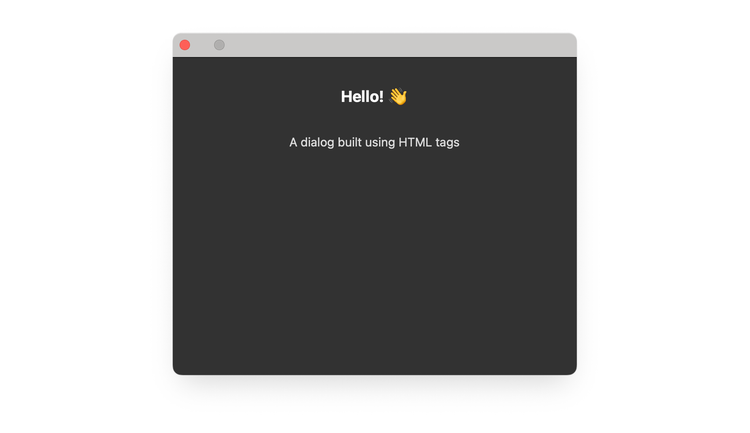
Define elements in HTML
Put persistent interface structure in index.html, apply presentation in a stylesheet, and use JavaScript only for behavior.
data-slots=heading, code
data-repeat=3
data-languages=HTML, JavaScript, CSS
index.html
<button id="showDialog">Show Dialog</button>

<dialog id="sampleDialog">
  <div>
    <h1>Hello!</h1>
    <p>A dialog built using HTML tags</p>
  </div>
</dialog>
index.js
const showDialogButton = document.getElementById("showDialog");
showDialogButton.addEventListener("click", async () => {
  const dialog = document.getElementById("sampleDialog");
  await dialog.uxpShowModal({
    title: "HTML dialog",
    resize: "none",
    size: { width: 400, height: 300 },
  });
});
styles.css
#sampleDialog > div {
  display: flex;
  flex-direction: column;
  height: 300px;
  width: 400px;
  align-items: center;
  color: #ddd;
}

h1 { color: #fff; }

#sampleDialog > div > p {
  margin-top: 30px;
}
Create elements with JavaScript
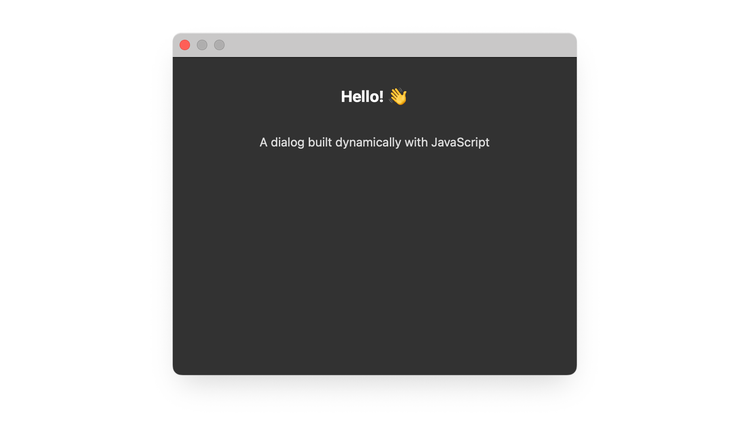
Use document.createElement() when the interface is generated at runtime. Append each child to its container, then add the completed dialog to the document before opening it.
data-slots=heading, code
data-repeat=2
data-languages=HTML, JavaScript
index.html
<!DOCTYPE html>
<html>
  <head>
    <script src="main.js"></script>
    <link rel="stylesheet" href="style.css" />
  </head>

  <body>
    <button id="showDialog">Show Dialog</button>
  </body>
</html>
index.js
const showDialogButton = document.getElementById("showDialog");
showDialogButton.addEventListener("click", async () => {
  // Create dialog element
  const dialog = document.createElement("dialog");


  // Create container
  const div = document.createElement("div");
  div.style.display = "flex";
  div.style.flexDirection = "column";
  div.style.height = "300px";
  div.style.width = "400px";
  div.style.alignItems = "center";
  div.style.color = "#ddd";

  // Create header
  const header = document.createElement("h1");
  header.textContent = "Hello!";
  header.style.color = "#fff";
  div.appendChild(header);

  // Create paragraph
  const para = document.createElement("p");
  para.textContent = "A dialog built dynamically with JavaScript";
  para.style.marginTop = "30px";
  div.appendChild(para);

  // Assemble and show
  dialog.appendChild(div);
  document.body.appendChild(dialog);
  await dialog.uxpShowModal({
    title: "JavaScript dialog",
    resize: "none",
    size: { width: 400, height: 300 },
  });
});
Create Spectrum components
You can use document.createElement() to create Spectrum UI elements dynamically:
// Create a Spectrum button
const button = document.createElement("sp-button");
button.textContent = "Click me";
button.setAttribute("variant", "cta");
document.body.appendChild(button);
data-variant=info
data-slots=text
document.createElement() works for Spectrum Widgets (sp-* elements). Define Spectrum Web Components in HTML markup instead.