Create an LGA customer
It is recommended that distributors follow a defined process for setting up an LGA customer account and placing an order.
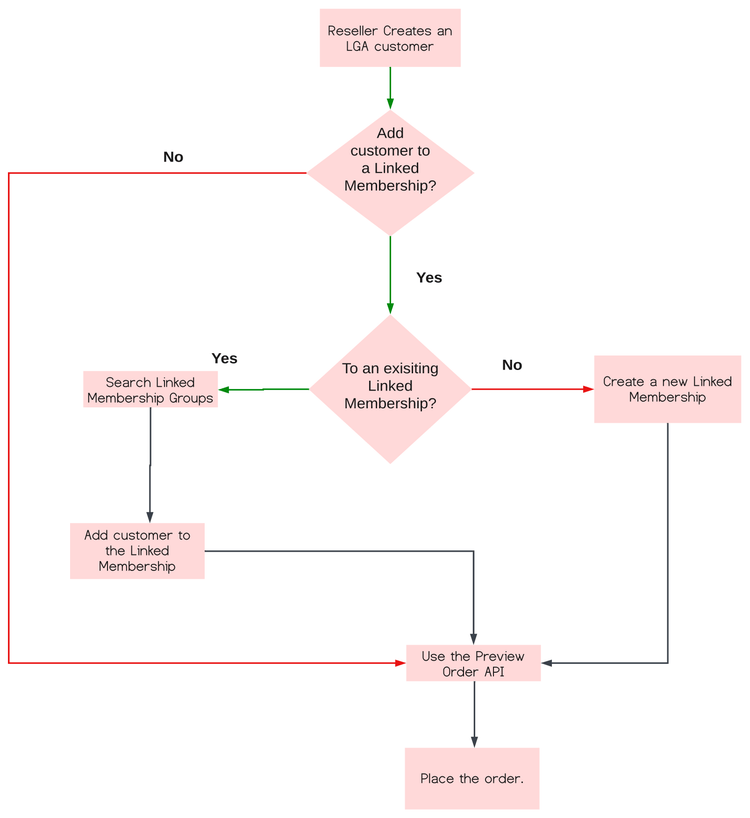
APIs to create and manage an LGA customer
You need to use the following APIs at various steps of the workflow to create an LGA customer:
-
Create an LGA customer:
- Create a customer: POST /v3/customers
- Verify customer details: GET /v3/customers/{customer-id}
-
Add LGA customers to a Linked Membership group. You can select one of these two options:
-
Option 1: Add LGA customer to an existing Linked Membership Group:
- Search Linked Membership Groups: GET /v3/linked_membership_groups
- Add to an existing group: POST /v3/customers/{customer_id}/linked_membership/enroll/{linked_membership_id}
-
Option 2: Create a Linked Membership for the LGA customer:
-
-
Place an order:
- Preview Order API: POST /v3/orders, with
orderTypeset toPreview - Create Order API: POST /v3/orders, with
orderTypeset toNEW
- Preview Order API: POST /v3/orders, with
The subsequent sections explain these APIs in detail.
1. Create an LGA customer
Use the POST /v3/customers API to create an LGA customer. Here are the specifics that differ from the standard Create Customer request:
- The
benefitsarray must include theLARGE_GOVERNMENT_AGENCYindicator for the LGA customer. - The
marketSegmentshould be set toGOVfor LGA customers. - The
marketSubSegmentsfield is mandatory for new LGA customer creation and should have one of the following values:FEDERALorSTATE. ThemarketSubSegmentsfield is not required for customers migrating from VIP to VIP Marketplace.
Request
{
  "resellerId": "5556667778",
  "externalReferenceId": "342",
  "companyProfile": {
    "companyName": "Fairmont",
    "preferredLanguage": "en-US",
    "marketSegment": "GOV",
    "marketSubSegments": ["FEDERAL"],  //  "FEDERAL" or "STATE"
    "address": {
      "country": "US",
      "region": "CA",
      "city": "San Jose",
      "addressLine1": "200 Fairmont Ave",
      "addressLine2": "Apt 123",
      "postalCode": "95110-1234",
      "phoneNumber": "800-123-4567"
    },
    "contacts": [
      {
        "firstName": "Donald",
        "lastName": "Duck",
        "email": "donald@duck.com",
        "phoneNumber": "408-123-4567"
      }
    ]
  },
  "benefits": [
    {
      "type": "LARGE_GOVERNMENT_AGENCY"
    }
  ]
}
Response
{
  "externalReferenceId": "342",
  "customerId": "9876543210",
  "resellerId": "5556667778",
  "globalSalesEnabled": false,
  "companyProfile": {
    "companyName": "Fairmont",
    "preferredLanguage": "en-US",
    "marketSegment": "GOV",
    "marketSubSegments": [
      "FEDERAL"
    ],
    "address": {
      "country": "US",
      "region": "CA",
      "city": "San Jose",
      "addressLine1": "200 Fairmont Ave",
      "addressLine2": "Apt 123",
      "postalCode": "95110-1234",
      "phoneNumber": "800-123-4567"
    },
    "contacts": [
      {
        "firstName": "Donald",
        "lastName": "Duck",
        "email": "donald@duck.com",
        "phoneNumber": "408-123-4567"
      }
    ]
  },
  "discounts": [
    {
      "offerType": "LICENSE",
      "level": "08"
    }
  ],
  "benefits": [
    {
      "type": "LARGE_GOVERNMENT_AGENCY",
      "status": "ACTIVE"
    }
  ],
  "cotermDate": "",
  "creationDate": "2019-05-02T22:49:52Z",
  "status": "1002",
  "links": {
    "self": {
      "uri": "/v3/customers/9876543210",
      "method": "GET",
      "headers": []
    }
  }
}
The following table provides descriptions for the response parameters:
LARGE_GOVERNMENT_AGENCY if the customer is an LGA customer.For more details, see Create Customer API and Customer Account parameters.
2. Get customer details
You can use the GET: /v3/customers/{customer-id} API to get the details of a customer and its LGA details.
Request Body
No change to the request body of the standard GET customer API request.
Response
{
  "externalReferenceId": "240715235148492799",
  "customerId": "1005512199",
  "resellerId": "1000250355",
  "status": "1000",
  "companyProfile": {
    "companyName": "Test organization for linked membership",
    "preferredLanguage": "en-US",
    "marketSegment": "GOV",
    "marketSubSegments": [
      "FEDERAL"
    ],
    "address": {
      "country": "US",
      "region": "CA",
      "city": "SAN JOSE",
      "addressLine1": "3453 Park Ave",
      "addressLine2": "3453 Park Ave",
      "postalCode": "95110",
      "phoneNumber": ""
    },
    "contacts": [
      {
        "firstName": "ABC",
        "lastName": "Corporation",
        "email": "email@domain.com",
        "phoneNumber": "28880-7323-8195"
      }
    ]
  },
  "discounts": [
    {
      "offerType": "LICENSE",
      "level": "01"
    }
  ],
  "cotermDate": "2025-07-16",
  "creationDate": "2024-07-15T23:51:49Z",
  "benefits": [
    {
      "type": "LARGE_GOVERNMENT_AGENCY",
      "status": "ACTIVE"
    }
  ],
  "globalSalesEnabled": false,
  "linkedMembership": {
    "id": "51001315",
    "name": "This is the LM Created for 1005513636",
    "type": "STANDARD",
    "linkedMembershipType": "OWNER",
    "creationDate": "2024-07-17T03:47:35",
    "country": "US",
    "benefitTypes": [
      "LARGE_GOVERNMENT_AGENCY"
    ],
},
  "links": {
    "self": {
      "uri": "/v3/customers/1005512199",
      "method": "GET",
      "headers": []
    }
  }
}
The following details are displayed in the response body of an LGA customer:
- The
benefitsarray showsLARGE_GOVERNMENT_AGENCYif the customer is an LGA. - The
linkedMembershiparray showsbenefitTypesandcountryfields.
For more details, refer to Get Customer Details API.
3. Search Linked Membership Groups
To use an existing Linked Membership for the LGA customer, use the GET /v3/linked_membership_groups API to search for Linked Membership Groups that match your criteria. You can refine the search using query parameters.
Usage instructions:
- The Search Linked Membership Groups API searches only for LGA Linked Memberships, and only LGA-enabled distributors can use this search API.
- You can use query parameters such as
countryandname.
Sample request with query parameters: GET <ENV>/v3/linked_membership_groups?country=US&name=SampleName
Query parameters
Request Header
See Headers Section
Request Body
None.
Response
[
  {

    "id": "31002062",
    "name": "Linked Membership Name",
    "type": "STANDARD",  // “STANDARD” or “CONSORTIUM”
    "creationDate": "2024-05-31T10:35:01",
    "marketSegment": "GOV",
    "country": "US",
    "membersCount": 5,
    "benefitTypes": [
      "LARGE_GOVERNMENT_AGENCY"
    ],
    "discounts": [
      {
        "offerType": "LICENSE",
        "level": "06"
      }
    ]
  }

]
LinkedMembership resource
Discounts resource in linkedMembership
HTTP status codes
- 2xx – Success
- 4xx – Error in client’s request
- 5xx – Error in Adobe servers
4. Add an LGA customer to an existing Linked Membership without needing an authorization code
The enroll customer API allows partners and distributors to use the distributor's auth token and add LGA customers to an existing Linked membership without needing an authorization code.
Note: The LGA customer being added to the Linked Membership must be from the same country as the Linked Membership.
Request URL: POST <ENV>/v3/customers/{customer_id}/linked_membership/enroll/{linked_membership_id}
Request Header
See API Headers.
Request Body
None.
Response
{
"message" : "Customer Successfully enrolled in the Linked Membership"
}
HTTP status codes
- 2xx – Success
- 4xx – Error in client’s request
- 5xx – Error in Adobe servers
5. Create a new Linked Membership for LGA customers
Use the Update Customer Details API (PATCH : /v3/customers/{customer-id}) to create a new Linked Membership and to add the LGA customer to it.
Notes:
- If the customer is LGA, the Linked Membership created through UpdateCustomer API, will be of type LGA.
- The country, market segment, and discount levels of the Linked Membership will be picked from the customer.
Request Body
{
  "linkedMembership": {
    "type": "STANDARD",
    "name": "This is the LM Created for 1005516130"
  },
  "companyProfile": {
    "companyName": "Test Customer 33a0e0bc-e38f-4b65-a5a2-8ccad6ea0e8",
    "preferredLanguage": "en-US",
    "marketSegment": "GOV",
    "marketSubSegments": [
      "FEDERAL"
    ],
    "address": {
      "country": "US",
      "region": "CA",
      "city": "San Jose",
      "addressLine1": "345 Park Ave",
      "addressLine2": "",
      "postalCode": "95110",
      "phoneNumber": ""
    },
    "contacts": [
      {
        "firstName": "David",
        "lastName": "John",
        "email": "dave.j+LM-3YC-23@adobetest.com"
      }
    ]
  }
}
Response
Same response as that of Get Customer Details API.