Mid-term upgrades
The Mid-Term Upgrade capability in VIP Marketplace enables a partner to upgrade a customer's product subscription to a higher-tier product, like from Teams to Enterprise, at any point during their current term. This means a customer no longer has to wait until the renewal cycle to make changes.
Advantages of mid-term upgrade
- Customer flexibility: Customers can access advanced features and higher-value products when needed, without waiting for the end of their subscription term.
- Revenue acceleration: Partners can capture upsell opportunities immediately, which improves annual recurring revenue and reduces deferred income.
- Pricing transparency: Provides prorated pricing, corrected discount levels, and refund estimates.
Upgrade path
Customers can choose from a set of pre-defined upgrade paths for their product subscriptions at any point during their current term. A few examples:
- Acrobat Pro Teams to Acrobat Studio Teams
- Acrobat Studio Teams to Acrobat Studio Enterprise
You can use the GET Offer Switch Paths API to retrieve the upgrade paths that are available. Upgrade paths include a switchType indicator that defines whether the upgrade must be full or can be partial:
-
Full switch
The entire quantity of the original subscription needs to be upgraded to the new product.Example: All 100 seats of Acrobat Standard Teams need to be switched to Acrobat Standard Enterprise. The upgrade path will be marked as FULL_ONLY.
-
Partial switch
You can either switch the entire quantity or a certain number of the original subscription quantity.Example: Out of 100 seats, only 40 are switched to Acrobat Standard Enterprise, and the remaining 60 stay on the original product. If the upgrade path is marked
PARTIAL_ALLOWED, the partner can perform either a partial or full upgrade.
Note:
- After a full switch, only the new product renews. After a partial switch, both products renew. The subscription's anniversary date remains unchanged.
- If the partner has not explicitly set a specific renewal quantity, Adobe automatically sets the renewal quantity of the original subscription to its current value during any full or partial upgrade. This behavior ensures that partners do not need to manually update the renewal quantity after completing an upgrade transaction.
Reassigning users
During a mid-term upgrade from one Teams subscription to another, partners can automatically reassign users from the original subscription to the upgraded product. To enable this feature, include the query parameter reassign-users=true when submitting the switch order request.
User reassignment follows a Last-In-First-Out (LIFO) strategy, meaning the most recently assigned users are reassigned first.
Note: Automatic user reassignment is not supported for upgrades from Teams to Enterprise or between Enterprise subscriptions.
Limitations
The following limitations are present in this release:
- Complex upgrades excluded: Combining multiple single apps into All Apps is not supported due to complexity in license mapping and pricing.
- Partial upgrade restrictions: Certain partial upgrades may be limited based on product eligibility or financial viability. Subscriptions tagged as high-growth offers or specific global customer products are excluded from switch eligibility.
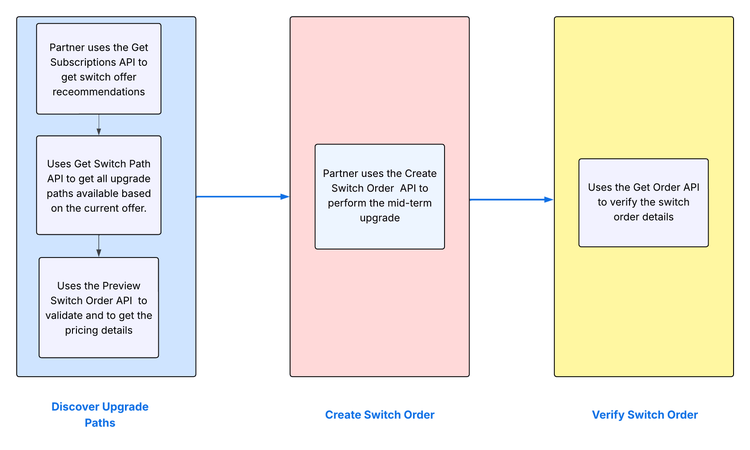
Mid-term upgrade process
The following figure illustrates the upgrade process:
For more information: