Manage Recommendations
Adobe's APIs enable VIP Marketplace partners to deliver intelligent, personalized, and in-context product recommendations, enhancing customer experience through upsell, cross-sell, and add-on opportunities. This boosts customer satisfaction and retention, benefiting resellers and Adobe with growth and increased customer engagement and conversion.
Adobe's recommendations are context-aware, tailored to the products the customer has or intends to purchase. For instance, new customers receive different suggestions compared to existing ones. These recommendations are presented at various phases of the user journey: discover, buy, use, and renew. Sample recommendations include:
- CC All Apps Pro for CC All Apps customers
- Acrobat Pro for Acrobat Standard customers
- Creative Cloud Enterprise Edition 4 for Creative Cloud Enterprise customers
- Adobe Express for non-Adobe Express customers
- Acrobat AI Assistant to Acrobat Pro customers
These recommendations provide details of products available to the customer for upsell, cross-sell, and add-on opportunities.
Adobe Instant Deal Registration recommendations
The Fetch Recommendations API can include Adobe Instant Deal Registration opportunities in discounts.dealRegistrations when includeDealRegistrations is true. The default is false. Opportunities associated with products already owned by the customer are returned first.
This discovery response does not apply the deal registration amount and does not expose a code or ID. Adobe re-evaluates eligibility when the order is processed.
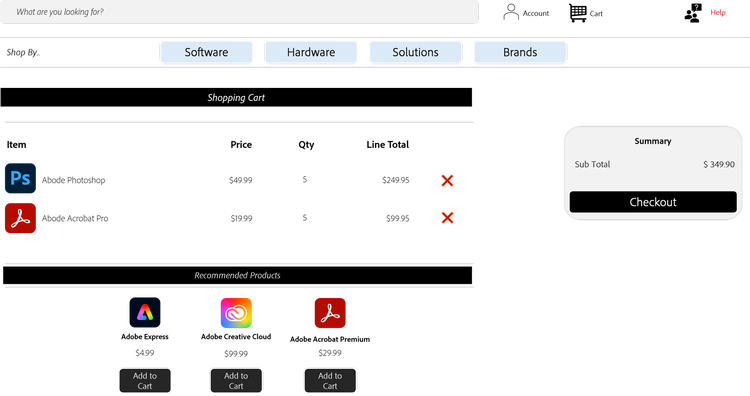
In the VIP Marketplace, users can be either 'resellers' or 'end customers', depending on the partner's business strategy and marketplace design. A reseller places orders against the customer's business account, whereas the customer navigates the partner marketplace to find products to order against their business account.
Regardless of the user type, the journey remains the same, as the Fetch Recommendations API focuses on customer-centric recommendations. For example, a partner can use the Preview Order API to list the recommendations, as illustrated in the following example:
Recommendation Ranking and Ordering
The Fetch Recommendations API returns a ranked list of product recommendations tailored to an individual customer. Each recommendation includes both a category and a rank, which together define how partners should interpret and present the results.
Recommendation categories
Recommendations are grouped into the following categories:
-
Upsell Recommends a higher-tier version of a product the customer already owns.
-
Cross-sell
Recommends complementary products that extend the value of the customer’s existing products. -
Add-on
Recommends additional products or services that enhance the current product experience.
These categories are designed to reflect the type of opportunity.
Ranking within categories
Within each category, multiple recommendations may be offered and are further prioritized using a ranking attribute to help partners identify the order of relevance.
For a customer with Acrobat Standard, the API may return:
In the example above:
- Acrobat Pro is the highest-priority upsell recommendation.
- Acrobat Studio is a secondary upsell option.
- AIA is the top (and only) add-on recommendation.
Dynamic nature of recommendations
Recommendations are generated dynamically at runtime based on:
- Customer entitlements
- Market and regional factors
- Product availability
- Recommendation engine logic
As a result:
- Partners should invoke the Fetch Recommendations API in real time for each customer interaction.
- Partners should not cache or hardcode SKU mappings.
- The set of recommendations and their ranking may change over time.
Best practices
- Always fetch recommendations per customer session or transaction.
- Display recommendations grouped by category and ordered by rank.
- Design UI components to handle variable list lengths.
- Avoid building logic that depends on fixed product relationships or static hierarchies.
Propensity Intelligence
In addition to product recommendations, the Fetch Recommendations API provides propensity intelligence for each customer. Propensity data is generated by Adobe's internal data intelligence team using behavioral and risk signals. Partners receive actionable insights without exposure to the underlying scoring logic.
Propensity types
The API currently supports the following two propensity types:
predictedAddonSize parameter that indicates the expected number of additional seats.Both propensity types appear under the propensity object of the Fetch Recommendations API.
Probability ratings
Each propensity type includes a probability field with one of the following three values:
Reason codes
Each propensity object includes a reasons array containing up to seven leading indicators that explain why the customer received the given rating, ordered by relevance. Each reason has the following attributes:
reasonCodecontract_num_months_to_renew.descriptionvalue"11" for months remaining.The reasons array may contain fewer than seven entries, or be empty. The array is always present when the propensity object is populated.
Refresh date
Each propensity object includes a refreshDate field in UTC ISO-8601 format that indicates when the customer was last scored by the underlying model. Refresh frequency varies by model type:
churndata is typically refreshed monthlyseatExpansiondata is typically refreshed weekly
Note: Refreshes may occasionally occur earlier than expected due to model updates or data corrections. This is expected and does not indicate an error.
Availability and error handling
Propensity data availability depends on the upstream scoring pipeline and feature flag state:
- Data unavailable: If no record for the customer, the node is returned as an empty object
{}. Both nodes are independent, which means one can be populated while the other is empty. - Data available: The full propensity object is returned with
probability,refreshDate, andreasons.
In all cases, productRecommendations and overlayRecommendations remain unaffected by propensity data availability.
Important: An empty propensity object
{}indicates that data is not available. Partners should not interpret it as LOW risk or LOW expansion potential.
Propensity best practices
- Use
churn.probability: HIGHto trigger proactive retention workflows such as early renewal outreach or customer success engagement. - Use
seatExpansion.probability: HIGHalong withpredictedAddonSizeto prioritize expansion conversations with appropriate sizing context. - The
reasonsarray provides transparency into what signals drive the rating. Reason codes indicate the primary drivers of the signal. However, a customer with a high churn risk may still have reason codes that appear healthy because some predictive factors are not exposed. This behavior is expected and is not a cause for concern.
Overlay recommendations
Adobe agents frequently engage directly with customers during overlay interactions to understand their needs and assess purchase intent. When an agent identifies a clear intent to purchase, an opportunity is generated on behalf of the customer and persisted within a Recommendation object. This opportunity is surfaced to the customer's assigned partner through the Fetch Recommendations API.
Overlay recommendations bridge the coordination gap between Adobe and partners by providing timely, actionable visibility into customer purchase intent. With this information, partners can proactively engage the customer, continue the conversation, and efficiently complete order placement.
How overlay recommendations differ from product recommendations?
productRecommendations with upsells, crossSells, addOnsoverlayRecommendations with new and renew opportunity arraysBoth types are returned together in the Fetch Recommendations response, allowing partners to discover product recommendations and purchase-intent opportunities in a single API call.
Read more about how to manage recommendations using APIs.
Partner integration process to provide recommendations
Below is a high-level overview of the partner integration model for providing non-overlay recommendations:
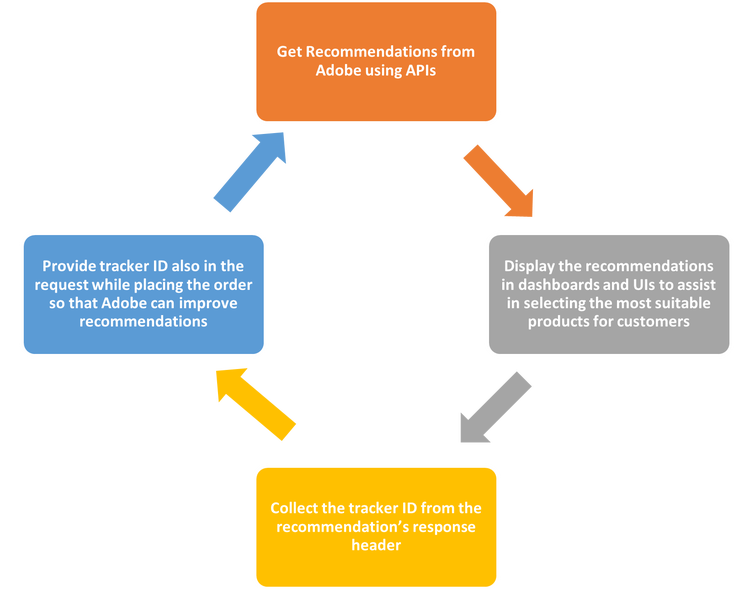
Note: Sending the tracker ID received with the recommendations back to Adobe helps Adobe gain insights into the effectiveness of the recommendations and improve future suggestions.
Sample Recommendations Use Case
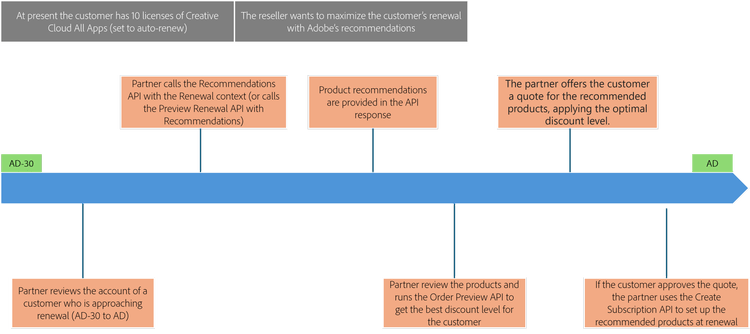
The following use case demonstrates how to obtain recommendations for a customer who is 30 days from the Anniversary Date (AD).
Scenario
- Customer is in the AD-30 interval
- Partner is ready to quote the reseller or customer and wants to explore recommended additional products.
- Autorenewal is enabled.
The following figure illustrates how recommendations are fetched to assist customers in selecting the best products that meet their needs: