View 3YC benefits status
To view the status of three-year benefits, navigate to benefits -> THREE_YEAR_COMMIT -> commitmentRequest section in the customer’s detailed view.
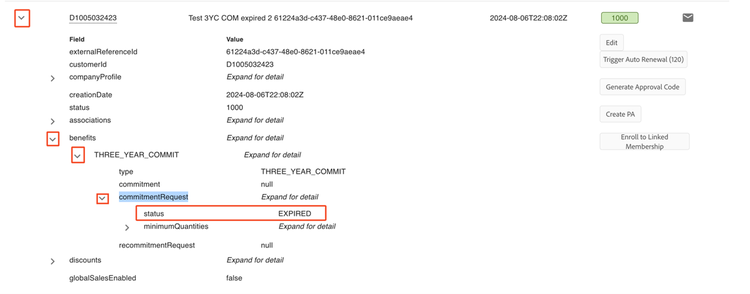
The 3YC status can have the following values:
Note: Customers with 3YC benefits in the status of INACTIVE, DECLINED, NONCOMPLIANT, or EXPIRED are considered to not have 3YC benefits.
3YC workflow differences between sandbox and production
There are some differences between the 3YC workflow in sandbox and production:
-
Emails: In production, the customer admin receives emails throughout the 3-year commit lifecycle (request, acceptance, termination). These emails are not sent in the sandbox environment.
-
Expiration: In production, unaccepted (REQUESTED) 3YC requests expire after 7 days, and accepted 3YC requests also expire after 7 days if they do not move to COMMITTED status. In sandbox, 3YC requests will not expire in either scenario.
-
Order returns and subscription updates are not included in sandbox:
- Returning an order is normally rejected if the return would drop the customer below committed quantities.
- Reducing subscription renewal quantity (or disabling autorenewal) is normally rejected if the eventual renewal order would drop the customer below committed quantities.