Manage deployments
For global customers to purchase offers outside their home country, they must create and use deployment resources. This topic will help you to:
Create a deployment
You can create deployments using the Commerce Partner API Postman Collection. Select the Deployment Management folder and select the POST Create Deployment request.
For more details on the API, refer to External API documentation.
Update a deployment
Follow these steps to edit a deployment in the Sandbox Portal:
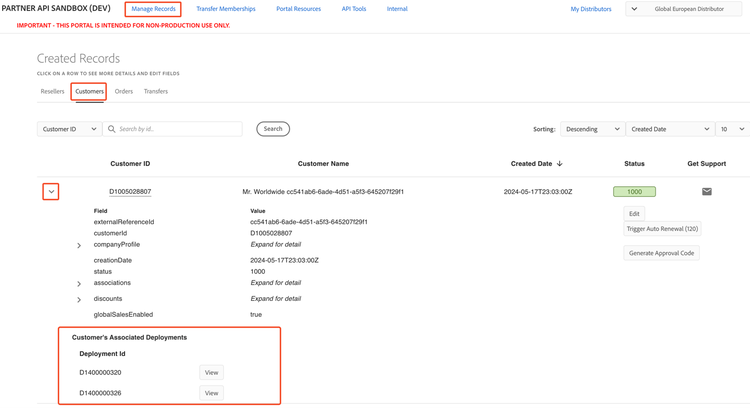
- Navigate to Manage Records > Customers
- Expand the desired Global Sales enabled customer’s details.
- Go to the Customer’s Associated Deployments section.
- Select the View button next to the customer’s
deploymentIdthat needs to be updated - Modify the fields. All fields that are not greyed out are editable.
- Select Save to save the changes.
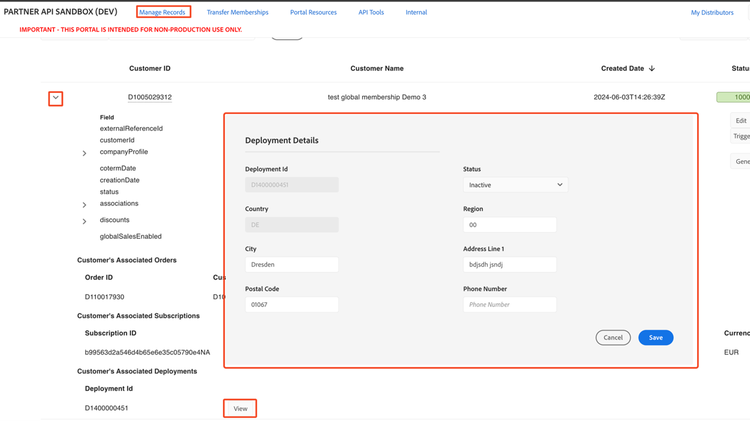
Note: Once the deployment’s country is set, it cannot be changed.
Deactivate a deployment
A deployment can be deactivated through the Sandbox Portal or through an API call.
- To deactivate through the Sandbox Portal, follow the steps provided in the section ‘Updating a Deployment’ and update the status field to ‘1004’.
- To deactivate through an API call, refer to deactivate a deployment.
View deployments
To view the deployments for a customer:
- Navigate to Manage Records > Customers.
- Expand the customer. All the deployments associated with the customer are displayed.