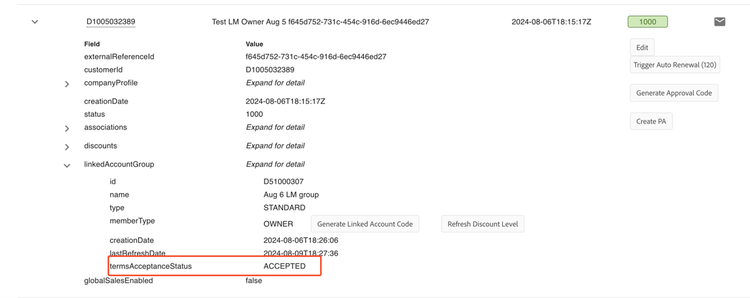
View linked membership details
Navigate to Manage Records > Customers-> Search by the customer ID and expand the view by clicking the down arrowhead. Further, expand the down arrowhead adjacent to ‘linkedAccountGroup’ to view the associated linked membership details.
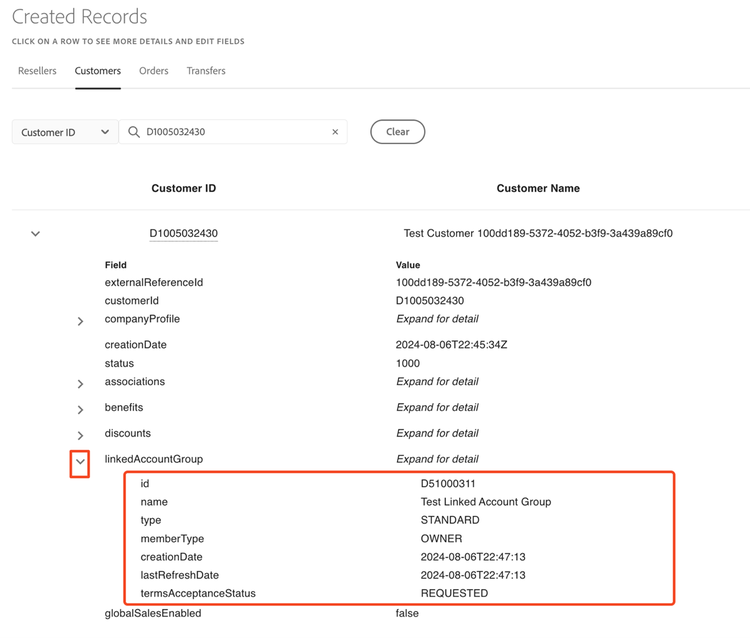
Please find a description of the fields below:
-
id: the linked account group ID.
-
name: Name of the associated linked account group.
-
type:
STANDARDorCONSORTIUM. -
memberType: Indicates if the customer is an OWNER or MEMBER in the linked account group.
-
creationDate: The creation date of the linked account group.
-
lastRefreshDate: The last refresh timestamp of the linked group discount level, if not refreshed is the same as
creationDate. -
termsAcceptanceStatus: This field is displayed only for linked owners and indicates whether the customer has accepted the linked account terms and conditions. This field can have below status:
REQUESTED: The linked owner is yet to accept or reject the linked account terms.ACCEPTED: The linked owner has accepted the terms.REJECTED: The linked owner has rejected the terms.
Linked Membership Terms (Portal only)
Before a linked owner can accept other members into the linked membership, he must accept the terms and conditions. To perform this action, follow the below steps:
- Go to the customer’s tab and expand the desired linked membership owner’s details.
- Select Linked Membership Terms
- Accept or reject the terms.
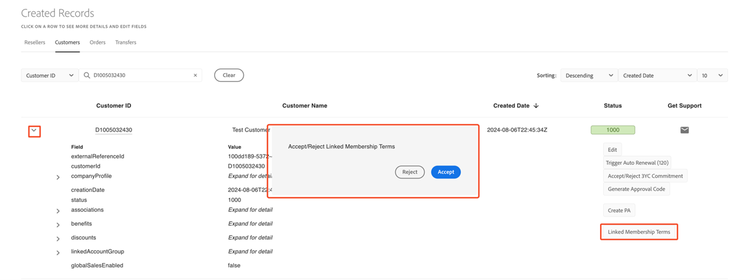
Note: Linked membership terms cannot be updated once it is set. Once the linked membership owner accepts the terms, the following actions can be performed:
- Generate approval
- Refresh discount levels
You can view the Linked Membership terms acceptance status from the termsAcceptanceStatus field available under linkedAccountGroup in the detailed customer view.