Webhooks OAuth 2.0 User Guide
Last update: Aug 10, 2025.
data-slots=text
Prerequisites
To use Webhook OAuth 2.0, you need to enable the account-level setting WEBHOOK_OAUTH20_ROLLOUT. Please contact Adobe customer support to activate this setting.
Set up Webhooks OAuth 2.0
1. Create a customer application.
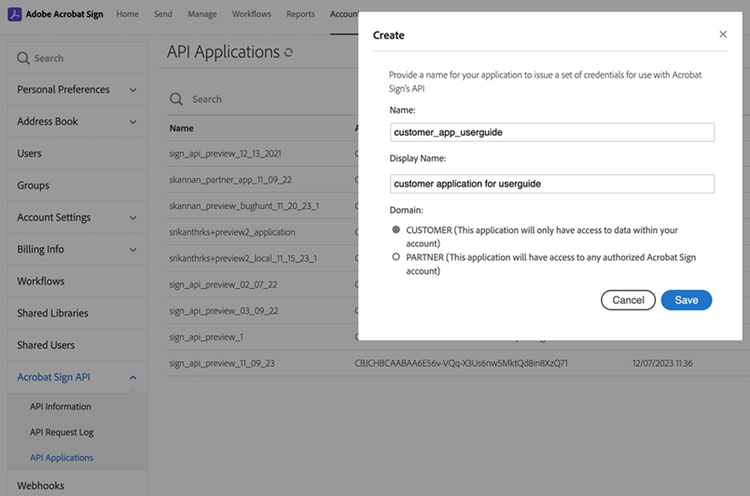
2. Enable the following scopes for the application:
- webhook_read
- webhook_write
- webhook_retention

3. Follow these steps to generate access_token to authorize requests for a Acrobat Sign API endpoint.
4. To create a WebhookEndpoint, send a POST request to the /api/rest/v6/accounts/{accountId}/webhookEndpoints with the following JSON body:
webhookEndpoints_POST_curl
curl --location 'https://api.na1.adobesignpreview.com/api/rest/v6/accounts/CBJCHBCAABAAHVF2SeYL6q68j8ttKbJ7stmVG59DtWJT/webhookEndpoints' \
--header 'Content-Type: application/json' \
--header 'Authorization: Bearer 3AAABLKmtbUBUicE9oSp05' \
--data '{
    "name" : "preview_na1_12_19_2023_1",
    "description": "preview_na_12_19_2023_1_description",
    "webhookEndpointUrl": "https://*.domain.subdomain.com/somePath?someQueryParam=*",
    "applicationIds": ["CBJCHBCAABAAhdTfTbSnTtEqZf_cLHgqnXwNqqucWvWa"],
    "oAuth20": {
      "authorizationServerUrl": "https://your.authorization-server.url",
      "clientId": "auth-server-client-id",
      "clientSecret": "auth-server-client-secret",
      "scope": "optional-scope-for-auth-server",
      "customHeaders": [
        {
          "headerName": "header1",
          "headerValue": "value1",
        }
      ]
    }
}'
data-slots=text
access_token: It is the only mandatory field.refresh_token: It is an optional field.token_type: Bearer token type is supported.expires_in: It is measured in seconds.{ "access_token":"HereIsYourSuperSecretAccessToken", "refresh_token":"HereIsYourSuperSecretRefreshToken", "token_type":"Bearer", "expires_in":3600 }
webhookEndpoints_POST
POST /api/rest/v6/accounts/{accountId}/webhookEndpoints HTTP/1.1
Host: api.na1.echosign.com
Authorization: Bearer 3AAABLKmtbUBUicE9oSp05
Content-Type: application/json

{
    "name" : "preview_na1_12_19_2023_1",
    "description": "preview_na_12_19_2023_1_description",
    "webhookEndpointUrl": "https://*.domain.subdomain.com/somePath?someQueryParam=*",
    "applicationIds": ["CBJCHBCAABAAhdTfTbSnTtEqZf_cLHgqnXwNqqucWvWa"],
    "oAuth20": {
      "authorizationServerUrl": "https://your.authorization-server.url",
      "clientId": "auth-server-client-id",
      "clientSecret": "auth-server-client-secret",
      "scope": "optional-scope-for-auth-server",
      "customHeaders": [
        {
          "headerName": "header1",
          "headerValue": "value1",
        }
      ]
    }
}
data-slots=text
5. Replace the value for the following attributes with the correct values:
6. To associate the webhookEndpointUrl details for a new webhook, send a POST request to /api/rest/v6/webhooks with the following JSON body:
data-slots=text
POST /api/rest/v6/webhooks HTTP/1.1
Host: api.na1.echosign.com
Authorization: 3AAABLKmtbUBUicE9oSp05 /* gitleaks:allow */
Content-Type: application/json

{
    "name": "preview_na1_webhook_12_19_2023_1",
    "scope": "USER",
    "state": "ACTIVE",
    "webhookSubscriptionEvents": [
        "AGREEMENT_ACTION_COMPLETED"
    ],
    "webhookEndpointInfo": {
        "webhookEndpointId": "e6a238bc-1c67-463c-992c-9edc9ba637a7",
        "domainPrefix": "callback-prod",
        "urlSuffix": "agreement_12_19_2023_1"
    }
}
Replace the value for the following attributes with the correct values:
You will get the following response containing the id of the webhook created:
{
    "id": "fe4880d0-4e16-4964-b5ab-07b06d30a430"
}
7. Once the webhook is configured with OAuth 2.0 (webhookEndpointId), all future webhook notifications (associated with respective scope) will include the access_token provided by the authorization server, as shown below.
data-slots=text
webhookEndpointUrl details
For webhookEndpointUrl, you can provide a leading and a trailing wildcard that would be replaced with respective values (domainPrefix and urlSuffix) when the webhook(s) are created by providing the webhookEndpointId, in addition to that.
Example webhookEndpointUrl: https: //yourDomain.com/webhook?agreementID=
You can link this webhookEndpointUrl to any new webhooks you create by using the id from the response in webhookEndpointInfo. Include domainPrefix and urlSuffix if you’re using wildcards. After associating the webhookEndpoint resource using the webhookEndpointId, with domainPrefix as “dev-01” and urlSuffix as “agreement123,” the resulting webhookUrl for /api/rest/v6/webhooks will be as follows: https: //dev-01.yourDomain.com/webhook?agreementId=agreement123
You will get the following response containing the id:
{
    "id": "e6a238bc-1c67-463c-992c-9edc9ba637a7"
}
The returned id is used to uniquely identify the webhookEndpoint.
© Copyright 2022, Adobe Inc.. Last update: Aug 10, 2025.
