Sign Gov and Commercial Comparison
Last update: Aug 04, 2023.
The Acrobat Sign commercial and Sign Gov instances differ in some key ways as described below.
Differences between Acrobat Sign Gov and Commercial
> API Applications.https://secure.na1.adobesign.usx-api-userx-api-userx-api-user is unsupported. See Impersonation.x-api-user header to impersonate users by their userId or email.login_hint query parameter is optional.login_hint query parameter is required.Impersonation setup
Unlike Acrobat Sign’s commercial instance, Sign Gov does not support:
- Fine grained (scope-level) impersonation.
- Impersonating users by passing the user ID or email of the user in the
x-api-userHTTP Header value as part of the REST API call.
Instead, in the Sign Gov environment:
- Impersonation applies to all the application scopes.
x-api-useris unsupported, and impersonation involves generating OAuth tokens via the/authorizeand/tokenendpoints.
The Sign Gov impersonation process is as follows:
- Generate an
admin_tokenand associatedadmin_refresh_token. - Use the
admin_tokento generate animpersonation_token.
Note the following:
- Only account admins can generate an
admin_tokenand each token can only be used to generate an impersonation token for users in the same account as the account admin. - The lifespan of the
admin_tokenis 5 min. - The
admin_refresh_tokenlifetime is unlimited, but will expire if inactive (not used) for more than 30 days. - You should persist the
admin_refresh_tokenin a secure storage location (for headless partner integration).
data-slots=header, text
Authentication endpoints
Note both the domain and version differences below. Sign Commercial endpoints:
GET https://secure.na1.adobesign.com/public/oauth/v2: Start the authorization code flow to login and consent to application permissionsPOST https://secure.na1.adobesign.com/oauth/v2/token: Obtain anaccess_tokenandrefresh_tokenupon successful completion and redirect back from the authorization code flowPOST https://secure.na1.adobesign.com/oauth/v2/refresh: Obtain a newaccess_tokenbased on arefresh_tokenPOST https://secure.na1.adobesign.com/oauth/v2/revoke: Revoke anaccess_tokenorrefresh_token` and any related tokens
Sign Gov endpoints:
POST https://secure.adobesign.us/api/gateway/adobesignauthservice/api/v1/token: Obtain anaccess_tokenandrefresh_tokenupon successful completion and redirect back from the authorization code flow.POST https://secure.adobesign.us/api/gateway/adobesignauthservice/api/v1/refresh: Obtain a newaccess_tokenbased on arefresh_token.POST https://secure.adobesign.us/api/gateway/adobesignauthservice/api/v1/revoke: Revoke anaccess_tokenorrefresh_tokenand any related tokens.POST https://secure.adobesign.us/api/gateway/adobesignauthservice/api/v1/logout: Log the web browser user out of identity provider if the subject matches that in the current identity provider session.
Web app user interface
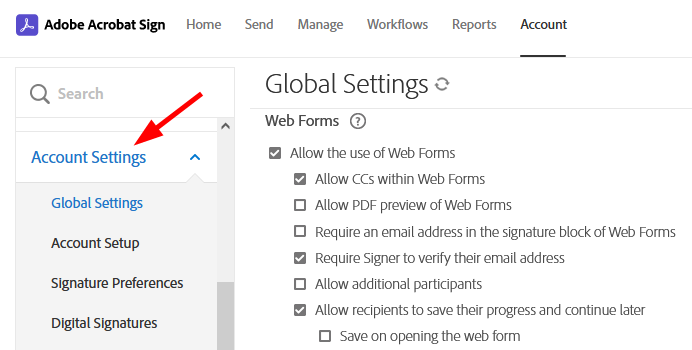
Sign Gov customers will see minor web application differences between their view and the Commercial view. For example, not all account settings apply in the Sign Gov environment, and these are removed from the user interface.
© Copyright 2022, Adobe Inc.. Last update: Aug 04, 2023.
