Deploy and install your app
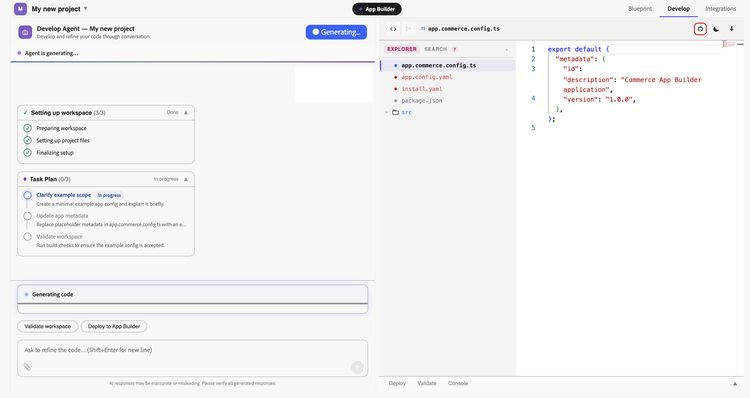
After you configure integrations, you can deploy the generated app directly from the Commerce Developer Agent. Deployment is not the final step in this process, the app must also be associated and installed in Commerce App Management before it becomes active.
Prerequisites
- You have generated and validated code on the Develop stage.
- You have completed the Integrations configuration, including the App Builder workspace, Commerce connection, and any required environment variables.
Deploy from the developer agent
To validate before you deploy, click Run validation. This runs npm install and npm build against the workspace.
- Click Deploy to App Builder on the Develop tab.
- Review the Confirm deployment message, which displays the target Organization, Project, Workspace, and Runtime namespace.
- Confirm the deployment.
- Review the logs on the Deploy tab.
The agent runs pre-deploy validation (aio app build) followed by deployment (aio app deploy), indicating the progress for each stage. If validation or deployment fails, the agent self-corrects the generated code and retries.
To undeploy, click Undeploy workspace at any time.
Associate the app in App Management
After deploying, you must associate the app in App Management to make it available for installation.
Follow the instruction in Associate an app in App Management.
Install and configure the app
-
On the row for the application you associated, click Install.
App Management displays a card showing the application name, description, and version, along with the extensibility features to be installed, such as events, webhooks and custom installations.
-
Click Install. When the installation completes, click Close.
-
On the application row, click Configure to fill in the business configuration values or any other information.
The configuration form shows every field defined by the blueprint, prefilled with the defaults it specified.
-
Click Close.
Your app is now deployed, installed, and configured. Any events, webhooks, or business configuration defined by the blueprint are active on your Commerce instance.