Add a custom multiselect attribute
This tutorial describes how you create a custom multiselect attribute for the Customer entity using code. The attribute appears in both the Customer Grid and the Customer Form in the Admin.
Use a multiselect attribute when you need to store multiple simultaneous values for a single customer field. Examples include eligible shipping methods, allowed sales channels, or subscription preferences. Unlike the dropdown attribute, a dropdown stores one selected option ID as an integer. A multiselect stores a comma-separated list of option IDs in a varchar value. Magento uses the ArrayBackend backend model to manage that storage. This tutorial also implements PatchRevertableInterface, so you can remove the attribute by running bin/magento setup:rollback.
Data patch implementation
The following sections show the PHP code you add to your module.
Create the data patch class
Create a data patch class called AddCustomerAttributeMultipleOptions under the \ExampleCorp\Customer\Setup\Patch\Data namespace. Magento runs this data patch automatically when you run bin/magento setup:upgrade. This class implements both \Magento\Framework\Setup\Patch\DataPatchInterface and \Magento\Framework\Setup\Patch\PatchRevertableInterface.
<?php
declare(strict_types=1);

namespace ExampleCorp\Customer\Setup\Patch\Data;

use \Magento\Framework\Setup\Patch\DataPatchInterface;
use \Magento\Framework\Setup\Patch\PatchRevertableInterface;

class AddCustomerAttributeMultipleOptions implements DataPatchInterface, PatchRevertableInterface
{
    public function apply(): void
    {
        // will be implemented in the next steps.
    }

    public function revert(): void
    {
        // will be implemented in the next steps.
    }

    public function getAliases(): array
    {
        // will be implemented in the next steps.
    }

    public static function getDependencies(): array
    {
        // will be implemented in the next steps.
    }
}
Inject the dependencies
The dependencies to the data patch are injected using constructor DI and are listed below:
\Magento\Framework\Setup\ModuleDataSetupInterfacefor initializing and ending the setup.\Magento\Customer\Setup\CustomerSetupFactoryfor creating a model of\Magento\Customer\Setup\CustomerSetupwhich is required to add and remove the custom attribute.\Magento\Customer\Model\ResourceModel\Attributealiased asAttributeResourcefor saving the attribute after adding custom data to it.\Psr\Log\LoggerInterfacefor logging exceptions thrown during the execution.
As with the dropdown attribute, the factory is stored rather than a single CustomerSetup instance, because both apply() and revert() need to create their own instance.
/**
 * Constructor
 *
 * @param ModuleDataSetupInterface $moduleDataSetup
 * @param CustomerSetupFactory $customerSetupFactory
 * @param AttributeResource $attributeResource
 * @param LoggerInterface $logger
 */
public function __construct(
    ModuleDataSetupInterface $moduleDataSetup,
    CustomerSetupFactory $customerSetupFactory,
    AttributeResource $attributeResource,
    LoggerInterface $logger
) {
    $this->moduleDataSetup = $moduleDataSetup;
    $this->customerSetupFactory = $customerSetupFactory;
    $this->attributeResource = $attributeResource;
    $this->logger = $logger;
}
Implement the apply method
There are five steps in developing a data patch. All the steps below are written inside the apply method.
-
Start and end the setup execution.
This turns off foreign key checks and sets the SQL mode.
$this->moduleDataSetup->getConnection()->startSetup(); /* Attribute creation code must be run between these two lines to ensure that the attribute is created smoothly. */ $this->moduleDataSetup->getConnection()->endSetup(); -
Add the multiselect customer attribute with the required settings.
Multiselect attributes differ from dropdown attributes in two important ways. First,
typeis set tovarcharrather thanint, because the stored value is a comma-separated string of selected option IDs (for example,3,7,12) rather than a single integer. Second, abackendmodel must be specified.ArrayBackendhandles serializing the array of selected IDs into that comma-separated string on save, and deserializing it back to an array on load. Without it, the multiselect will not persist correctly./** @var CustomerSetup $customerSetup */ $customerSetup = $this->customerSetupFactory->create(['setup' => $this->moduleDataSetup]); $customerSetup->addAttribute( CustomerMetadataInterface::ENTITY_TYPE_CUSTOMER, // entity type code 'custom_multi_options', // unique attribute code [ 'label' => 'Customer Custom Attribute MultiOptions', 'type' => 'varchar', 'input' => 'multiselect', 'source' => \Magento\Eav\Model\Entity\Attribute\Source\Table::class, 'backend' => \Magento\Eav\Model\Entity\Attribute\Backend\ArrayBackend::class, 'required' => false, 'position' => 555, 'system' => false, 'user_defined' => true, 'is_used_in_grid' => true, 'is_visible_in_grid' => true, 'is_filterable_in_grid' => true, 'is_searchable_in_grid' => false, ] );Table Setting Key Description labelCustomer Custom Attribute MultiOptions- Label for displaying the attribute valuetypevarchar- Stores selected option IDs as a comma-separated stringinputmultiselect- Renders as a multiselect list in the customer formsourceProvides the list of selectable options backendArrayBackend- Serializes and deserializes the comma-separated option ID stringrequiredfalse- Attribute will be an optional field in the customer formposition555- Sort order in the customer formsystemfalse- Not a system-defined attributeuser_definedtrue- A user-defined attributeis_used_in_gridtrue- Ready for use in the customer gridis_visible_in_gridtrue- Visible in the customer gridis_filterable_in_gridtrue- Filterable in the customer gridis_searchable_in_gridfalse- Not searchable in the customer grid (multiselect fields are filtered by option, not free-text searched) -
Add the attribute to an attribute set and group.
There is only one attribute set and group for the customer entity. The default attribute set ID is a constant defined in the
CustomerMetadataInterfaceinterface and setting the attribute group ID to null makes the application use the default attribute group ID for the customer entity.$customerSetup->addAttributeToSet( CustomerMetadataInterface::ENTITY_TYPE_CUSTOMER, // entity type code CustomerMetadataInterface::ATTRIBUTE_SET_ID_CUSTOMER, // attribute set ID null, // attribute group ID 'custom_multi_options' // unique attribute code ); -
Make the attribute visible in the customer form.
// Get the newly created attribute's model $attribute = $customerSetup->getEavConfig() ->getAttribute(CustomerMetadataInterface::ENTITY_TYPE_CUSTOMER, 'custom_multi_options'); // Make attribute visible in Admin customer form and storefront forms $attribute->setData('used_in_forms', [ 'adminhtml_customer', 'customer_account_create', 'customer_account_edit', ]); // Save modified attribute model using its resource model $this->attributeResource->save($attribute); -
Handle exceptions in a try/catch block.
try {
    // All the code inside the apply method goes into the try block.
} catch (Exception $exception) {
    $this->logger->error($exception->getMessage());
}
Implement the revert method
Because this class implements PatchRevertableInterface, it must also define a revert() method. This method is called when bin/magento setup:rollback targets this patch and removes the attribute from the system.
public function revert(): void
{
    $this->moduleDataSetup->getConnection()->startSetup();

    /** @var CustomerSetup $customerSetup */
    $customerSetup = $this->customerSetupFactory->create(['setup' => $this->moduleDataSetup]);

    try {
        $customerSetup->removeAttribute(
            CustomerMetadataInterface::ENTITY_TYPE_CUSTOMER,
            'custom_multi_options'
        );
    } catch (Exception $e) {
        $this->logger->error($e->getMessage());
    }

    $this->moduleDataSetup->getConnection()->endSetup();
}
Implement the rest of the interface
This data patch does not have any other patch as a dependency, and this data patch was not renamed earlier, so both getDependencies and getAliases can return an empty array.
public static function getDependencies(): array
{
    return [];
}

public function getAliases(): array
{
    return [];
}
Execute the data patch
Run bin/magento setup:upgrade from the project root to execute the newly added data patch.
-
The attribute is created in the customer form under the Account Information section.
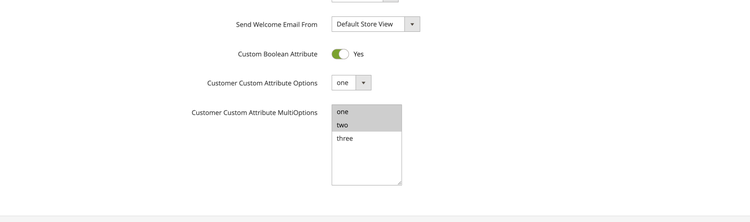
-
The attribute is displayed in the customer grid and can be filtered by selecting one or more options.

To remove the attribute, run bin/magento setup:rollback and target this patch. The revert() method will execute and delete the attribute from the system.
Code reference
<?php
declare(strict_types=1);

namespace ExampleCorp\Customer\Setup\Patch\Data;

use Exception;
use Psr\Log\LoggerInterface;
use Magento\Customer\Api\CustomerMetadataInterface;
use Magento\Customer\Model\ResourceModel\Attribute as AttributeResource;
use Magento\Customer\Setup\CustomerSetup;
use Magento\Customer\Setup\CustomerSetupFactory;
use Magento\Eav\Model\Entity\Attribute\Backend\ArrayBackend;
use Magento\Eav\Model\Entity\Attribute\Source\Table;
use Magento\Framework\Setup\ModuleDataSetupInterface;
use Magento\Framework\Setup\Patch\DataPatchInterface;
use Magento\Framework\Setup\Patch\PatchRevertableInterface;

/**
 * Creates a Customer multi-select attribute stored using ArrayBackend.
 */
class AddCustomerAttributeMultipleOptions implements DataPatchInterface, PatchRevertableInterface
{
    /**
     * @var ModuleDataSetupInterface
     */
    private $moduleDataSetup;

    /**
     * @var CustomerSetupFactory
     */
    private $customerSetupFactory;

    /**
     * @var AttributeResource
     */
    private $attributeResource;

    /**
     * @var LoggerInterface
     */
    private $logger;

    /**
     * Constructor
     *
     * @param ModuleDataSetupInterface $moduleDataSetup
     * @param CustomerSetupFactory $customerSetupFactory
     * @param AttributeResource $attributeResource
     * @param LoggerInterface $logger
     */
    public function __construct(
        ModuleDataSetupInterface $moduleDataSetup,
        CustomerSetupFactory $customerSetupFactory,
        AttributeResource $attributeResource,
        LoggerInterface $logger
    ) {
        $this->moduleDataSetup = $moduleDataSetup;
        $this->customerSetupFactory = $customerSetupFactory;
        $this->attributeResource = $attributeResource;
        $this->logger = $logger;
    }

    /**
     * Get array of patches that have to be executed prior to this.
     *
     * @return string[]
     */
    public static function getDependencies(): array
    {
        return [];
    }

    /**
     * Get aliases (previous names) for the patch.
     *
     * @return string[]
     */
    public function getAliases(): array
    {
        return [];
    }

    /**
     * Run code inside patch
     */
    public function apply(): void
    {
        // Start setup
        $this->moduleDataSetup->getConnection()->startSetup();

        /** @var CustomerSetup $customerSetup */
        $customerSetup = $this->customerSetupFactory->create(['setup' => $this->moduleDataSetup]);

        try {
            // Add customer attribute with settings
            $customerSetup->addAttribute(
                CustomerMetadataInterface::ENTITY_TYPE_CUSTOMER,
                'custom_multi_options',
                [
                    'label' => 'Customer Custom Attribute MultiOptions',
                    'type' => 'varchar',
                    'input' => 'multiselect',
                    'source' => Table::class,
                    'backend' => ArrayBackend::class,
                    'required' => false,
                    'position' => 555,
                    'system' => false,
                    'user_defined' => true,
                    'is_used_in_grid' => true,
                    'is_visible_in_grid' => true,
                    'is_filterable_in_grid' => true,
                    'is_searchable_in_grid' => false,
                ]
            );

            // Add attribute to default attribute set and group
            $customerSetup->addAttributeToSet(
                CustomerMetadataInterface::ENTITY_TYPE_CUSTOMER,
                CustomerMetadataInterface::ATTRIBUTE_SET_ID_CUSTOMER,
                null,
                'custom_multi_options'
            );

            // Get the newly created attribute's model
            $attribute = $customerSetup->getEavConfig()
                ->getAttribute(CustomerMetadataInterface::ENTITY_TYPE_CUSTOMER, 'custom_multi_options');

            // Make attribute visible in Admin customer form and storefront forms
            $attribute->setData('used_in_forms', [
                'adminhtml_customer',
                'customer_account_create',
                'customer_account_edit',
            ]);

            // Save attribute using its resource model
            $this->attributeResource->save($attribute);
        } catch (Exception $e) {
            $this->logger->error($e->getMessage());
        }

        // End setup
        $this->moduleDataSetup->getConnection()->endSetup();
    }

    /**
     * Rollback all changes, done by this patch
     */
    public function revert(): void
    {
        // Start setup
        $this->moduleDataSetup->getConnection()->startSetup();

        /** @var CustomerSetup $customerSetup */
        $customerSetup = $this->customerSetupFactory->create(['setup' => $this->moduleDataSetup]);

        try {
            $customerSetup->removeAttribute(
                CustomerMetadataInterface::ENTITY_TYPE_CUSTOMER,
                'custom_multi_options'
            );
        } catch (Exception $e) {
            $this->logger->error($e->getMessage());
        }

        // End setup
        $this->moduleDataSetup->getConnection()->endSetup();
    }
}