Create Design
The Create Design workflow lets users start something new: they can browse a curated set of templates (or begin from a blank canvas), pick one, and design from it in a focused editor. It pairs a Template Browser with a Design Editor—choose a template, then remix it into a finished asset.
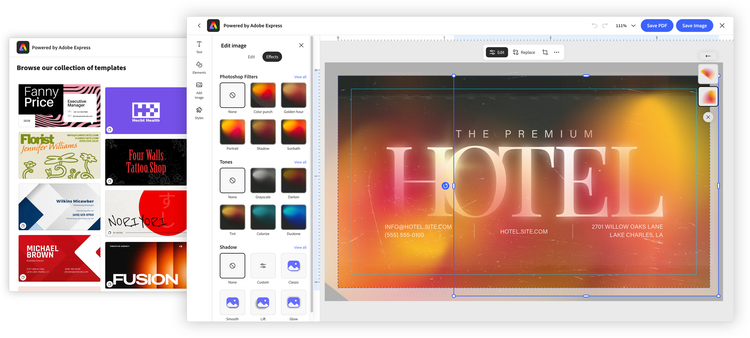
How Create Design works
Launch the workflow from the module object:
module.createDesign(
  appConfig?: FDECreateDesignAppConfig,
  exportConfig?: ExportConfig,
  containerConfig?: ContainerConfig,
): void;
All parameters are optional and positional—to skip one, pass undefined in its place. exportConfig and containerConfig are covered in Shared configuration; the rest of this page is about what's specific to Create Design, configured through appConfig (of type FDECreateDesignAppConfig).
Browsing and choosing content
The heart of Create Design is contentBrowseConfig—it defines the Template Browser experience: for example, categoriesConfig specifies which collection users browse, templateFilters controls how templates are filtered, and showCreateNew determines whether to show a CTA that allows users to start from a blank document of the provided size.
const appConfig = {
  contentBrowseConfig: {
    // The curated collection to browse
    categoriesConfig: [
      { category: "templates", collectionId: "urn:aaid:sc:VA6C2:..." },
    ],
    // Additional filtering based on number of pages, dimensions, template type
    templateFilters: {
      behaviors: ["still"],
      dimensions: { width: 3.5, height: 2, unit: "in" },
      templateType: "business-card",
    },
    // Offer a "start from a blank canvas" option
    showCreateNew: true,
    // Title shown above the browser
    headerText: "Choose a template",
    // UI configuration options for the Template Browser
    hideSearchBar: true,
    hideFilters: true,
    disablePremiumContent: true,
    // Keep users within the curated set (suppress "more like this")
    hideMoreLikeThis: true,
  },
  // Specify the list of file types that the user can publish
  allowedFileTypes: ["application/pdf", "image/jpeg", "image/png"],
  // EDE variant to tailor the editor experience
  variant: "print",
  callbacks: {
    /* ... */
  },
};

module.createDesign(appConfig, exportConfig, containerConfig);
Embedded browsing is deliberately curated, not open-ended discovery: standalone Express recommends templates broadly to help users explore, but inside your app the host already supplies the product and intent, so the browser stays within the collection you configure—and a 1-up preview lets users confirm a template before a new document is created. hideMoreLikeThis reinforces that boundary by suppressing "more like this" recommendations. Content browsing is a capability in its own right, with its own collection, filtering, and layout options—see the Template Browser concept guide; Create Design surfaces that same experience as the entry point to designing.
Tailoring the experience with variants
Create Design honors the shared variant option (see Experience variants). Setting variant: "print", for example, gives users a print-oriented toolset and enables print-friendly defaults automatically, so the experience matches a print workflow end to end; for instance, the Express editor won't surface timeline-dependent tools that are relevant only for video.
data-slots=header, text
data-variant=warning
In active development
Output configuration today
There's an asymmetry between the two workflows worth understanding. Edit Design lets you pass explicit output controls. For example, including PDF settings such as CMYK color mode and an ICC color profile (its pdfPrintConfig) is possible for the print variant. Create Design does not accept those output configs yet.
Create Design falls back to sensible defaults—CMYK color with a standard coated ICC profile (Coated GRACoL 2006 (ISO 12647-2:2004)) and bleed enabled—so output is correct out of the box even though you can't set it explicitly here.
This gap is expected to close in the future through the onIntentChange callback: as a user moves from browsing a template into editing it, onIntentChange will let you pass configuration—including output settings—into that next step. Until then, if you need precise output control at creation time, plan around these defaults, or route users into Edit Design, where the output controls are available today.
Handling the result
When the user finishes and exports, EDE behaves like a standard Embed SDK module: the onPublish callback fires with the exported asset and its metadata; return a publish status to confirm or deny. See Shared configuration.
Related
- Embed SDK Embedded Design Editor tutorial: build the Create Design workflow step by step
- Edit Design — the companion workflow, with output controls
- Embedded Design Editor — the shared concepts and configuration
- Template Browser — the content-browsing experience Create Design builds on
- SDK reference:
FDECreateDesignAppConfig