Embedded Design Editor
The Embedded Design Editor (EDE) is Adobe's architecture for delivering purpose-built creation experiences inside your application. Instead of embedding the full Adobe Express editor, EDE gives you a focused, configurable surface built around specific workflows.
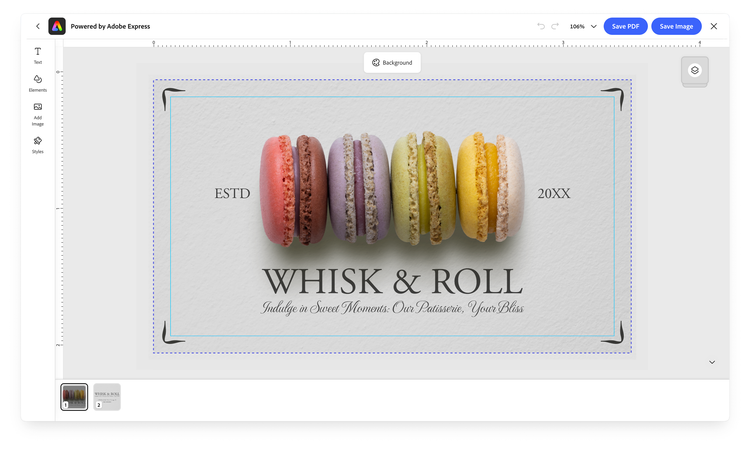
The shift EDE represents is from bespoke integrations toward a shared, scalable platform; it separates the underlying creative capabilities from the experience presented to end users, so the same platform can power very different user journeys through variants rather than duplicated engineering. EDE also improves the user experience by means of faster loading times, seamless workflow transitions (e.g., moving from template selection to design editing without a full app reload), and better resilience against Adobe Express feature changes and updates.
data-slots=header, text
data-variant=info
In active development
How EDE fits into the Embed SDK
EDE experiences run as modules; so far, there are two entry points:
module.createDesign()module.editDesign()docId, templateId, or an asset)You launch the experiences from the module object returned by the SDK's initialize() call.
await import("https://cc-embed.adobe.com/sdk/v4/CCEverywhere.js");

const { module } = await window.CCEverywhere.initialize(
  { clientId: "your-client-id", appName: "your-app-name" },
  { locale: "en-US" },
);

module.createDesign(/* ... */); // start a new design
module.editDesign(/* ... */); // edit an existing one
Getting an API key and calling initialize() are common to every Embed SDK integration—see the Quickstart and Get Credentials. This guide focuses on what's specific to EDE.
Experience variants
A variant tailors the whole experience to a class of workflow. You set it through the variant property on a workflow's appConfig, and it determines which creative tools the editor surfaces—text, images, shapes, icons, and other design elements—so the UI matches the task instead of exposing everything Express can do. Variants are how you build experience-focused UIs.
variant"default""print"The set of variants will grow as new focused workflows are added. Treat the SDK reference as the authoritative, current list. Set the variant the same way in either workflow:
const appConfig = {
  variant: "print",
  // ...workflow-specific options
};
Shared configuration
Both EDE workflows accept the same standard Embed SDK configuration objects that every module uses: appConfig, exportConfig, and containerConfig (while editDesign() requires an additional docConfig object to pass an existing document to preload onto the Editor)
ccEverywhere.module.createDesign(
  appConfig?: FDECreateDesignAppConfig,
  exportConfig?: ExportConfig,
  containerConfig?: ContainerConfig,
): void;

ccEverywhere.module.editDesign(
  docConfig: FDEEditDesignDocConfig,
  appConfig?: FDEEditDesignAppConfig,
  exportConfig?: ExportConfig,
  containerConfig?: ContainerConfig,
): void;
data-slots=header, text
data-variant=info
A note on Type Names
FDE in some SDK type names such as FDECreateDesignAppConfig. It refers to the same Embedded Design Editor described here, and may change in the future to match the current naming convention.appConfig: the per-workflow options; the parts unique to each are covered on the Create Design and Edit Design pages.exportConfig: the export/publish options (buttons, file types, output shape). See theExportConfigreference.containerConfig: how the SDK iframe is presented (fill, inline, or modal). See theContainerConfigreference.appConfig.callbacks: lifecycle and event callbacks such asonPublish,onError, andonCancel. See theCallbacksreference.
data-slots=header, text
data-variant=warning
Intent change
onIntentChange() callback is not operational for EDE workflows today. It is expected to become relevant in the future—for example, to carry configuration forward as one workflow tethers into another. See Create Design → Output configuration today for where this will matter.Related
- Embed SDK Embedded Design Editor tutorial: build a Create Design → Edit Design flow step by step
- Create Design — browse a template and design from it
- Edit Design — open and refine an existing document
- Template Browser — the content-browsing experience Create Design builds on
- SDK reference:
FDECreateDesignAppConfig,FDEEditDesignAppConfig