data-slots=image, heading, text
data-variant=fullWidth
data-textColor=white

FAQ
Table of Contents
<!-- The comment below is needed, otherwise the Markdown-all-in-one extensions will automatically create a TOC and mess with the layout --> <!-- no toc -->
Getting Started
- Do you have a mobile SDK?
- Is there a cost to use the SDK?
- What is the versioning strategy for the SDK?
SDK Access & Approval
- Can I still use the SDK for personal or experimental projects?
- How do I request access?
- What criteria are used to evaluate access requests?
- Would Adobe need to approve the integrations before my users can start using it?
- What happens to existing integrations?
User Requirements & Authentication
- Do my users need to have an Adobe ID?
- How do I enable SSO for my service?
- When are users required to sign in when using the Embed SDK?
- Is there a Terms of Use or consent flow during login?
- How long do user sessions last?
- Who manages user accounts and authentication?
Features & Functionality
- How does the full editor provided by the SDK differ from the free/paid versions of Adobe Express on the web?
- My user base consists of students/minors. How can I be assured they get appropriate content?
- How are user entitlements (free vs premium) handled?
- Can I control which templates are shown to users?
- Can the SDK be launched from different entry points in my application?
- How are assets handled when users download or save their work?
Configuration & Setup
Integration Responsibilities
Technical Requirements
Troubleshooting
- I run into the "Adobe Express is not available" error
- Why might cross-domain requests behave differently in Safari?
- Users are unable to sign out of Adobe Express due to a Content Security Policy restriction. How do I fix this?
- How can I debug and troubleshoot errors effectively?
Support
Getting Started
Do you have a mobile SDK?
Our efforts are currently focused on desktop apps and web.
Is there a cost to use the SDK?
Access to the Adobe Express Embed SDK now requires a business approval process. Contact sales to submit your use case for evaluation. For more details, see SDK Access & Approval.
What is the versioning strategy for the SDK?
- The SDK follows a continous release model, with newer versions including bug fixes and feature enhancements. We are no longer approving integrations using using SDK V1, V2, or V3.
- V1 and V2 are deprecated and V3 will be deprecated in 2024.
- Please migrate to V4 as soon as possible: we've created a Migration Guide to help you with the transition.
SDK Access & Approval
Can I still use the SDK for personal or experimental projects?
Access is currently focused on use cases with clear business or user impact. We strongly recommend validating your use case by contacting Sales before starting any integration.
How do I request access?
Use this form to contact Sales and submit your use case. Our team will review and follow up.
What criteria are used to evaluate access requests?
We prioritize use cases that demonstrate clear business impact. This includes supporting adoption of Adobe Express enterprise customers, paid usage of the Embed SDK in the context of a strategic partnership, or serving a well-defined user base (starting from 1 Million users).
Would Adobe need to approve the integrations before my users can start using it?
Your users can use the integrations, but, we will display a red banner indicating, The experience powered by Adobe Express has not been approved yet. The banner is removed only after your integration is approved; it can take up to approximately 24 hours for the banner to disappear after approval.
What happens to existing integrations?
Approved integrations will remain active until December 2027. After that, they'll need to go through the new business approval process.
User Requirements & Authentication
Do my users need to have an Adobe ID?
Users will need to sign in using an existing Adobe ID, or create an account, in order to save projects created. Projects will be saved to the user's Adobe Express account in a folder named after your integration.
Creating an account for Adobe Express is always free with premium upgrades available.
How do I enable SSO for my service?
To enable Single Sign-On (SSO) for your service, when using Adobe express Embed SDK, you need to set it up using the Adobe admin console.
Learn to use the Adobe Admin Console to set up Single Sign-On (SSO) with your Identity provider and troubleshoot setup-related problems.
When are users required to sign in when using the Embed SDK?
Authentication timing is controlled with the loginMode parameter during SDK initialization. With loginMode: "delayed", users can start editing without signing in and are prompted to authenticate only when an action requires it (for example, saving, exporting, or accessing premium features). That pattern reduces friction and is common in partner integrations.
For more details, see loginMode in the Initialize SDK Reference.
Is there a Terms of Use or consent flow during login?
Yes. The first time users authenticate, they must accept Adobe’s Terms of Use and Privacy Policy before proceeding, regardless of loginMode. For supported workflows (such as Edit Image), you can use the inlineTOUConsent option to show that consent inline in the embedded experience instead of only at login.
How long do user sessions last?
Session length follows the user’s Adobe account: sign-in typically stays valid for up to 14 days, while the SDK uses short-lived client tokens (about 5 minutes). Users are not asked to sign in again until that Adobe account session ends.
For more background, see Set up user identity and Single Sign-on for your organization on Adobe Help, and the Adobe IMS user authentication guide.
Who manages user accounts and authentication?
Adobe manages sign-in for Express through the user’s Adobe account. The host application does not store Adobe credentials; users can use any valid Adobe account, including one they created outside your app.
Features & Functionality
How does the full editor provided by the SDK differ from the free/paid versions of Adobe Express on the web?
There are two functional differences in the embedded Adobe Express full editor compared to Adobe Express on the web:
- Content sharing: In an embedded experience, we assume that a user will save the outcome of their creative project back to the host application in order to continue work in the host application. We have disabled sharing capabilities in embedded Adobe Express experiences.
- Content publishing: For the same reason above, you have the ability to pre-define the output type (file types, pixel size, etc.) of the Adobe Express project that is saved to the host application. For this reason, post scheduling and exporting multiple output types are disabled for the embedded Adobe Express editor.
My user base consists of students/minors. How can I be assured they get appropriate content?
The embedded Adobe Express full editor can be setup to launch student safe content even before a student is signed into the embedded experience. More information about Adobe & Student Privacy.
How are user entitlements (free vs premium) handled?
Entitlements follow the user’s Adobe account subscription: free accounts have limited templates, assets, and generative features; premium accounts have broader access and higher limits. Your app can supply premium access or let users sign in with their own Adobe account. If you need a different entitlements model for your users, work with your Adobe partner.
Can I control which templates are shown to users?
Yes. You can configure template discovery using appConfig parameters such as selectedCategory and categorySearchText.
For more details, see BaseEditorAppConfig.
Can the SDK be launched from different entry points in my application?
Yes. You can launch the Embed SDK from any UI element in your application, such as buttons, template selections, or custom workflows.
This enables you to design flexible user journeys based on your application’s requirements.
How are assets handled when users download or save their work?
When users download assets, files are saved locally to the user’s device.
When users save assets through the SDK, the SDK returns asset data (for example, base64). The host application is responsible for storing and managing these assets.
Configuration & Setup
How many domains can be added with a single API key for a service?
You can add upto five domains with a single API key. Additionally, there is no limit on the number of subdomains that you can employ for these services. Use wildcards to enter multiple subdomains (*.my-domain.com) or commas to separate multiple domains (www.domain-1.com, www.domain-2.com). During local development, you can include ports greater than 1023 with localhost (example, localhost:3000). Standard ports (80, 443) will be used for non-localhost domains.
Integration Responsibilities
Which parts of the experience are managed by Adobe versus my application?
The host application is responsible for building and managing its own user interface, including:
- Marketing or landing pages
- Template galleries
- Asset libraries
The Embed SDK provides the Adobe Express editing experience within an embedded environment.
When assets are saved, the SDK returns asset data, and the host application is responsible for storing and managing those assets.
Technical Requirements
Which web browsers are supported?
- Google Chrome: Version 100 or later
- Microsoft Edge: Version 107 or later
- Safari: Version 17 or later
- Firefox: Version 117 or later
You can refer to the complete technical requirements here.
What operating systems are supported?
- Windows: Version 10 or later
- macOS: Version 11 or later
- ChromeOS
You can refer to the complete technical requirements here.
Troubleshooting
I run into the "Adobe Express is not available" error
Please refer to this troubleshooting guide.
Why might cross-domain requests behave differently in Safari?
In some cross-domain workflows, Safari may exhibit unexpected behavior because of how it caches GET request responses across different origins. Unlike other browsers, Safari may reuse or overwrite cached responses between domains, which can surface as CORS-related errors even when the integration is correctly configured.
This issue is commonly observed in flows where an additional asset request is triggered from another domain (for example, share or download actions implemented by the host application).
To mitigate this behavior:
- Configure the asset or image domain to return the
Vary: Originresponse header so responses are cached separately per origin - Ensure all required domains are properly allowlisted for the integration. See Edit the list of allowed domains in the quickstart guide.
- Validate the flow across multiple browsers to isolate browser-specific issues

If the issue persists, review any additional cross-domain asset requests in the implementation flow and coordinate with your Adobe partner for further guidance.
Users are unable to sign out of Adobe Express due to a Content Security Policy restriction. How do I fix this?
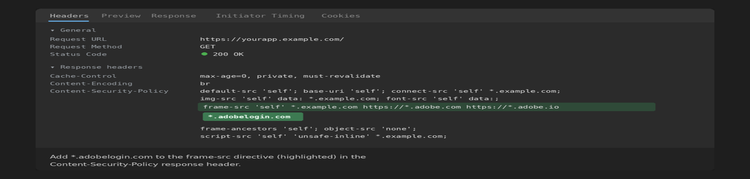
The sign-out flow redirects through https://ims-na1.adobelogin.com/, which is blocked if it is not listed in your frame-src directive. Add *.adobelogin.com to the frame-src directive in your Content-Security-Policy response header.
How can I debug and troubleshoot errors effectively?
Refer to the error handling guide provided with the SDK documentation. It includes detailed information on understanding exceptions, accessing error metadata, and best practices for handling different types of errors.
Support
Who can I contact for help?
If you have any questions about the process, please contact ccintrev@adobe.com.