Inter Plugin Communication
UXP allows communication between plugins installed within the same application
This feature is handy when you know another plugin already automates a specific task; in such cases, you can invoke it instead of duplicating the effort. To provide the best user experience, ensure your plugin clearly communicates such dependencies.
Overview
The Plugin Manager module provides the necessary APIs to establish the connection. Before diving into an example, make sure you're familiar with the following topics:
Additionally, you will need to have a basic understanding of the plugin you are going to communicate with, which includes:
- The plugin's
idandentrypoints - The structure of arguments to be passed, if applicable.
Implementation
We’ll refer to the two plugins as Requester and Responder.
Requester
This is the plugin that will initiate the communication with the Responder. It must have the enablePluginCommunication permission set to true in the manifest.json file.
{
  // ...
  "requiredPermissions": {
    "ipc": { "enablePluginCommunication": true }
  }
  // ...
}
Through the pluginManager module, the Requester plugin can get a list of all installed plugins in Premiere and find the Responder plugin by its id (which must be known in advance).
const { pluginManager } = require("uxp");

const allPlugins = pluginManager.plugins;
const responderPlugin = Array.from(allPlugins)
  .find(plugin => plugin.id === "Test-responder"); // 👈 Responder id
When you've stored a reference to the Responder plugin, you can invoke its command entrypoints using the invokeCommand(), or request to show its panel using the showPanel() methods. Pass the id of the entrypoint you want to invoke or show.
responderPlugin.invokeCommand("simpleCommand");
responderPlugin.showPanel("simplePanel");
data-variant=info
data-slots=heading, text, text2
invokeCommand() method:const payload = { message: "From Requester" };
responderPlugin.invokeCommand("simpleCommand", payload);
Responder
This is the plugin that will receive the communication from the Requester plugin. It does not need additional manifest permissions, but the command entrypoints the Requester will invoke must be exposed in the manifest.json file.
{
  // ...
  "entrypoints": [
    {
      "id": "simplePanel",
      "type": "panel",
      "label": { "default": "Main Panel" },
      // ...
    },
    {
      "id": "simpleCommand",
      "type": "command",
      "label": { "default": "Simple Command" }
    },
    {
      "id": "commandWithInput",
      "type": "command",
      "label": { "default": "Command With Input" }
    }
  ],
  // ...
}
The commands should also be implemented in the index.js file. For more information, please refer to the Add Commands tutorial.
Example
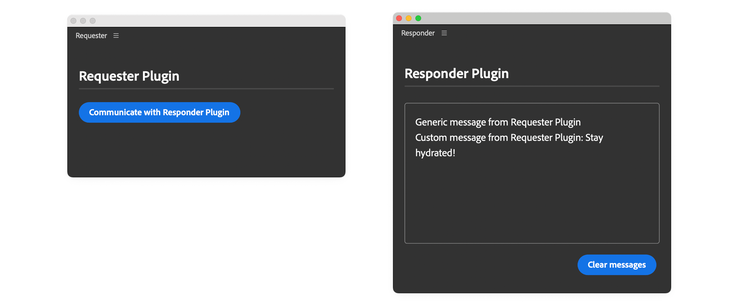
In this example, the Requester plugin implements a button that will initiate three requests to the Responder plugin:
- show the Responder's panel
- invoke the Responder's
simpleCommandentrypoint - invoke the Responder's
commandWithInputentrypoint, with an input payload
The Responder plugin will log the requests in the panel's body.
Requester code
data-slots=heading, code
data-repeat=4
data-languages=HTML, CSS, JavaScript, JSON
index.html
<!DOCTYPE html>
<html>
<head>
  <script src="main.js"></script>
  <link rel="stylesheet" href="style.css" />
</head>
<body>
  <sp-heading>Requester Plugin</sp-heading>
  <sp-divider></sp-divider>
  <div class="main-div">
    <sp-body id="plugin-body">
      <sp-button id="btnCommunicate">
        Communicate with Responder Plugin
      </sp-button>
    </sp-body>
  </div>
</body>
</html>
style.css
body { padding: 16px; color: white; }

sp-divider { margin-bottom: 20px; }

sp-heading { color: var(--uxp-host-text-color-secondary, white); }
index.js
//global objects.
const { pluginManager } = require("uxp");

document
  .querySelector("#btnCommunicate")
  .addEventListener("click", communicateWithAnotherPlugin);

function communicateWithAnotherPlugin() {
  try {
    const allPlugins = pluginManager.plugins;
    const plugin = Array.from(allPlugins).find(
      (plugin) => plugin.id === "Test-responder"
    );
    if (plugin && plugin.enabled) {
      console.log("All commands:", plugin.manifest.commands);
      console.log("All panels:", plugin.manifest.panels);

      // Show the plugin panel
      // Note that panels can only be made visible
      // You can't ask to hide a panel
      plugin.showPanel("simplePanel");

      // Invoke the command
      plugin.invokeCommand("simpleCommand");

      // Send an payload to the command
      const payload = { message: "Stay hydrated!" };
      // Invoke the command with the payload
      plugin.invokeCommand("commandWithInput", payload.message);
    } else {
      // Prompt the user to install/enable the plugin before trying again
    }
  } catch (e) {
    console.error(e);
  }
}
manifest.json
{
  "id": "Test-requester",
  "name": "Requester",
  "shortname": "3pstarterplugin",
  "version": "1.0.0",
  "main": "index.html",
  "host": { "app": "premierepro", "minVersion": "25.6.0" },
  "manifestVersion": 5,
  "requiredPermissions": {
    "localFileSystem": "request",
    "clipboard": "readAndWrite",
    "ipc": { "enablePluginCommunication": true }
  },
  "entrypoints": [
    {
      "id": "starterpanel",
      "type": "panel",
      "minimumSize": { "width": 430, "height": 500 },
      "maximumSize": { "width": 2000, "height": 2000 },
      "preferredDockedSize": { "width": 230, "height": 300 },
      "preferredFloatingSize": { "width": 400, "height": 300 },
      "label": { "default": "PremierePro IPC Panel" },
      "icons": [
        {
          "width": 23, "height": 23,
          "path": "icons/dark.png", "scale": [1,2],
          "theme": [ "darkest", "dark", "medium" ]
        },
        {
          "width": 23, "height": 23,
          "path": "icons/light.png", "scale": [1,2],
          "theme": [ "lightest", "light" ]
        }
      ]
    }
  ],
  "icons": [
    {
      "width": 48, "height": 48, "path": "icons/plugin-icon.png",
      "scale": [1,2],
      "theme": [ "darkest", "dark", "medium", "lightest", "light", "all" ],
      "species": [ "pluginList" ]
    }
  ]
}
Responder code
data-slots=heading, code
data-repeat=4
data-languages=HTML, CSS, JavaScript, JSON
index.html
<!DOCTYPE html>
<html>
<head>
  <script src="main.js"></script>
  <link rel="stylesheet" href="style.css" />
</head>
<body>
  <sp-heading>Responder Plugin</sp-heading>
  <sp-divider></sp-divider>
  <div class="main-div">
    <sp-body id="plugin-body"> </sp-body>
  </div>
  <footer>
    <sp-button id="clear-btn">Clear messages</sp-button>
  </footer>
</body>
</html>
style.css
body { color: white; padding: 16px; }

sp-divider { margin-bottom: 20px; }

li:before { content: "• "; width: 3em; }

#plugin-body {
  color: var(--uxp-host-text-color-secondary, white);
  height: 220px; margin-top: 5px; border: 1px solid #808080;
  border-radius: 4px; padding: 16px; overflow: scroll;
}

sp-heading { color: var(--uxp-host-text-color-secondary, white); }

footer {
  display: flex; flex-wrap: wrap; justify-content: flex-end; }

footer > * { margin: 5px; }

footer div { margin-bottom: 1em; width: 100%; }

.main-div { position: relative; }

.clear-btn {
  display: none; position: absolute; top: 10px; right: 6px; cursor: pointer;
}

.main-div:hover .clear-btn { display: inline; }
index.js
//global objects.
const { entrypoints } = require("uxp");

entrypoints.setup({
  commands: {
    simpleCommand: () => doThing(),
    commandWithInput: (args) => doThing(args),
  },
  panels: { simplePanel: { show(rootNode) {} },
  },
});

// Log messages to the panel's body
function logToPanel(msg) {
  const bodyElement = document.getElementById("plugin-body");
  const message =
    msg === undefined
      ? `Generic message from Requester Plugin <br />`
      : `<span>Custom message from Requester Plugin: ${msg}</span><br />`;
  bodyElement.innerHTML += message;
}

// Commands handler
function doThing(args) {
  console.log("payload", args);
  // Pass a payload (if any) to the panel
  logToPanel(args && args.data[0]);
}

// Clear the panel's body
document.getElementById("clear-btn").addEventListener("click", () => {
  const bodyElement = document.getElementById("plugin-body");
  if (bodyElement) {
    bodyElement.innerHTML = "";
  }
});
manifest.json
{
  "id": "Test-responder",
  "name": "Responder",
  "shortname": "3pstarterplugin",
  "version": "1.0.0",
  "main": "index.html",
  "host": { "app": "premierepro", "minVersion": "25.6.0" },
  "manifestVersion": 5,
  "entrypoints": [
    {
      "id": "simplePanel",
      "type": "panel",
      "minimumSize": { "width": 430, "height": 500 },
      "maximumSize": { "width": 2000, "height": 2000 },
      "preferredDockedSize": { "width": 230, "height": 300 },
      "preferredFloatingSize": { "width": 400, "height": 300 },
      "label": { "default": "Main Panel" },
      "icons": [
        {
          "width": 23, "height": 23,
          "path": "icons/dark.png", "scale": [1,2],
          "theme": [ "darkest", "dark", "medium" ]
        },
        {
          "width": 23, "height": 23,
          "path": "icons/light.png", "scale": [1,2],
          "theme": [ "lightest", "light" ]
        }
      ]
    },
    {
      "id": "simpleCommand",
      "type": "command",
      "label": {
        "default": "Simple Command"
      }
    },
    {
      "id": "commandWithInput",
      "type": "command",
      "label": {
        "default": "Command With Input"
      }
    }
  ],
  "icons": [
    {
      "width": 48, "height": 48, "path": "icons/plugin-icon.png",
      "scale": [1,2],
      "theme": [ "darkest", "dark", "medium", "lightest", "light", "all" ],
      "species": [ "pluginList" ]
    }
  ]
}
Additional notes
- You may not see any error if the entrypoint is not found. We recommend using
plugin.manifest.commandsandplugin.manifest.panelsto select from the actual list of entrypoints. Users may have turned off a particular plugin via the Adobe Creative Cloud Desktop App. Before invoking it, check the plugin's availability by usingplugin.enabled. - You cannot pass methods in the payload object.
- Cross-application communication is not supported (e.g., Premiere to Photoshop).
Summary
Inter-plugin communication enables UXP plugins to invoke commands and show panels from other installed plugins within Adobe Premiere.
Key Concepts:
-
Requester plugin: This plugin initiates communication and requires the
enablePluginCommunication: truepermission inmanifest.json.- Plugin Manager: Use
pluginManager.pluginsto discover and reference other installed plugins by theirid. - Communication methods:
invokeCommand()to execute commands andshowPanel()to display panels from the target plugin.
- Plugin Manager: Use
-
Responder plugin: This plugin receives communication requests, exposes entrypoints in its manifest (no special permissions are needed), and implements the entrypoints in its code.