Add a command entrypoint
A command entrypoint adds an action to the host application's plugin menu. When the user selects it, UXP runs the JavaScript handler registered for that command ID.
Use a command for a task that runs on demand and does not need a persistent interface. A command can still open a modal dialog when it needs user input or confirmation.
In Premiere, commands appear under Window > UXP Plugins beneath the plugin name.
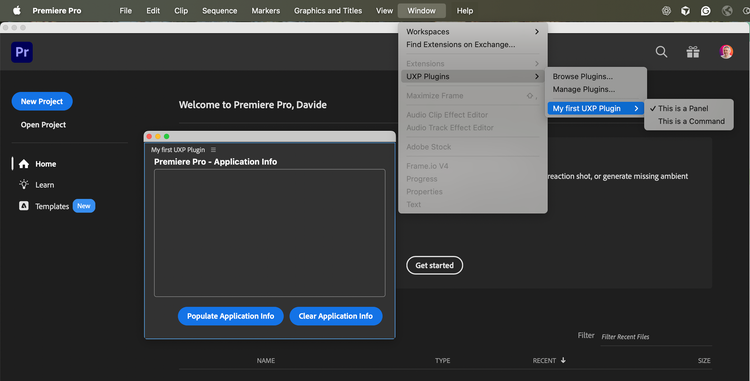
1. Declare the command
Add an entrypoint with "type": "command" to manifest.json. Give it a stable id; the JavaScript registration must use the same value.
{
  // ...
  "entrypoints": [
    {
      "type": "command",
      "id": "myCommand",
      "label": "This is a Command"
    }
  ]
}
data-slots=text1
label property also accepts a LocalizedString when the command name needs localization.2. Register the handler
Create the function that should run when the user selects the command:
// index.js
function myCommandHandler() {
  console.log("Command invoked!");
}
Register the function with either entrypoints.setup() or module.exports. Choose one pattern based on the plugin's entrypoint file.
Use entrypoints.setup()
Use entrypoints.setup() when the plugin has an HTML entrypoint or combines commands with panels and lifecycle hooks:
data-slots=heading, code
data-repeat=2
data-languages=JavaScript, JSON
index.js
const { entrypoints } = require("uxp");

function myCommandHandler() { console.log("Command invoked!"); }

entrypoints.setup({
  commands: {
    myCommand: myCommandHandler
  }
});
manifest.json
{
  // ...
  "entrypoints": [
    {
      "type": "command",
      "id": "myCommand",
      "label": "This is a Command"
    }
  ]
  // ...
}
The myCommand property matches the command ID declared in manifest.json. See Command handlers for the broader entrypoints.setup() model.
data-slots=text
data-variant=warning
entrypoints.setup() only once. Register every command, panel, and lifecycle hook in the same setup object.Use module.exports
For a command-only plugin without an HTML interface, point the manifest's main property directly to the JavaScript file and export the command map:
data-slots=heading, code
data-repeat=2
data-languages=JavaScript, JSON
index.js
module.exports = {
  commands: {
    myCommand: myCommandHandler
  }
};
manifest.json
{
  // ...
  "main": "index.js",
  // ...
  "entrypoints": [
   {
      "type": "command",
      "id": "myCommand",
      "label": "This is a Command"
    }
  ],
  // ...
}