Communicate between plugins
Use inter-plugin communication (IPC) when one UXP plugin needs to reuse functionality exposed by another plugin in the same host application. Through the UXP Plugin Manager, one plugin can open another plugin's panel or invoke one of its commands.
This guide refers to the plugin that sends the request as the Requester and the plugin that receives it as the Responder.
How inter-plugin communication works
Communication depends on both plugins:
- The Responder exposes a command or panel entrypoint and implements its behavior.
- The Requester enables IPC, finds the Responder by its plugin ID, and calls an entrypoint by its ID.
Before you begin
Make sure you have:
- Two plugins installed in the same host application.
- The Responder's plugin ID and the IDs of the command or panel entrypoints you want to use.
- Any input expected by the Responder's command handler.
data-variant=info
data-slots=text
1. Expose the Responder entrypoints
The Responder does not need an additional IPC permission. Declare each command or panel that the Requester can use in the Responder's manifest.json file:
{
  "entrypoints": [
    {
      "id": "simplePanel",
      "type": "panel",
      "label": { "default": "Main Panel" }
    },
    {
      "id": "simpleCommand",
      "type": "command",
      "label": { "default": "Simple Command" }
    },
    {
      "id": "commandWithInput",
      "type": "command",
      "label": { "default": "Command With Input" }
    }
  ]
}
Implement the corresponding command handlers and panel in the Responder's JavaScript. See Add Commands for details about registering command entrypoints.
2. Enable communication in the Requester
The Requester must set the enablePluginCommunication permission to true in its manifest.json file:
{
  "requiredPermissions": {
    "ipc": { "enablePluginCommunication": true }
  }
}
3. Find the Responder
Import pluginManager, then search the installed plugins for the Responder's known plugin ID:
const { pluginManager } = require("uxp");

const allPlugins = pluginManager.plugins;
const responderPlugin = Array.from(allPlugins)
  .find((plugin) => plugin.id === "Test-responder");
Before sending a request, confirm that responderPlugin exists and that responderPlugin.enabled is true.
4. Open a panel or invoke a command
Call showPanel() with a panel entrypoint ID, or call invokeCommand() with a command entrypoint ID:
responderPlugin.showPanel("simplePanel");
responderPlugin.invokeCommand("simpleCommand");
To pass data to a command, provide it as the second argument to invokeCommand():
const payload = { message: "From Requester" };
responderPlugin.invokeCommand("simpleCommand", payload);
Complete example
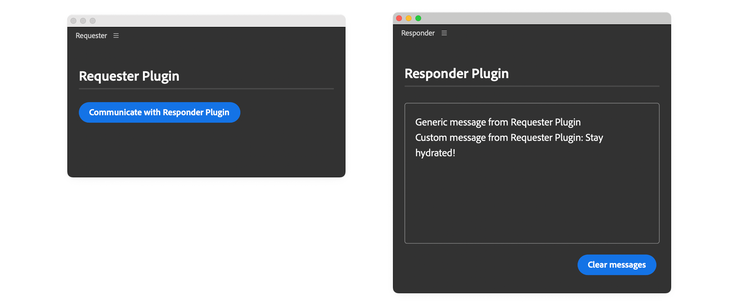
In this example, a button in the Requester sends three requests to the Responder:
- Open the Responder's panel.
- Invoke the Responder's
simpleCommandentrypoint. - Invoke the Responder's
commandWithInputentrypoint with a payload.
The Responder logs each request in its panel.
Requester code
data-slots=heading, code
data-repeat=4
data-languages=HTML, CSS, JavaScript, JSON
index.html
<!DOCTYPE html>
<html>
<head>
  <script src="main.js"></script>
  <link rel="stylesheet" href="style.css" />
</head>
<body>
  <sp-heading>Requester Plugin</sp-heading>
  <sp-divider></sp-divider>
  <div class="main-div">
    <sp-body id="plugin-body">
      <sp-button id="btnCommunicate">
        Communicate with Responder Plugin
      </sp-button>
    </sp-body>
  </div>
</body>
</html>
style.css
body { padding: 16px; color: white; }

sp-divider { margin-bottom: 20px; }

sp-heading { color: var(--uxp-host-text-color-secondary, white); }
main.js
const { pluginManager } = require("uxp");

document
  .querySelector("#btnCommunicate")
  .addEventListener("click", communicateWithAnotherPlugin);

function communicateWithAnotherPlugin() {
  try {
    const allPlugins = pluginManager.plugins;
    const plugin = Array.from(allPlugins).find(
      (plugin) => plugin.id === "Test-responder"
    );
    if (plugin && plugin.enabled) {
      console.log("All commands:", plugin.manifest.commands);
      console.log("All panels:", plugin.manifest.panels);

      // Show the plugin panel. pluginManager cannot hide panels.
      plugin.showPanel("simplePanel");

      // Invoke the command
      plugin.invokeCommand("simpleCommand");

      // Send a payload to the command
      const payload = { message: "Stay hydrated!" };
      plugin.invokeCommand("commandWithInput", payload.message);
    } else {
      // Prompt the user to install/enable the plugin before trying again
    }
  } catch (error) {
    console.error(error);
  }
}
manifest.json
{
  "id": "Test-requester",
  "name": "Requester",
  "shortname": "3pstarterplugin",
  "version": "1.0.0",
  "main": "index.html",
  "host": { "app": "premierepro", "minVersion": "25.6.0" },
  "manifestVersion": 5,
  "requiredPermissions": {
    "ipc": { "enablePluginCommunication": true }
  },
  "entrypoints": [
    {
      "id": "starterpanel",
      "type": "panel",
      "minimumSize": { "width": 430, "height": 500 },
      "maximumSize": { "width": 2000, "height": 2000 },
      "preferredDockedSize": { "width": 230, "height": 300 },
      "preferredFloatingSize": { "width": 400, "height": 300 },
      "label": { "default": "PremierePro IPC Panel" },
      "icons": [
        {
          "width": 23, "height": 23,
          "path": "icons/dark.png", "scale": [1,2],
          "theme": [ "darkest", "dark", "medium" ]
        },
        {
          "width": 23, "height": 23,
          "path": "icons/light.png", "scale": [1,2],
          "theme": [ "lightest", "light" ]
        }
      ]
    }
  ],
  "icons": [
    {
      "width": 48, "height": 48, "path": "icons/plugin-icon.png",
      "scale": [1,2],
      "theme": [ "darkest", "dark", "medium", "lightest", "light", "all" ],
      "species": [ "pluginList" ]
    }
  ]
}
Responder code
data-slots=heading, code
data-repeat=4
data-languages=HTML, CSS, JavaScript, JSON
index.html
<!DOCTYPE html>
<html>
<head>
  <script src="main.js"></script>
  <link rel="stylesheet" href="style.css" />
</head>
<body>
  <sp-heading>Responder Plugin</sp-heading>
  <sp-divider></sp-divider>
  <div class="main-div">
    <sp-body id="plugin-body"> </sp-body>
  </div>
  <footer>
    <sp-button id="clear-btn">Clear messages</sp-button>
  </footer>
</body>
</html>
style.css
body { color: white; padding: 16px; }

sp-divider { margin-bottom: 20px; }

li:before { content: "• "; width: 3em; }

#plugin-body {
  color: var(--uxp-host-text-color-secondary, white);
  height: 220px; margin-top: 5px; border: 1px solid #808080;
  border-radius: 4px; padding: 16px; overflow: scroll;
}

sp-heading { color: var(--uxp-host-text-color-secondary, white); }

footer {
  display: flex; flex-wrap: wrap; justify-content: flex-end; }

footer > * { margin: 5px; }

footer div { margin-bottom: 1em; width: 100%; }

.main-div { position: relative; }

.clear-btn {
  display: none; position: absolute; top: 10px; right: 6px; cursor: pointer;
}

.main-div:hover .clear-btn { display: inline; }
main.js
const { entrypoints } = require("uxp");

entrypoints.setup({
  commands: {
    simpleCommand: () => doThing(),
    commandWithInput: (args) => doThing(args),
  },
  panels: {
    simplePanel: { show(rootNode) {} },
  },
});

// Log messages to the panel's body
function logToPanel(msg) {
  const bodyElement = document.getElementById("plugin-body");
  const message =
    msg === undefined
      ? `Generic message from Requester Plugin <br />`
      : `<span>Custom message from Requester Plugin: ${msg}</span><br />`;
  bodyElement.innerHTML += message;
}

// Handle both command entrypoints
function doThing(args) {
  console.log("payload", args);
  // Pass a payload (if any) to the panel
  logToPanel(args && args.data[0]);
}

// Clear the panel's body
document.getElementById("clear-btn").addEventListener("click", () => {
  const bodyElement = document.getElementById("plugin-body");
  if (bodyElement) {
    bodyElement.innerHTML = "";
  }
});
manifest.json
{
  "id": "Test-responder",
  "name": "Responder",
  "shortname": "3pstarterplugin",
  "version": "1.0.0",
  "main": "index.html",
  "host": { "app": "premierepro", "minVersion": "25.6.0" },
  "manifestVersion": 5,
  "entrypoints": [
    {
      "id": "simplePanel",
      "type": "panel",
      "minimumSize": { "width": 430, "height": 500 },
      "maximumSize": { "width": 2000, "height": 2000 },
      "preferredDockedSize": { "width": 230, "height": 300 },
      "preferredFloatingSize": { "width": 400, "height": 300 },
      "label": { "default": "Main Panel" },
      "icons": [
        {
          "width": 23, "height": 23,
          "path": "icons/dark.png", "scale": [1,2],
          "theme": [ "darkest", "dark", "medium" ]
        },
        {
          "width": 23, "height": 23,
          "path": "icons/light.png", "scale": [1,2],
          "theme": [ "lightest", "light" ]
        }
      ]
    },
    {
      "id": "simpleCommand",
      "type": "command",
      "label": {
        "default": "Simple Command"
      }
    },
    {
      "id": "commandWithInput",
      "type": "command",
      "label": {
        "default": "Command With Input"
      }
    }
  ],
  "icons": [
    {
      "width": 48, "height": 48, "path": "icons/plugin-icon.png",
      "scale": [1,2],
      "theme": [ "darkest", "dark", "medium", "lightest", "light", "all" ],
      "species": [ "pluginList" ]
    }
  ]
}
Limitations and troubleshooting
- UXP may not report an error when an entrypoint ID does not exist. Check
plugin.manifest.commandsandplugin.manifest.panelsto verify the available IDs. - A user can disable the Responder through the Creative Cloud desktop app. Check
plugin.enabledbefore sending a request. - Payload objects cannot contain methods.
showPanel()can show a panel, but it cannot hide one.