Manage renewals
Managing subscription renewals enables partners to ensure uninterrupted service and maintain accurate subscription configurations. Adobe supports both auto-renewals, which are system-initiated, and manual renewals, which are partner-initiated and can occur either early or late.
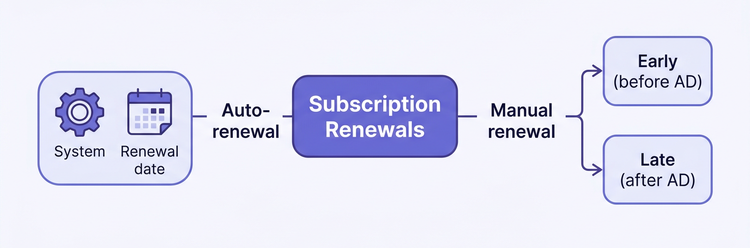
Key dates:
- Anniversary date (AD): The contract renewal date that determines the start and end of the subscription term. The AD rolls over after a successful early renewal.
- Renewal date: The date on which the system runs auto-renewal. This date does not change if an early renewal is completed.
Renewal types
Auto-renewal (system-initiated)
- Triggered automatically by Adobe on the renewal date each year.
- Uses the subscription’s configured renewal quantity and preferences.
- No partner action is required unless the customer opts out. In that case, use Update Subscription to disable auto-renewal.
Manual renewal (partner-initiated)
Variant
When
Rules
Early renewal
Before the AD, between AD-30 and AD-1
New products and additional seats are allowed. The order is invoiced immediately. The AD rolls over after the first early renewal order.
Late renewal
After the AD, and typically within 14 days ater AD.
Only the same products are allowed, and the quantity must be less than or equal to the prior term. New products or additional quantities are not permitted.
For details and API flows, see Managing early renewals using APIs and Managing auto-renewals using APIs.
Quick reference
What you need
Where to go
Configure auto-renewal (enable/disable, set quantity)
- Create Subscription (
POST /v3/customers/<customer-id>/subscriptions) <br/> - Update Subscription (PATCH /v3/customers/<customer-id>/subscriptions/<subscription-id>)Preview a renewal (pricing, eligibility)
- Preview Renewal Order (
POST /v3/customers/{customerId}/orders with orderType: "PREVIEW_RENEWAL"). See Order scenarios for more details.Place a renewal order (early or late)
- Create Renewal Order (
POST /v3/customers/{customerId}/orders with orderType: "RENEWAL"). See Order scenarios for more details.Check subscription renewal state
- Get details of all subscriptions of a customer (
GET /v3/customers/{customerId}/subscriptions) <br/> - Get details of a specific subscription (GET /v3/subscriptions/{subscriptionId})Renewal-specific error codes