Manage manual renewals using APIs
Partners can manually renew subscriptions using APIs to preview eligibility and pricing, submit early or late renewal orders, and manage quantities and offer rules. This enables flexible renewal timing while maintaining service continuity and compliance with subscription rules.
The following two manual renewal types are supported:
Quick reference
POST /v3/customers/{customerId}/orders with orderType: "PREVIEW_RENEWAL"). See Order scenarios for more details.POST /v3/customers/{customerId}/orders with orderType: "RENEWAL"). See Create Order and Order scenarios.GET /v3/customers/{customerId}/subscriptions) <br/> - Get details of a specific subscription (GET /v3/subscriptions/{subscriptionId})Early renewals
Early renewal allows partners to renew subscriptions before the AD and introduces specific lifecycle and validation rules.
Key rules
- Orders placed before AD are invoiced immediately.
- The return period is 14 days from order placement. Returns do not roll back the AD.
- The AD rolls over only once, after the first successful early renewal order.
- Subsequent renewal orders are allowed only after the previous order is fully processed.
Pricing behavior
- Non‑3YC customers: Price effective date is the order placement date.
- 3YC customers: Price effective date is based on the license commitment start date. Early renewal does not reset the 3YC commitment cycle.
Country-specific prices apply from the country's cutover, subject to commitment price locks. Early renewals placed before cutover retain regional pricing. For currency changes, follow the new-currency request rules below.
Early renewal after a currency change
After a currency cutover, eligible customers must early renew in the new currency. For example, this applies when Canada transitions from USD to CAD or Mexico transitions from USD to MXN. This is an exception to the standard requirement to reference an existing subscription:
- Use
orderType: "PREVIEW_RENEWAL"to preview andorderType: "RENEWAL"to submit the early renewal. - Select an offer from the applicable country-specific price list and send
currencyCode: "CAD"orcurrencyCode: "MXN"on the line item. - Omit
subscriptionIdfor this new-currency early renewal. An old USD subscription ID is rejected with HTTP 422 even when the request specifies the new currency. - Include
deploymentIdwhere required for a global customer's deployment.
The order creates a new-currency subscription to the next anniversary date. Old-currency early renewals are rejected with CURRENCY_NOT_ACTIVE_FOR_COUNTRY (HTTP 422), except where commitment rules permit the old currency.
Customers with a 3YC commitment accepted before cutover cannot order in the new currency during that commitment. Active 3YC customers can still early renew in USD, subject to the existing eligibility restrictions, including the final-term recommitment rule. Contact support to terminate the 3YC before moving to the new currency early. Active HGO commitments also retain the old currency until commitment end.
At anniversary renewal, quantities already early renewed on either subscription are deducted before the remaining quantities are combined in the new currency. See Combined renewal quantities.
Quantity and product rules
- The first early renewal can include either existing products or new products.
- One Order can contain either existing products upto existing current quantities or a combination of new products with additional seats of existing products beyond current quantity.
- New seat addition in an early renewal order for existing products (subsequent orders) can only be executed after early renewing all the existing quantities of that product.
- After the first successful Early Renewal, only RENEWAL orders are allowed until the Renewal Date, which is essentially when the current term ends. The Anniversary Date is updated during the initial Early Renewal, and any additional orders during the current renewal cycle must also follow the Early Renewal flow. If a restricted order type is submitted during this period, error code 3131 is returned.
- EOL SKUs can be early renewed only for 3YC customers.
- EOS SKUs cannot be early renewed.
Impact of early renewal on anniversary date and renewal date
Examples: Early Renewal, Auto‑Renewal, and AD Behavior
Early renewal workflow using APIs
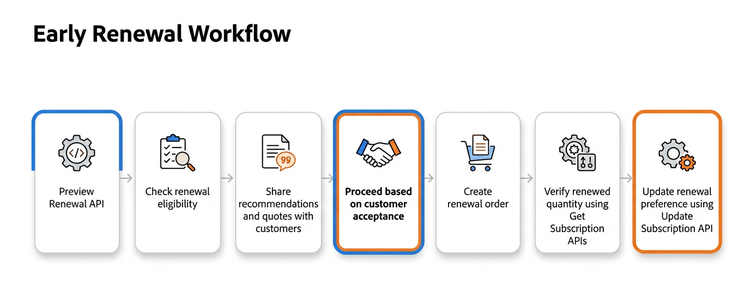
1. Preview Renewal
Simulate a renewal to validate eligibility, pricing, and offers before placing the order.
Endpoint: POST <ENV>/v3/customers/<customer-id>/orders
Notes:
subscriptionIdis necessary when the order is for an existing subscription, except for an eligible early renewal in a new currency, which must omit the old subscription ID.- If the intention is to renew a new offer, then it is optional.
- In this case, send the applicable
currencyCodeon the line item and includedeploymentIdwhere required for a global customer's deployment.
- In this case, send the applicable
- When renewing a new offer without
subscriptionId, the request is rejected if a subscription already exists for that offer, except for the new-currency early-renewal flow described above. - Adobe evaluates Instant Deal Registration automatically and independently of flexible discount codes.
Request
-
URL:
<ENV>/v3/customers/<customer-id>/orders -
Body:
{
"orderType": "PREVIEW_RENEWAL",
"externalReferenceId": "759",
"currencyCode": "USD",
"lineItems": [
 {
   "extLineItemNumber": 1,
   "offerId": "80004567EA01A12",
   "subscriptionId": "e0b170437c4e96ac5428364f674dffNA",
   "quantity": 10
 }
 ]
}
Response
   {
   "referenceOrderId": "",
   "externalReferenceId": "",
   "orderId": "",
   "customerId": "1006370655",
   "currencyCode": "USD",
   "orderType": "PREVIEW_RENEWAL",
   "creationDate": "2025-05-02T22:49:54Z",
   "status": "",
  "lineItems": [
    {
      "extLineItemNumber": 1,
      "offerId": "11083117CA03A12",
      "quantity": 10,
      "subscriptionId": "3d0630693446f8bdff9cbd08f4b68bNA",
      "status": "1000",
      "currencyCode": "USD",
      "proratedDays": 365,
      "pricing": {
        "partnerPrice": 350.50,
        "discountedPartnerPrice": 350.50,
        "netPartnerPrice": 350.50,
        "lineItemPartnerPrice": 3505.00
      }
    }
   ]
   }
Preview Renewal includes isDealRegistered only when Instant Deal Registration was auto-injected for a line item. If absent, Instant Deal Registration was not injected or evaluated; false means qualification failed; and true means qualification passed. Amount fields are omitted when the value is false. With fetch-price=true, qualifying line items include earnedDealRegPerUnit and earnedDealRegAmount in pricing, and pricingSummary includes totalEarnedDealRegAmount. These deal registration amounts do not reduce existing partner-price fields.
2. Create renewal order
Use the POST /v3/customers/<customer-id>/orders endpoint with orderType as RENEWAL to place a renewal order.
Endpoint: POST <ENV>/v3/customers/<customer-id>/orders
Notes:
subscriptionIdis necessary when the order is for an existing subscription, except for an eligible early renewal in a new currency, which must omit the old subscription ID.- If the intention is to create a subscription for a new offer, then it is optional.
- In this case, send the applicable
currencyCodeon the line item and includedeploymentIdwhere required for a global customer's deployment.
- In this case, send the applicable
- When renewing a new offer without
subscriptionId, the request is rejected if a subscription already exists for that offer, except for the new-currency early-renewal flow described above.
Request:
{
  "orderType": "RENEWAL",
  "externalReferenceId": "759",
  "currencyCode": "USD",
  "lineItems": [
    {
      "extLineItemNumber": 1,
      "offerId": "80004567EA01A12",
      "subscriptionId": "e0b170437c4e96ac5428364f674dffNA",
      "quantity": 10

    }
  ]
}
Response
{
  "referenceOrderId": "",
  "orderType": "RENEWAL",
  "externalReferenceId": "759",
  "customerId": "9876543210",
  "orderId": "5120008001",
  "currencyCode": "USD",
  "creationDate": "2019-05-02T22:49:54Z",
  "status": "1002",
  "lineItems": [
    {
      "extLineItemNumber": 1,
      "offerId": "80004567EA01A12",
      "quantity": 1,
      "status": "1002",
      "subscriptionId": "e0b170437c4e96ac5428364f674dffNA"
    }
  ],
  "links": { ... }
}
3. Verify renewed quantity details using GET Subscriptions API
Use the Subscriptions API to confirm renewedQuantity and other renewal-related fields.
Endpoints:
GET <ENV>/v3/customers/<customer-id>/subscriptions/<subscription-id>GET <ENV>/v3/customers/<customer-id>/subscriptions
The renewedQuantity parameter in the response indicates the quantity that was manually renewed before the Anniversary Date.
A sample response is as follows:
{
  "subscriptionId": "1c3a4517c44cfc925704fe942a79abNA",
  "offerId": "65304479CA01A12",
  "currentQuantity": 10,
  "usedQuantity": 0,
  "autoRenewal": {
    "enabled":true,
    "renewalQuantity": 5
  },

"renewedQuantity":5,
  "creationDate": "2024-09-13T09:22:13Z",
  "renewalDate": "2025-09-13",
  "status": "1000",
  "currencyCode": "USD",

  "links": {
    "self": {
      "uri": "/v3/customers/123456789/subscriptions/1c3a4517c44cfc925704fe942a79abNA",
      "method": "GET",
      "headers": []
    }
  }
}
Late renewals
Late renewal occurs after the AD when the subscription either did not auto‑renew or was opted out of auto‑renewal.
Rules:
- Occurs after Anniversary Date (AD) up to the allowed grace period (typically 14 days).
- Partners can renew expired or near‑expired subscriptions manually during this window.
- Can only include products from the previous term.
- Quantity must be equal to or less than the previous‑term quantity.
- Additional quantity is not allowed in the renewal order.
- New purchases require a separate new Create Order workflow.
Note: You can use the same set of APIs mentioned above for Early Renewals, to perform late renewals as well. A renewal‑type order placed after the AD is considered a late renewal order. Whereas, a renewal type of order placed with line item before AD will be considered an Early Renewal Order.