Product Recommendations
The Recommendations API empowers VIP Marketplace partners to provide intelligent, personalized, and context-aware product suggestions, enhancing the customer experience through upsell, cross-sell, and add-on opportunities. For more details, see Manage recommendations using APIs section in the Adobe Commerce Partner API documentation.
Testing Recommendations in Sandbox
The standalone Recommendations API and certain existing APIs can fetch recommendations through query parameters, and these recommendations are now available in the Sandbox environment.
No updates have been made to the Sandbox UI, as recommendations will be delivered exclusively through the APIs.
Specific, hardcoded recommendations have been configured to facilitate integration and functional testing of the recommendations feature. These predefined rules are as follows:
Adobe Instant Deal Registration recommendations
Call the standalone Recommendations API with includeDealRegistrations set to true; omitting it or setting it to false excludes discounts.dealRegistrations. Responses do not expose a code or ID.
For the predefined scenarios and expected order outcomes, see Test Adobe Instant Deal Registration in Sandbox.
Note: In production, recommendations will be context-aware and based on the customer's entitlements (products owned), and products that are already owned are not recommended.
Testing Propensity Signals in Sandbox
In addition to product recommendations, the Sandbox enables you to test propensity signals. For more information about propensity signals, see Propensity Intelligence.
Configuring propensity levels
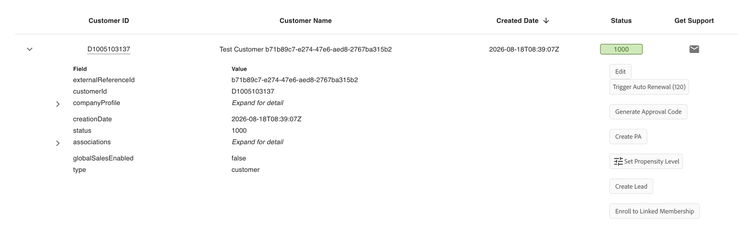
Under Manage Records > Customers, expand a customer row and select Set Propensity Level from the actions list.
This opens the Set propensity level dialog, where you can independently set Churn level and Seat addition, corresponding to the churn and seatExpansion signals in the API response. Select Save to apply your changes, or Reset to default to revert both levels back to Medium.
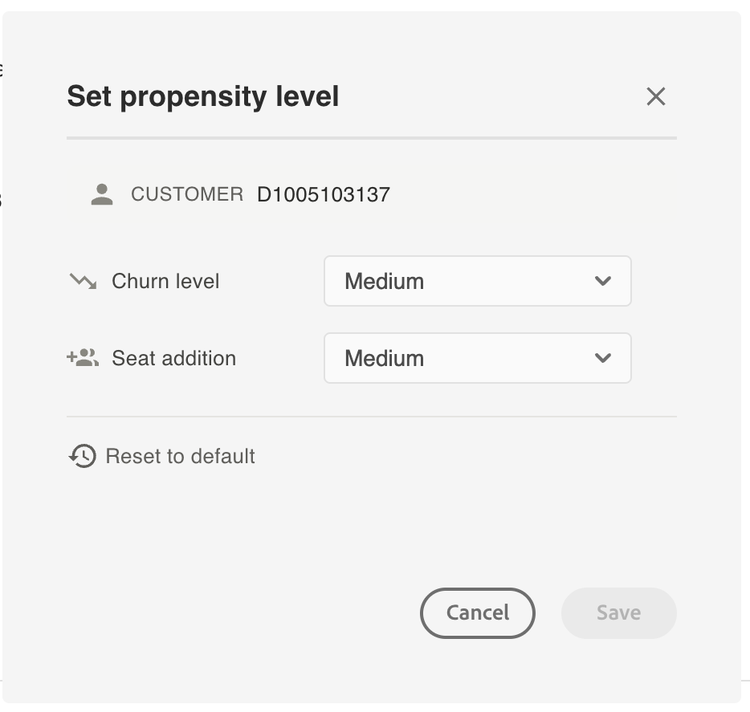
Configuring propensity levels allows you to test all supported response scenarios without waiting for a corresponding real-world customer condition.
MEDIUM probability prediction.HIGH probability prediction.LOW probability prediction."churn": [].- Medium is the default level for both
churnandseatExpansionunless they are explicitly configured for a customer. churnandseatExpansioncan be configured independently. For example, you can setchurnto High while leavingseatExpansionat Medium.- Selecting Reset to default restores both signals to Medium for the selected customer.
Testing workflow
- Set the propensity level for
churn,seatExpansion, or both, for a customer in Sandbox. - Call the Fetch Recommendations API for that customer, setting
includePropensityto an array containing the signal or signals you configured, for example["churn", "seatExpansion"]. - Verify that the
propensityobject in the response matches the level you configured. - Repeat the test with different propensity levels to validate all response-handling scenarios in your integration.