Big text template
A title, a short collapsed body, a longer expanded body, and an optional large side icon.
Body text is split across two keys: adb_body holds the full text shown when the notification is expanded, and adb_template_properties.adb_collapsed_text holds the short text shown when it is collapsed. When adb_collapsed_text is absent, the collapsed state falls back to adb_body.
How it looks
The following example shows the same big text notification, with a large icon, in the collapsed and expanded states:
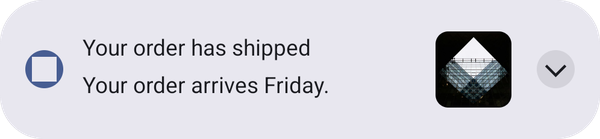
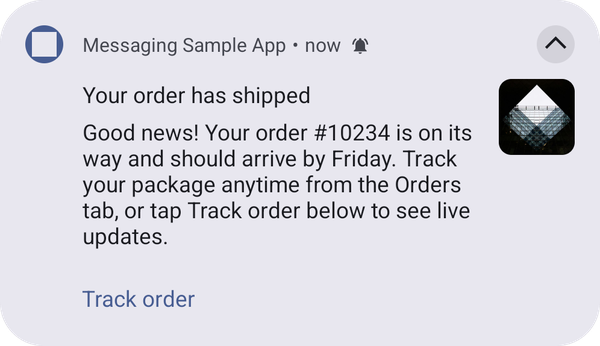
When there is no large icon, or the icon can't be downloaded, the text uses the full width of the notification.
Configuration
This template is rendered by the UI Builder plugin. To add the plugin to your app, see Add the UI Builder plugin to your app. When the plugin is not added, the push is displayed as a standard notification. See Push templates troubleshooting.
Properties
In addition to the top level keys documented on Push notification payload keys (adb_title, adb_body, adb_icon, adb_sound, adb_channel_id, adb_n_count, adb_n_priority, adb_n_visibility, adb_a_type, adb_uri, adb_act), this template reads:
adb_template_type"ajo_bigtext".adb_version"1" when absent.adb_template_properties.adb_collapsed_textadb_body when absent.adb_template_properties.adb_large_iconadb_template_properties, not as a flat, top level adb_large_icon key.Large icon recommendations
data-variant=info
data-slots=text
- Recommended aspect ratio: 1:1 (square). The large icon is always rendered center-cropped, so a square source image fills the icon area without unexpected cropping.
Example
{
   "message":{
      "android":{
         "data":{
            "adb_template_type": "ajo_bigtext",
            "adb_version": "1",
            "adb_title": "Your order has shipped",
            "adb_body": "Good news! Your order #10234 is on its way and should arrive by Friday. Track your package anytime from the Orders tab, or tap Track order below to see live updates.",
            "adb_icon": "ic_launcher_background",
            "adb_sound": "bells",
            "adb_channel_id": "ajo_bigtext_channel",
            "adb_n_count": "1",
            "adb_n_priority": "PRIORITY_HIGH",
            "adb_n_visibility": "PUBLIC",
            "adb_a_type": "WEBURL",
            "adb_uri": "https://www.adobe.com",
            "adb_act": "[{\"label\":\"Track order\",\"uri\":\"https://www.adobe.com\",\"type\":\"WEBURL\"}]",
            "adb_template_properties": "{\"adb_collapsed_text\":\"Your order arrives Friday.\",\"adb_large_icon\":\"https://example.com/box.png\"}"
         }
      }
   }
}
data-variant=info
data-slots=text
adb_template_properties is a JSON-encoded string, like adb_act above, because FCM data messages only allow string values. The object shown inside it is the decoded shape.See also: Basic template, Push templates troubleshooting.