data-slots=heading, text
data-variant=centered
data-textColor=white
data-background=linear-gradient(135deg, #30186E 0%, #6432C8 100%)
Hybrid plugins
data-slots=text
data-backgroundcolor=blue
data-variant=info
data-slots=heading, text
In this section
data-slots=link, text
data-width=300px
data-slots=link, text
data-width=300px
How Hybrid plugins work
A Hybrid plugin is a standard UXP plugin that loads a dynamically linked C++ library. JavaScript imports the compiled .uxpaddon with require() and calls its exported functions like any other module.
The model is similar to C++ addons in Node.js:
const addon = require("sample.uxpaddon");
The addon exposes native functions and properties to JavaScript. Keep interface code and routine orchestration in JavaScript, and move only the work that benefits from native execution into C++.
Choose Hybrid for native work
Hybrid plugins are a good fit for:
- Performance-intensive media processing: waveform analysis, frame-level pixel operations, audio DSP, or similar computation.
- Existing C++ libraries: image processing, machine learning, codecs, or internal native libraries.
- High-volume metadata work: batch XMP processing or custom schema transformations.
- Native integrations: hardware SDKs, proprietary pipelines, or platform APIs exposed only through C or C++.
Do not add a native layer when the task can be implemented reliably with UXP or host APIs. Native binaries add platform builds, code signing, testing, and distribution requirements.
Before you begin
data-variant=info
data-slots=heading, text
Get the Hybrid Plugin SDK
Download the SDK
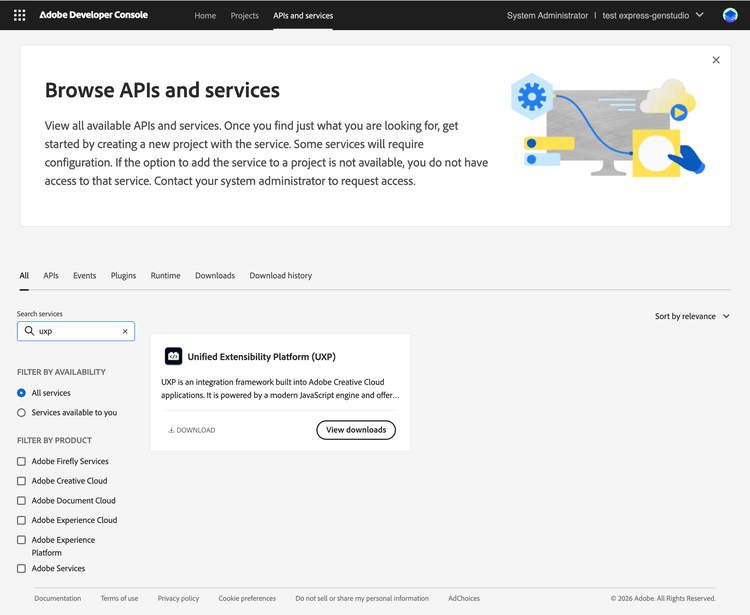
Download the UXP Hybrid Plugin SDK from the Adobe Developer Console (if you get "Access Denied", see this FAQ). Unpack the contents and read the included README.md for platform-specific build instructions.
Review the SDK contents
The SDK provides headers, utilities, and templates for building native addons, called uxpaddons. Its API follows concepts similar to Node-API.
src/apisrc/utilitiesUXP_ADDON_INIT and UXP_ADDON_TERMINATE macros for registering initialization and termination routines.template/template-devtemplate/template-pluginPlan SDK updates
The SDK is versioned separately from host applications and labeled by UXP version. Check each target host's release notes for SDK announcements. Adopting a newer SDK requires rebuilding and republishing the native binaries; addons built with an older supported SDK remain compatible with newer supported host releases.
Next step
Follow Build a Hybrid Plugin to compile an addon, connect it to JavaScript, configure the manifest, debug both layers, and package the plugin.