data-slots=heading, text
data-background=linear-gradient(180deg, #c946eb, #6372f5)
data-variant=default
data-textColor=white
Adobe Express Translate Connectors
Build native service integrations for Adobe Express using a declarative, manifest-driven connector framework. Connect your translation service directly into Adobe Express workflows without building a panel or UI from scratch.
Adobe Express Translate Connectors integrate third-party services directly into native Adobe Express features. You configure your integration through the Connector Playground, which generates a manifest.json that Adobe Express uses to render the UI and route API calls to your service. Connectors do not require a panel or custom UI code.
Adobe Express currently supports Translate connectors, which power the Translate feature in Adobe Express. Translate connectors are available only to Adobe Express users signed in with an enterprise account.
data-slots=heading, text
data-variant=info
Before you start: check your account access
Enterprise Adobe accounts with a Developer or Administrator role get the Connector Playground and submission for private share links and internal listings by default. Personal Adobe accounts, and public listing for any account type, require approval through the Connector interest form first, as shown below.
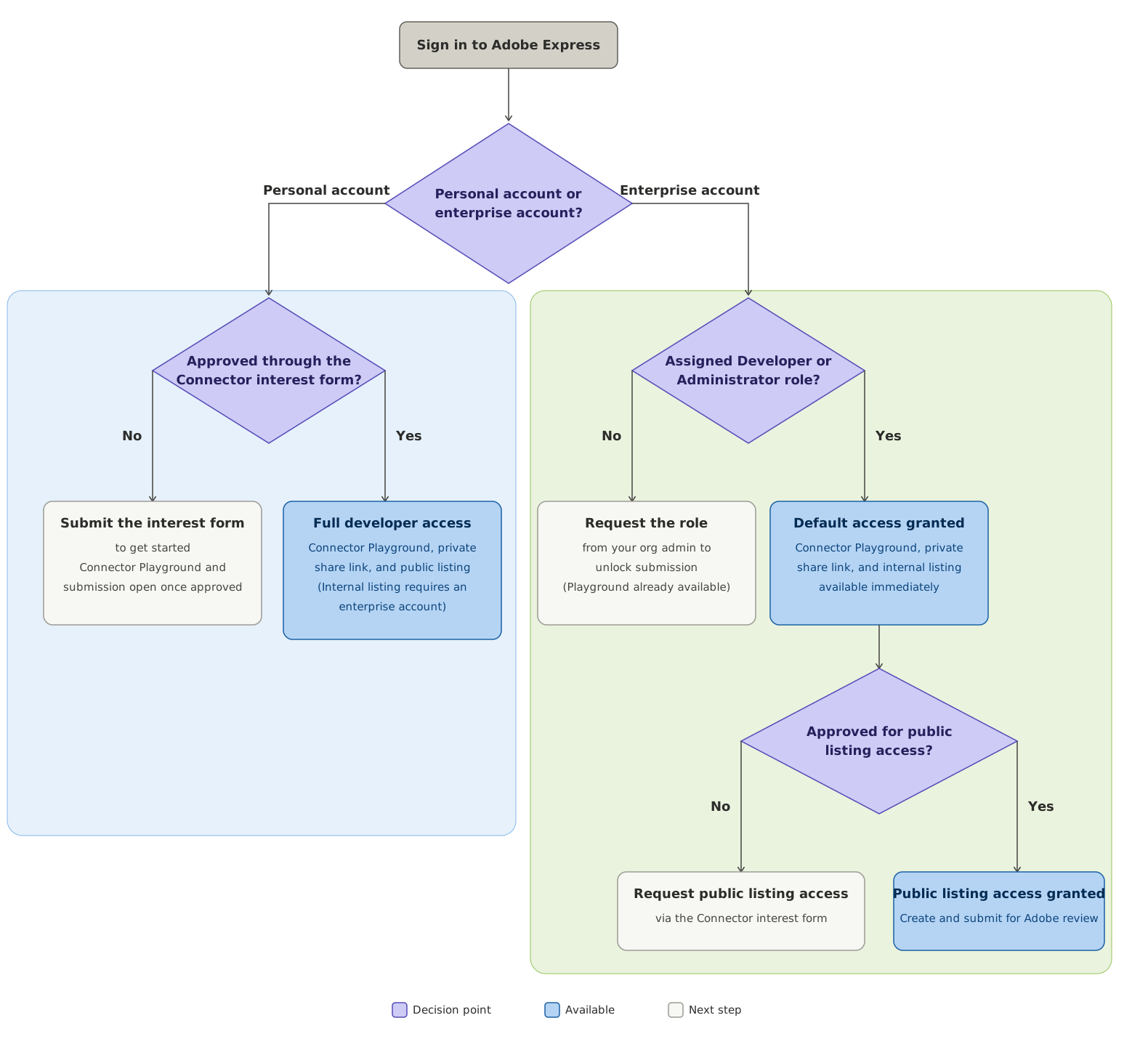
See Account access at a glance for the complete access table and the exceptions to keep in mind.
data-slots=heading, link, text
data-width=33%
Start Here
Download the developer resources and prepare your environment before building your first connector.
data-slots=link, text
data-width=33%
Learn how translate connectors work, what you can build, and the core concepts behind the manifest-driven model.
data-slots=link, text
data-width=33%
Choose an authentication method, implement the five Translate API endpoints, and test your service locally with the provided spec and sample code.
data-slots=link, text
data-width=33%
Skip hosting your own service. Deploy your Translate connector as Adobe I/O Runtime actions using the App Builder starter template.
data-slots=heading, link, text
data-width=33%
Configure & Test
Use the Connector Playground to configure your connector, generate the manifest, validate your setup, and connect your service.
data-slots=link, text
data-width=33%
Verify each endpoint with
curl, then validate the end-to-end integration in the Connector Playground and the Translate panel.data-slots=link, text
data-width=33%
Understand every section of the
manifest.json file: identity, app targets, API configuration, auth, and UI configuration.data-slots=heading, link, text
data-width=50%
References
Complete HTTP API contract for Translate connectors: all endpoints, request/response schemas, and error codes.
data-slots=link, text
data-width=50%
Answers to common questions about Adobe Express Translate Connectors and known limitations.
data-slots=heading, link, text
data-width=50%
Support
Diagnose and resolve common errors in the Connector Playground, manifest validation, authentication, and the Translate panel.
data-slots=heading, link, text
data-width=50%
Distribute
Distribute your connector through an internal listing, a public listing, or a private share link. Compare options and start the submission process.