Starters and samples
Learn from working examples and jumpstart your plugin development with sample code and starter templates.
Overview
When building UXP plugins for Premiere, you don't need to start from scratch. We provide two types of resources to help you:
- Samples: Complete, working examples that demonstrate specific features or use cases
- Starters: Minimal templates with framework setup to help you begin a new plugin project
GitHub repository
You can find a collection of samples and starter templates in the official repository:
This repository includes:
- Working plugin examples for common tasks
- Best practices for plugin architecture
- Integration examples with Premiere APIs
- Reusable code patterns you can adapt for your projects
UDT templates
When you create a new plugin with the UXP Developer Tool (UDT), you can choose from several built-in templates:
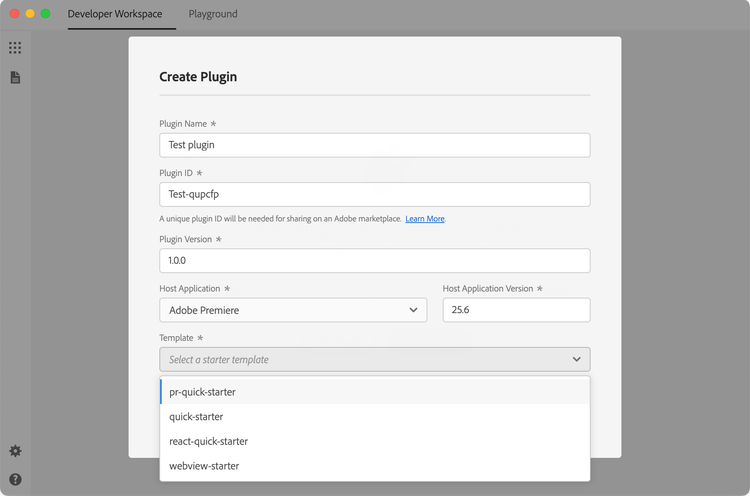
These templates provide a ready-to-use project structure with:
- Pre-configured
manifest.jsonfile - Basic HTML and JavaScript scaffolding
- Example code demonstrating key concepts
- Proper directory organization
To use a template, select it when running the create command in UDT. Learn more about this process in the UDT Deep Dive tutorial.
Hybrid Plugin SDK
If you're building a Hybrid Plugin that combines JavaScript with native C++ code, download the UXP Hybrid Plugin SDK from the Adobe Developer Console. The SDK includes:
- C++ headers and API definitions for building native addons (
.uxpaddonfiles) - A
template-devproject with source code to use as a starting point - A pre-compiled
template-pluginyou can load directly into UDT
See the Hybrid Plugins guide for build instructions and configuration details.
Tutorials
Looking to build something from scratch? The Tutorials section provides step-by-step guides that walk you through complete plugin development tasks:
- UDT Deep Dive: Master the Adobe UXP Developer Tool
- Add Commands: Create menu items in Premiere
- Add Lifecycle Hooks: Respond to plugin and panel events
- Add Multiple Panels: Work with multiple panel entrypoints
- Add Modal Dialogs: Create modal dialogs as a user interface for Commands or as an additional UI for Panels
- Inter Plugin Communication: Enable plugins to communicate with each other
Recipes
For quick, focused code examples without the full tutorial treatment, check out the Recipes section. Recipes provide bite-sized, ready-to-use code snippets for common use cases:
- File system operations
- Network requests
- UI interactions
- Clipboard access
- And more
Contributing
We'd love to expand this collection with more real-world examples. If you've built something useful, consider contributing:
- Fork the samples repository
- Add your sample with clear documentation
- Create a pull request and tag us for review
Your contributions help the entire plugin developer community!