Configure observability subscriptions
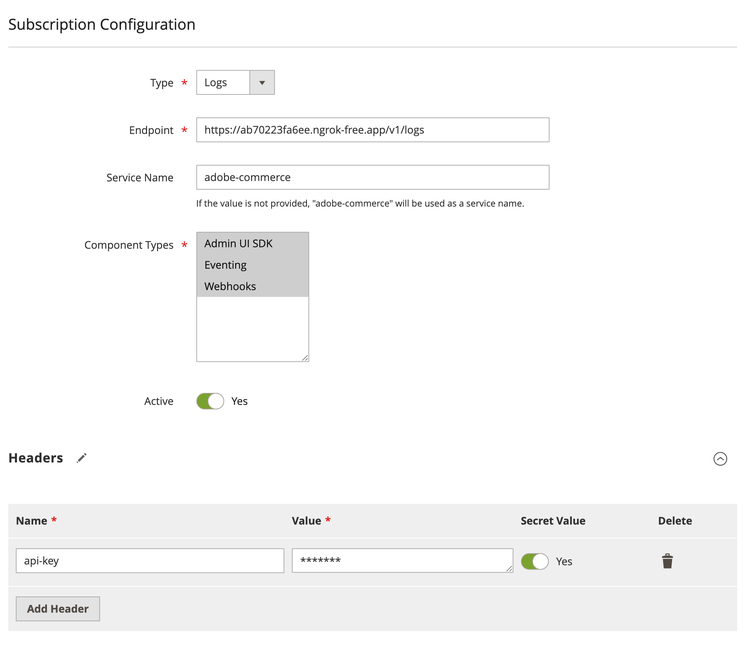
To start using the observability module, you need to configure Adobe Commerce by creating a new subscription. You can create a subscription in two ways: in the Admin UI or through the REST API. You can create multiple subscriptions, each with its own configuration. The subscription configuration includes the following parameters:
- Type: The type of subscription:
logs,metrics, ortraces. - Endpoint: The endpoint where observability data will be sent. This is the URL of an observability collector that supports OpenTelemetry protocol such as New Relic, Datadog, or a custom collector.
- Component: The component the subscription is created for. Supported values are
Webhooks,Eventing, andAdmin UI SDK, depending on the selected type. You can select one or more components to monitor. - Service name: The name of the service that will be used to identify the logs in the destination.
- Is active: A flag that indicates whether the subscription is active.
- Headers: Additional headers that will be sent with the logs to the destination. They are useful for adding custom metadata or authentication information. You can specify if a header has secret values to hide in the Admin UI or REST response.
- Log message configuration: Enables or disables the additional data in the log message. This data includes the request headers, payload, and response payloads for webhooks.
Commerce sends all data in the OpenTelemetry format.
Admin configuration
To configure observability in the Admin UI, navigate to System > Observability > Subscription List. Here you can create, update, and delete subscriptions.
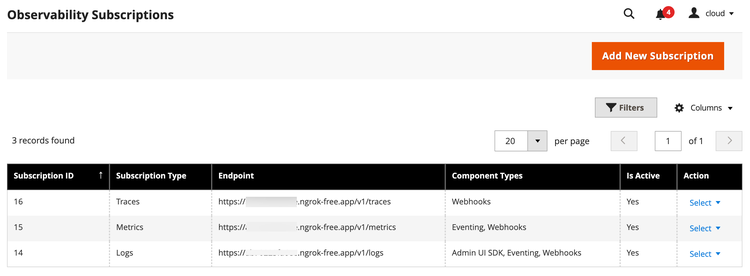
To create a new subscription, click the Add New Subscription button. Enter the required information and click Save Subscription. The new subscription is added to the list.
Connect with an observability platform
You can connect Adobe Commerce observability data with various observability platforms that support the OpenTelemetry protocol, such as New Relic, Datadog, Splunk, or a custom collector. To do this, you must configure the endpoint URL and any required headers in the observability subscription.