Integrate with EDS storefront
Integrate your Out-of-Process Extensions (OOPE) with the Edge Delivery Service (EDS) Storefront.
Prerequisites
The following prerequisites are required to enable your OOPE integration with the EDS Storefront:
-
Configure Storefront in EDS with the checkout drop-in component.
- The checkout drop-in component allows users to enter shipping and payment information, review their order details, and confirm their purchase.
- To access the latest EDS Storefront boilerplate with drop-in components, see EDS Adobe Commerce Boilerplate.
Integrate with checkout drop-in components
Checkout drop-in components provide extensibility points to integrate with OOPE payment methods. See Add a payment method from the Checkout drop-in documentation for integration details.
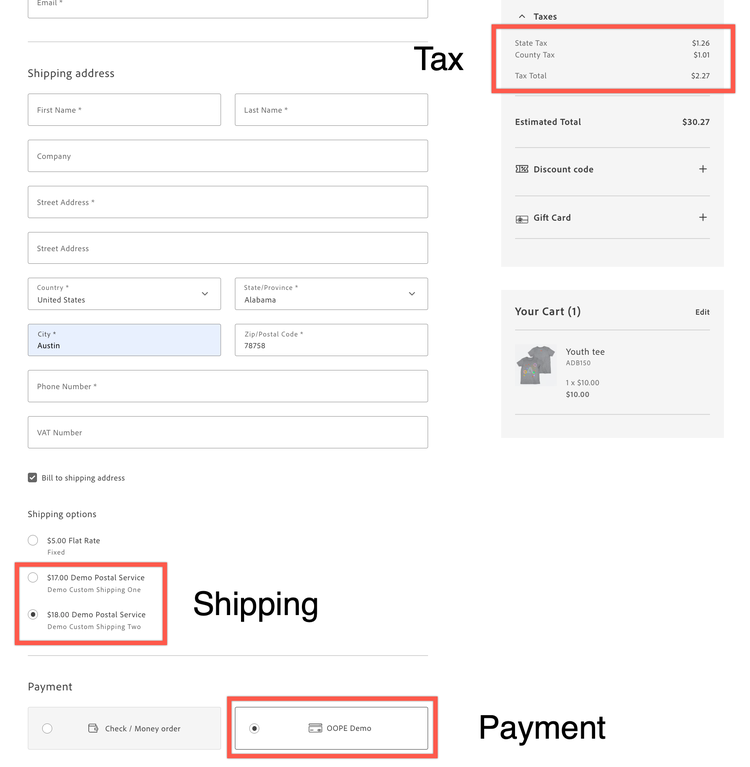
The following image indicates the location of the checkout drop-in component in the EDS Storefront:
Extend OOPE GraphQL Schema
If you want to retrieve OOPE payment method information from the Commerce instance, you can extend the GraphQL query using drop-in components with the GraphQL Extensibility API.
-
In
build.mjsof the boilerplate, add the following code to extend the OOPE GraphQL schema:overrideGQLOperations([ { npm: '@dropins/storefront-checkout', operations: [ ` fragment CHECKOUT_DATA_FRAGMENT on Cart { available_payment_methods { code title oope_payment_method_config { backend_integration_url custom_config { ... on CustomConfigKeyValue { key value } } } } selected_payment_method { code title oope_payment_method_config { backend_integration_url custom_config { ... on CustomConfigKeyValue { key value } } } } } `, ], }, ]); -
Extend the OOPE GraphQL schema in the checkout drop-in component initializer. It enables the drop-in component to retrieve the OOPE data.
await initializeDropin(async () => { ... return initializers.mountImmediately(initialize, { langDefinitions, models: { CartModel: { transformer: (data) => { return { availablePaymentMethods: data?.available_payment_methods, selectedPaymentMethod: data?.selected_payment_method, }; }, }, }, }); })(); -
Retrieve the OOPE payment method information from the data coming from the event responses.
events.on('checkout/initialized', handleCheckoutInitialized, { eager: true }); -
Retrieve Cart information from the data coming from the event responses.
events.on('cart/data', handleCartData, { eager: true });