CategoryTree API reference
<!-- MarkdownTOC -->
<!-- /MarkdownTOC -->
The Category Tree API returns category information for selected category IDs. If you call the API without specifying a category, CategoryTree returns a list of all top-level Adobe Stock categories.
You can optionally request the results in languages other than English by using the locale parameter.
Please note that categories are metadata set manually by the Stock Contributor (the photographer or artist who uploaded the asset), not by Adobe Stock. Therefore, if the asset is not categorized correctly, it is due to human error. Also, the Stock Search API does not use machine-learning algorithms when searching by category--it can only rely on information provided by the Contributor. Finally, categories are not actively curated by Adobe Stock, so new categories are not added or removed on a regular basis.
On the other hand, keyword search is driven by both machine learning and by Contributor metadata. For that reason, searching by keywords instead of categories is considered a best practice, and is generally more reliable and accurate. Adobe Stock maintains this API mainly for backwards compatibility with existing applications.
Category Tree calls
Authentication
An Authorization header is not required.
Request headers
See API authentication and Headers for Stock API calls for details about header content.
- Required headers:
x-Product,x-api-key - Optional headers:
Authorization,X-Request-Id
URL parameters
Pass the following parameters with a GET request.
en_US. See the full list of Locales. String.Responses
CategoryTree's response is returned in a JSON array that can contain multiple category structures. Each category may have child categories beneath it that can be discovered with subsequent requests.
    [
        {
            "id": Integer,
            "link": String,
            "name": String
        },
        {
            "id": Integer,
            "link": String,
            "name": String
        }
    ]
/Category/linkname/category_id <br/>See below for example usage. String.Example requests and responses
First, we obtain a list of all top-level categories by not including the category_id parameter.
    GET /Rest/Media/1/Search/CategoryTree HTTP/1.1
    Host: stock.adobe.io
    X-Product: MySampleApp/1.0
    x-api-key: MyApiKey
The response is multiple categories, including "Food" (id 289).
    [
        {
            "id": 261,
            "link": "/Category/states-of-mind/261?load_type=category",
            "name": "States of Mind"
        },
        {
            "id": 289,
            "link": "/Category/food/289?load_type=category",
            "name": "Food"
        },
        {
            "id": 444,
            "link": "/Category/graphic-resources/444?load_type=category",
            "name": "Graphic Resources"
        },
    ]
The category "Food" has multiple child subcategories which we cannot see here without further requests. Here is a subset of its category structure.
-
Food
-
Accessories
-
Bread
-
Cheese and Dairy Products
- Camembert
- Cheddar
- Emmental and Gruyere
- Feta
-
Cooking
-
To get the first child level of Food, we pass its category_id of 289.
    GET /Rest/Media/1/Search/CategoryTree?category_id=289 HTTP/1.1
    Host: stock.adobe.io
    X-Product: MySampleApp/1.0
    x-api-key: MyApiKey
We see it has child IDs of 300, 301, and 311.
    [
        {
            "id": 300,
            "link": "/Category/bread/300?load_type=category",
            "name": "Bread"
        },
        {
            "id": 301,
            "link": "/Category/cheese-and-dairy-products/301?load_type=category",
            "name": "Cheese and Dairy Products"
        },
        {
            "id": 311,
            "link": "/Category/cooking/311?load_type=category",
            "name": "Cooking"
        },
    ]
If we want to see the children of "Cheese and Dairy Products", we make another request for category_id 301.
    GET /Rest/Media/1/Search/CategoryTree?category_id=301 HTTP/1.1
    Host: stock.adobe.io
    X-Product: MySampleApp/1.0
    x-api-key: MyApiKey
And get back multiple types of cheeses.
    [
        {
            "id": 302,
            "link": "/Category/camembert/302?load_type=category",
            "name": "Camembert"
        },
        {
            "id": 303,
            "link": "/Category/cheddar/303?load_type=category",
            "name": "Cheddar"
        },
        {
            "id": 304,
            "link": "/Category/emmental-and-gruyere/304?load_type=category",
            "name": "Emmental and Gruyere"
        },
        {
            "id": 305,
            "link": "/Category/feta/305?load_type=category",
            "name": "Feta"
        },
    ]
We cannot go further than this, because there is a limit of 3 to each category.
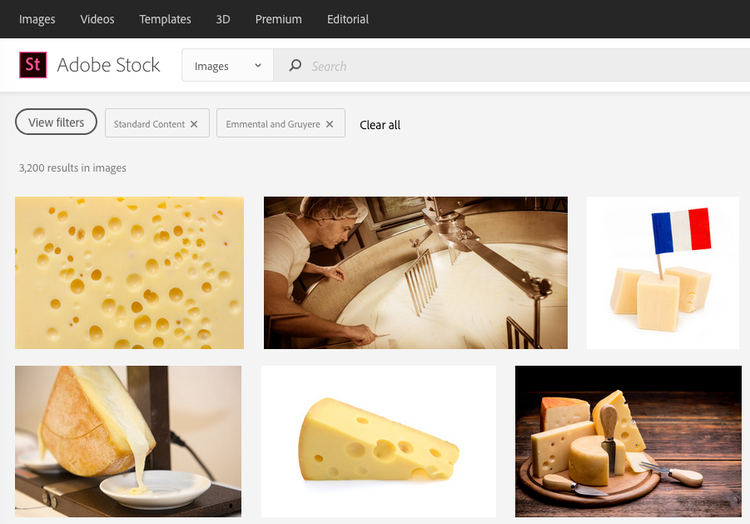
From the data above, we can construct URLs to the Adobe Stock website using the link response fields.
-
Food: https://stock.adobe.com/Category/food/289?load_type=category
-
Cheese and Dairy Products: https://stock.adobe.com/Category/cheese-and-dairy-products/301?load_type=category
- Cheddar: https://stock.adobe.com/Category/cheddar/303?load_type=category
- Emmental and Gruyere: https://stock.adobe.com/Category/emmental-and-gruyere/304?load_type=category
-
And on the Stock website, we can see the category filter applied: