Prompt widget
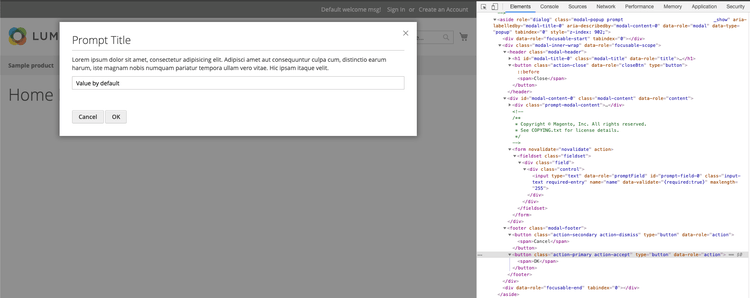
The prompt widget implements a modal pop-up window with an input field, and a cancel and a confirmation button.
It extends the modal widget.
The prompt widget source is <Magento_Ui_module_dir>/view/base/web/js/modal/prompt.js.
The widget can be used for implementing prompt windows for both, admin and storefront. The design patterns for the modal pop-up windows in the admin are described in the Admin Pattern Library, the Slide-out Panels, Modal Windows, and Overlays topic.
Initialize
The prompt widget can be initialized with or without binding to a certain element.
Example 1: initialization on an element
$('#prompt_init').prompt({
    title: $.mage.__('Prompt title'),
    actions: {
        confirm: function(){}, //callback on 'Ok' button click
        cancel: function(){}, //callback on 'Cancel' button click
        always: function(){}
    }
});
Example 2: standalone initialization
require([
    'jquery',
    'Magento_Ui/js/modal/prompt'
], function($, prompt) { // Variable that represents the `prompt` function

    prompt({
        title: $.mage.__('Some title'),
        content: $.mage.__('Some content'),
        actions: {
            confirm: function(){},
            cancel: function(){},
            always: function(){}
        }
    });

});
For details about how to initialize a widget in a .phtml template, refer to the JavaScript initialization topic.
Options
actions
Widget callbacks.
Type: Object.
Default value:
actions: {
    confirm: function(){},
    cancel: function(){},
    always: function(){}
}
autoOpen
Automatically open the prompt window when the widget is initialized.
Type: Boolean
Default value: false
clickableOverlay
Close the prompt window when a user clicks on the overlay.
Type: Boolean
Default value: true
content
The prompt window content.
Type: String.
focus
The selector of the element to be in focus when the prompt window opens. If focus is not specified or set to empty string, the focus is on the close button. If focusing is not required, set focus to none.
Type: String.
Default value: ''
title
The title of the prompt window.
Type: String.
Default value: ''
modalClass
The CSS class of the prompt window.
Type: String.
Default value: 'prompt'
promptContentTmpl
The template of the prompt popup form.
Type: String.
Default value:
<form <%= formAttr %>>
    <fieldset class="fieldset">
        <div class="field">
            <% if(data.label){ %>
            <label for="prompt-field-<%- data.id %>" class="label">
                <span><%= data.label %></span>
            </label>
            <% } %>
            <div class="control">
                <input type="text" data-role="promptField" id="prompt-field-<%- data.id %>" class="input-text" <%= inputAttr %>/>
            </div>
        </div>
    </fieldset>
</form>
The file with template ui/template/modal/modal-prompt-content.html.
value
The value of the prompt field.
Type: String.
Default value: ''
promptField
The prompt field selector.
Type: String.
Default value: '[data-role="promptField"]'
attributesForm
The attributes for the prompt form.
Type: Object.
Default value: {}
attributesField
The attributes for the prompt field.
Type: Object.
Default value: {}
validation
Specifies if the prompt form should be validated, when the confirmation button is clicked.
Type: Boolean
Default value: false
validationRules
The array of validation classes which will be added to prompt field.
Type: Array
Default value: []
Events
The prompt widget implements the following events:
confirmcallback: called when the confirmation button is clicked. The first argument is the value of the input field.cancelcallback: called when the cancel button is clicked.alwayscallback: called when the popup is closed.
Keyboard navigation
- ESC key: cancel the input and close the current prompt window (the same behavior as for the 'Cancel' button)
- ENTER key: confirm the input and close the current prompt window (the same behavior as for the 'OK' button)
- TAB key: set focus to the next focusable element (looped inside the prompt window)
- SHIFT+TAB keys combination: set focus to the previous focusable element (looped inside the prompt window)
Code Sample
Initialization on an element
<script>
    require([
        'jquery',
        'Magento_Ui/js/modal/prompt'
    ], function ($) {
        'use strict';

        $('.prompt-modal-content').prompt({
            title: $.mage.__('Prompt Title'),
            modalClass: 'prompt',
            value: $.mage.__('Value by default'),
            validation: true,
            promptField: '[data-role="promptField"]',
            validationRules: ['required-entry'],
            attributesForm: {
                novalidate: 'novalidate',
                action: ''
            },
            attributesField: {
                name: 'name',
                'data-validate': '{required:true}',
                maxlength: '255'
            }, // attributes for the input field
            actions: {
                always: function() {
                    // do something when the modal is closed
                },
                confirm: function () {
                    // do something when the confirmation button is clicked
                },
                cancel: function () {
                    // do something when the cancel button is clicked
                }
            }
        });
    });
</script>
Standalone initialization
<div class="prompt-modal-content">
    <p>Lorem ipsum dolor sit amet, consectetur adipisicing elit.</p>
</div>

<script>
    require([
        'jquery',
        'Magento_Ui/js/modal/prompt'
    ], function ($, prompt) {
        'use strict';

        prompt({
            title: $.mage.__('Prompt Title'),
            content: $.mage.__($('.prompt-modal-content')),
            modalClass: 'prompt',
            value: $.mage.__('Value by default'),
            validation: true,
            promptField: '[data-role="promptField"]',
            validationRules: ['required-entry'],
            attributesForm: {
                novalidate: 'novalidate',
                action: ''
            },
            attributesField: {
                name: 'name',
                'data-validate': '{required:true}',
                maxlength: '255'
            },
            actions: {
                always: function() {
                    // do something when the modal is closed
                },
                confirm: function () {
                    // do something when the confirmation button is clicked
                },
                cancel: function () {
                    // do something when the cancel button is clicked
                }
            }
        });
    });
</script>
Result