DynamicRowsDragAndDrop component
The DynamicRowsDragAndDrop component is an extension for DynamicRows, allowing users to change column position in the table.
Options
Option
Description
Type
Default Value
componentThe path to the component's
.js file in terms of RequireJS.String
'Magento_Ui/js/dynamic-rows/dnd'draggableElementThe dragged HTML element.
Object
{}draggableElementClassThe class adds to the dragged element.
String
'_dragged'enabledWhether the component is allowed to change the position of columns.
Boolean
truerecordsCacheThe array of cached records.
Array
[]separatorsClassThe object with class separators for top and bottom positions.
Object
{top: '_dragover-top', bottom: '_dragover-bottom'}templatePath to the component's
.html template.String
'ui/dynamic-rows/cells/dnd'Sources files
Extends UiElement:
- app/code/Magento/Ui/view/base/web/js/dynamic-rows/dnd.js
- app/code/Magento/Ui/view/base/web/templates/dynamic-rows/cells/dnd.html
Examples
Integration
This is an example of how the DynamicRowsDragAndDrop component integrates with the DynamicRows component:
<dynamicRows name="dynamic_rows">
    <settings>
        <addButtonLabel translate="true">Add Record</addButtonLabel>
        <dndConfig>
            <param name="enabled" xsi:type="boolean">true</param>
            <param name="draggableElementClass" xsi:type="string">_dragged</param>
            <param name="tableClass" xsi:type="string">table.admin__dynamic-rows</param>
        </dndConfig>
    </settings>
    <container name="record" component="Magento_Ui/js/dynamic-rows/record">
        <argument name="data" xsi:type="array">
            <item name="config" xsi:type="array">
                <item name="isTemplate" xsi:type="boolean">true</item>
                <item name="is_collection" xsi:type="boolean">true</item>
                <item name="componentType" xsi:type="string">container</item>
            </item>
        </argument>
        <field name="field" formElement="input">
            <argument name="data" xsi:type="array">
                <item name="config" xsi:type="array">
                    <item name="fit" xsi:type="boolean">false</item>
                </item>
            </argument>
            <settings>
                <validation>
                    <rule name="required-entry" xsi:type="boolean">true</rule>
                </validation>
                <dataType>text</dataType>
                <label>Field</label>
            </settings>
        </field>
    </container>
</dynamicRows>
Result
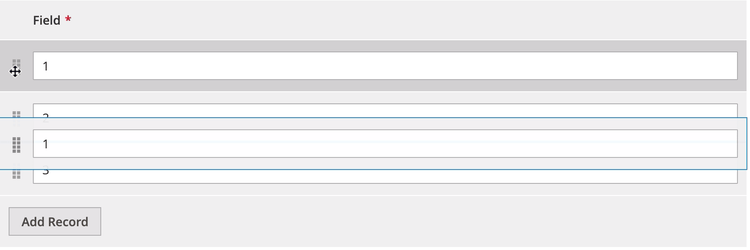
Disable
This is an example of how the DynamicRowsDragAndDrop component disables the DynamicRows component:
<dynamicRows name="dynamic_rows">
    <settings>
        ...
        <dndConfig>
            <param name="enabled" xsi:type="boolean">false</param>
        </dndConfig>
    </settings>
    <container name="record" component="Magento_Ui/js/dynamic-rows/record">
        ...
    </container>
</dynamicRows>