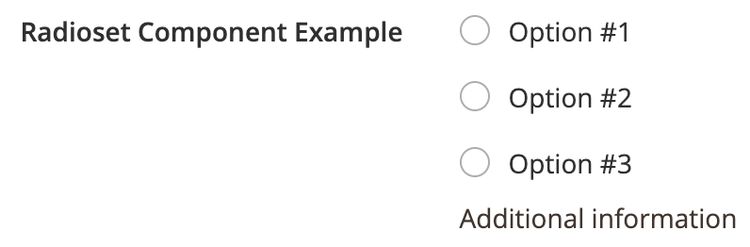
Radioset component
The Radioset component is a shortcut for Checkboxset, with the input type set to the radio button.
Options
Option
Description
Type
Default
componentThe path to the component’s
.js file in terms of RequireJS.String
Magento_Ui/js/form/element/checkbox-setmultipleSet the input type in the UI: true for checkbox, false for radio button.
Boolean
falseoptionsThe array of the options to be displayed in the list for selection.
Array
[]templateThe path to the component’s
.html template.String
ui/form/element/checkbox-setSource files
Extends Abstract:
app/code/Magento/Ui/view/base/web/js/form/element/checkbox-set.jsapp/code/Magento/Ui/view/base/web/templates/form/element/checkbox-set.html
Examples
Integration
This is an example of how the Radioset component integrates with the Form component:
<form>
    ...
    <fieldset>
        ...
        <radioset name="radioset_example">
            <argument name="data" xsi:type="array">
                <item name="config" xsi:type="array">
                    <item name="additionalInfo" xsi:type="string">Additional information</item>
                </item>
            </argument>
            <settings>
                <label translate="true">Radioset Component Example</label>
                <options>
                    <option name="0" xsi:type="array">
                        <item name="value" xsi:type="number">1</item>
                        <item name="label" xsi:type="string" translate="true">Option #1</item>
                    </option>
                    <option name="1" xsi:type="array">
                        <item name="value" xsi:type="number">2</item>
                        <item name="label" xsi:type="string" translate="true">Option #2</item>
                    </option>
                    <option name="2" xsi:type="array">
                        <item name="value" xsi:type="number">3</item>
                        <item name="label" xsi:type="string" translate="true">Option #3</item>
                    </option>
                </options>
            </settings>
        </radioset>
    </fieldset>
</form>
Result