API date-trended KPI basic report
The Analytics 2.0 Report API allows you to create, retrieve, or update basic and advanced date-trended KPI reports. You can use the example in this guide as a programattically-recurring report. It uses the same data and methods that are used in the UI.
This guide provides instructions for a basic KPI report of Visits, Orders, and Revenue metrics for the Day dimension. For instructions on advanced KPI reports, see the Advanced Date-trended API Report Guide.
data-variant=info
data-slots=text
The report endpoint described in this guide is routed through analytics.adobe.io. To use it, you will need to first create a client with access to the Adobe Analytics Reporting API. For more information, refer to Getting started with the Analytics API.
Report features
This guide shows an example for reporting key metrics over the past 30 days. You can use the requests and responses in this example to produce similar reports for the following purposes:
- Populating dashboards
- Exporting data to CSV files
- Feeding business-intelligence tools
- Connecting to cloud data warehouses
- Scheduling automated KPI updates
Example visualization
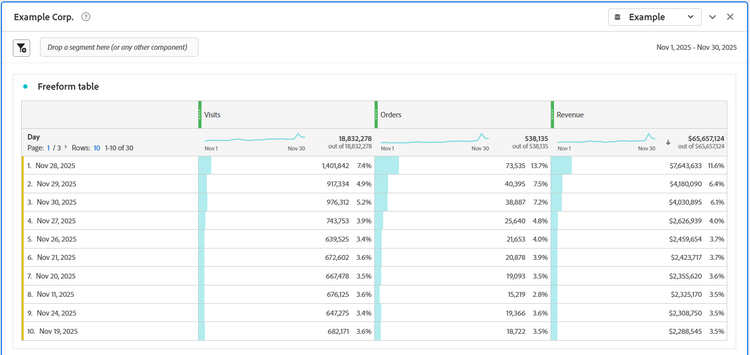
In Analysis Workspace, this example KPI report might include the following free-form table:
And the following line graph and number summary visualizations of the same data:
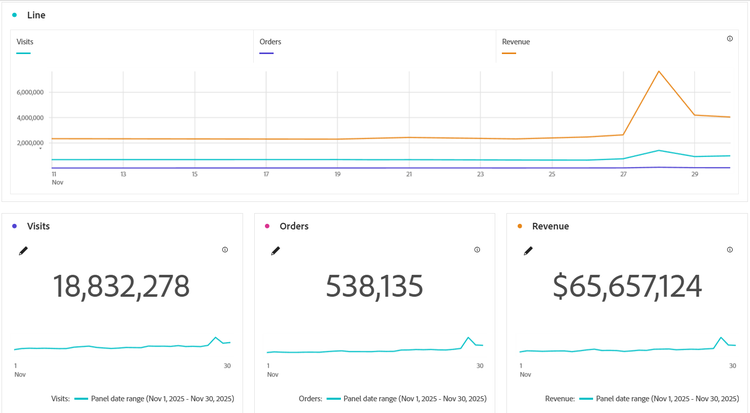
Report APIs provide data, not visualizations
When you design reports via the Report API, you interact with the data foundation used by Analysis Workspace or another intelligence tool. API structures do not specify the presentation layers built on top of the data. You will not see a visualization parameter type in the JSON request or response.
Request the date-trended data
To request the data:
- Use the following URI for your POST HTTP call: POST https://analytics.adobe.io/api/{global-company-id}/reports. To find your Global Company ID, you can use the Discovery API.
- Use the example request JSON below as a template for requesting the data. Provide your desired date range in the request with any other modifications to the dimension or example key metrics.
Click the Request tab in the following example to see a POST request corresponding to the data shown in the visualizations above. Click the Response tab to see a successful JSON response for the request.
data-slots=heading, code
data-repeat=2
data-languages=CURL,JSON
Example request
curl -X 'POST' \
  'https://analytics.adobe.io/api/{global-company-id}/reports' \
  -H 'accept: application/json' \
  -H 'Content-Type: application/json' \
  -H 'x-api-key: {API-key}' \
  -H 'Authorization: {Bearer-token}
  -d '{REQUESTJSON}
{
    "rsid": "examplersid",
    "globalFilters": [
        {
            "type": "dateRange",
            "dateRange": "2025-11-01T00:00:00.000/2025-12-01T00:00:00.000"
        }
    ],
    "metricContainer": {
        "metrics": [
            {
                "columnId": "0",
                "id": "metrics/visits"
            },
            {
                "columnId": "1",
                "id": "metrics/orders"
            },
            {
                "columnId": "2",
                "id": "metrics/revenue",
                "sort": "desc"
            }
        ]
    },
    "dimension": "variables/daterangeday",
    "settings": {
        "countRepeatInstances": true,
        "includeAnnotations": true,
        "nonesBehavior": "return-nones",
        "limit": 10,
        "page": 0
    },
    "statistics": {
        "functions": [
            "col-max",
            "col-min"
        ]
    },
    "capacityMetadata": {
        "associations": [
            {
                "name": "applicationName",
                "value": "Analysis Workspace UI"
            },
            {
                "name": "projectId",
                "value": "695da79bc917a51999999999"
            },
            {
                "name": "projectName",
                "value": "KPI by API"
            },
            {
                "name": "panelName",
                "value": "Freeform table"
            }
        ]
    }
}
Example response
{
    "totalPages": 3,
    "firstPage": true,
    "lastPage": false,
    "numberOfElements": 10,
    "number": 0,
    "totalElements": 30,
    "columns": {
        "dimensions": [
            {
                "id": "variables/daterangeday",
                "dimensionColumnId": "0fd6feb6-a35c-48ff-ad57-33c8d2a83606",
                "type": "time"
            }
        ],
        "columnIds": [
            "0",
            "1",
            "2"
        ],
        "dimension": {
            "id": "variables/daterangeday",
            "dimensionColumnId": "0fd6feb6-a35c-48ff-ad57-33c999999999",
            "type": "time"
        }
    },
    "rows": [
        {
            "data": [
                1401842,
                73535,
                7643632.88
            ],
            "itemId": "1251028",
            "value": "Nov 28, 2025"
        },
        {
            "data": [
                917334,
                40395,
                4180090.2800000003
            ],
            "itemId": "1251029",
            "value": "Nov 29, 2025"
        },
        {
            "data": [
                976312,
                38887,
                4030894.64
            ],
            "itemId": "1251030",
            "value": "Nov 30, 2025"
        },
        {
            "data": [
                743753,
                25640,
                2626938.6
            ],
            "itemId": "1251027",
            "value": "Nov 27, 2025"
        },
        {
            "data": [
                639525,
                21653,
                2459653.5300000003
            ],
            "itemId": "1251026",
            "value": "Nov 26, 2025"
        },
        {
            "data": [
                672602,
                20878,
                2423716.52
            ],
            "itemId": "1251021",
            "value": "Nov 21, 2025"
        },
        {
            "data": [
                667478,
                19093,
                2355620.19
            ],
            "itemId": "1251020",
            "value": "Nov 20, 2025"
        },
        {
            "data": [
                676125,
                15219,
                2325169.57
            ],
            "itemId": "1251011",
            "value": "Nov 11, 2025"
        },
        {
            "data": [
                647275,
                19366,
                2308749.96
            ],
            "itemId": "1251024",
            "value": "Nov 24, 2025"
        },
        {
            "data": [
                682171,
                18722,
                2288544.73
            ],
            "itemId": "1251019",
            "value": "Nov 19, 2025"
        }
    ],
    "summaryData": {
        "filteredTotals": [
            18832278,
            538135,
            65657124.02
        ],
        "annotations": [],
        "totals": [
            18832278,
            538135,
            65657124.02
        ],
        "annotationExceptions": [],
        "col-max": [
            1401842,
            73535,
            7643632.88
        ],
        "col-min": [
            385434,
            7788,
            1058036.96
        ]
    },
    "oberonAdditionalProperties": [
        {
            "lookupTime": 0.00246924,
            "totalReportTime": 6.863,
            "maxReportTime": 0.404759,
            "reportQueueTime": 0.000122,
            "capacityQueueTime": 0,
            "complexityScore": 0.33,
            "complexityMonthBoundaries": 3,
            "complexityColumns": 3,
            "complexityUniqueSegments": 0,
            "requestTime": 0.436879,
            "unhashTime": 0.000089671
        }
    ],
    "resultsRefreshDates": [
        "2025-12-01T19:38:07"
    ]
}
Example request details
The JSON example provides a request for data of the top ten days of November 2025 in descending order, according to revenue. Note the following details:
- On or near lines 12-13, the
daterangeis specified as November 1, 2025 to December 1, 2025. - On or near Lines 16-29, the metrics are specified as
visits,orders, andrevenuefor columns0,1, and2, respectively. - On or near line 29, a
sortin descending order is specified for values in column2(revenue). This enables the ranking feature for the top days according to revenue. - On or near line 33, the
dimensionis specified asdaterangeday. - On or near line 38, a
limitis specified for the response to10days. - On or near lines 62-63, the metadata of
Freeform tableis asscociated withpanelName.
Request parameters
The example request includes the following parameters in the payload:
rsidglobalFilterstype, dateRange, and dateRangeIdtypedateRangedateRangeIdThisMonthmetricContainermetrics arraymetricsColumnId, id, and sortcolumnId0idmetricsortasc or descdimensionsettingscountRepeatInstancesincludeAnnotationslimitpagenonesBehavior0 if set to exclude-nonesstatisticsfunctions arrayfunctionscol-max and col-mincol-maxcol-mincapacityMetadataassociations arrayassociationsname and value parameters for each type of metadata associated with report; e.g., applicationName, projectId, projectName, and panelNamenamevalueExample response
Click on the Response tab above to see the entire response. It shows the data for the top ten ranked days according to revenue. Note the following for the first three days returned:
- November 28, 2025 (occurring on "Black Friday") had
1401842Visits,73535Orders, and7643632.88dollars forRevenue. - November 29, 2025 (occurring during "Black Friday" weekend) had
917334Visits,40395Orders, and4180090.28dollars forRevenue. - November 30, 2025 (occurring during "Black Friday" weekend) had
976312Visits,38887Orders, and4030894.64dollars forRevenue.
Although the metrics data is rounded in the visualizations, it matches the data in the examples above.
Response parameters
The example response includes the following parameters:
totalPagesfirstPagelastPagenumberOfElementsnumber0totalElementscolumnsdimension datadimensionid and typeidtypedimension ID data typecolumnIds0rowsitemId, value and dataitemIddaterangeday), the itemId deterministically encodes the calendar date and is independent of the report suite calendar configuration. For more information, see the section below: "How the itemId encodes the date".valueitemId. This is a localized, calendar-aware label intended for display, not for date parsing. For report suites using a custom calendar (for example, Modified Gregorian/fiscal), value can read as 2022 (Jun 1-May 31).datasummaryDatafilteredTotalsannotationstotalsannotationExceptionscol-maxcol-minHow the itemId encodes the date
For time dimensions such as variables/daterangeday, the itemId is not an arbitrary key. It deterministically encodes the underlying Gregorian date, regardless of whether the report suite includes a standard or a custom (fiscal) calendar. Because of this, itemId is the reliable field to read when you need the actual date: the value field is a display label whose format changes with the report suite calendar, while the itemId for a given date does not.
The itemId is built by concatenating the following segments, left to right:
00, December = 11)daterangehour and daterangeminute onlydaterangeminute onlyThe hour segment is appended for daterangehour and daterangeminute; the minute segment is appended only for daterangeminute. Date-only dimensions such as daterangeday end after the day segment.
Examples
daterangeday)12510281251028daterangeday)11200011120001daterangehour)112000119112000119daterangeminute)1120001190211200011902daterangeday; custom fiscal calendar, value = 2022 (Jun 1-May 31))12205011220501To decode an itemId back to a date, read the segments from the right: the last two digits are the day and the two before that are the zero-indexed month; the remaining leading digits are the year offset, so add 1900. For time dimensions, the rightmost four digits are the hour and minute, with the day and month shifted left accordingly.
Examples
12510281251028112000111200011120001190211200011902value = 2022 (Jun 1-May 31))12205011220501To decode an itemId back to a date, read the segments from the right: the last two digits are the day and the two before that are the zero-indexed month; the remaining leading digits are the year offset, so add 1900. For time dimensions, the rightmost four digits are the hour and minute, with the day and month shifted left accordingly.
Partial Responses (206 Status Code)
A 206 status code indicates a partial response. This status code means that there were some columns in the reporting response that have errors. These errors can include any of the following:
- Unauthorized Metric: User does not have access to the requested metric
- Metric Not Enabled: The requested metric is not enabled in this report suite
- Unauthorized Dimension: User does not have access to the requested dimension
- Dimension Not Enabled: The requested dimension is not enabled in this report suite
- Unauthorized Global Dimension: User does not have access to the global dimension for this request
- Global Dimension Not Enabled: The global dimension for this request is not enabled in this report suite
- Unexpected Number of Items: Anomaly Detection algorithm returned an unexpected number of anomalies
- General Service Error: General Anomaly Detection service error
More help on this topic
For an API Report example that uses the page dimension and page metrics instead of date-trended data, see the Reporting API overview.