Payment Services vaulted card workflow
The following diagram shows the workflow of a checkout authorization using a vaulted card.
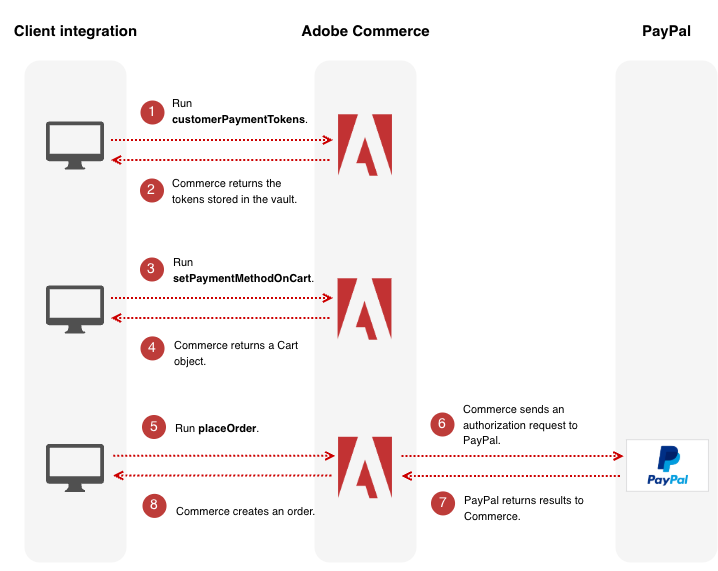
-
Use the
customerPaymentTokensquery to retrieve the payment tokens the customer stored in the vault. -
Commerce returns an array of payment tokens.
-
The client integration renders the token information, and the customer selects a payment method.
When the customer selects a stored payment method, the client integration uses the
setPaymentMethodOnCartmutation to set the payment method topayment_services_paypal_vault. -
Commerce returns a
Cartobject. -
Run
placeOrder. -
Commerce sends an authorization request to PayPal.
-
PayPal returns the result to Commerce.
-
Commerce creates an order.
Additional Payment information
When you set the payment method to Payment Services vaulted card in the setPaymentMethodOnCart mutation, you must supply a value for the public_hash field. Run the customerPaymentTokens query to retrieve the value.
This public_hash comes from the customerPaymentTokens query.
payment_services_paypal_vault attributes
The setPaymentMethodOnCart mutation has a payment_services_paypal_vault object that contains the following attributes:
payments_order_idpaypal_order_idpaypal_order_idpayment_sourcepublic_hashExample usage
The following example shows the setPaymentMethodOnCart mutation constructed for the Payment Services vaulted card workflow.
Request:
mutation {
    setPaymentMethodOnCart ( input: {
        cart_id: "uocGxUi5H97XFAMhY3s66q4aFYG3Bmdr",
        payment_method: {
            code: "payment_services_paypal_vault",
            payment_services_paypal_vault: {
                payment_source: "vault",
                payments_order_id: "mp-order-a4babd34-13d3-4ac0-b1b0-109bb7be1574",
                paypal_order_id: "9R90936863877801D",
                public_hash: "shew83bdbd83y2bdjbwb2ib2ds"
            }
        }
    }
    ) {
        cart {
            id
            selected_payment_method {
                code
            }
        }
    }
}
Response:
{
  "data": {
    "setPaymentMethodOnCart": {
      "cart": {
        "id": "r8TKHa58b7Y8VaZHLyABNxrEdS8hJJTZ",
        "selected_payment_method": {
          "code": "payment_services_paypal_vault"
        }
      }
    }
  }
}